



THE AUTHOR:

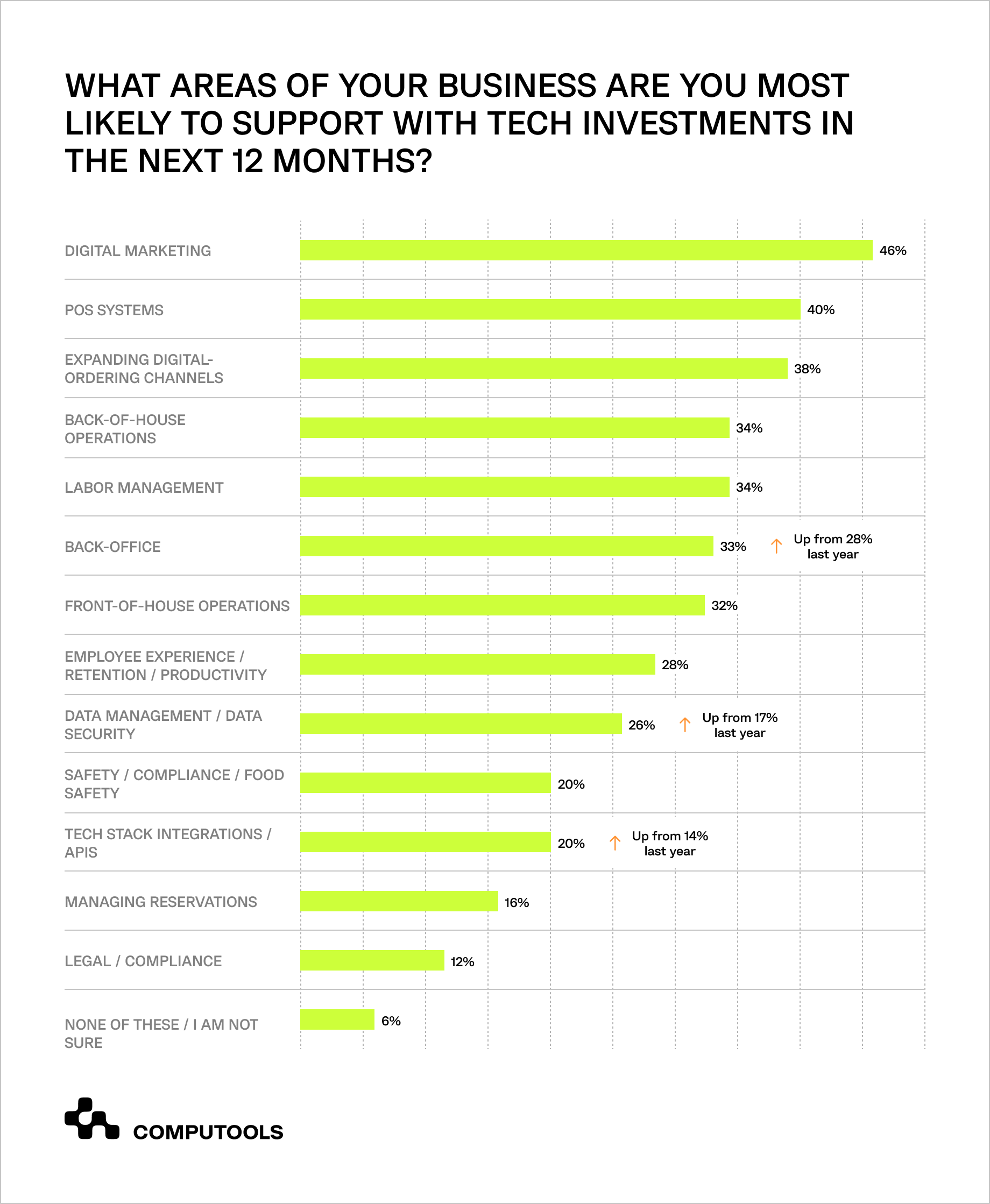
In the 2025 Restaurant Technology Outlook survey by Nation’s Restaurant News and Restaurant Business, 40% of restaurant operators planned to invest in POS systems, while 38% expected to expand digital-ordering channels over the following 12 months. As restaurants process orders across websites, mobile apps, kiosks, tables, delivery services, and in-store terminals, a restaurant order management system helps integrate order intake, payments, kitchen routing, inventory availability, and fulfillment updates into a single operational workflow.
Developing such a platform requires a system that can validate orders, manage modifiers and stock dependencies, synchronize payments and POS data, support kitchen execution, and provide reliable reporting. This article explains how to define the required functionality, plan integrations, select a technology stack, and build a solution for efficient daily operations.
Restaurant order management system development in practice: the Tap App case
For Tap App, a digital ordering platform serving restaurants and cafés across the UK, the challenge was to launch a convenient customer application without losing control over operational complexity. Different venues had their own menus, availability rules, table information, opening hours, and service scenarios, while customers needed a simple way to order food and drinks on-site or off-site. The client also faced a tight launch schedule and needed a stable product that restaurant partners could adopt without adding friction to daily operations.
Drawing on our experience in mobile app development services, we delivered a cross-platform application for iOS and Android that connected customer ordering with restaurant-side workflows. Users could browse venue information and menus, place orders, add notes, make secure payments, add tips, and monitor order status. Restaurants gained a structured digital channel for managing incoming orders, supporting different menu configurations, monitoring performance in real time, and reducing availability-related issues.
The project required a practical approach to restaurant order management software development. We coordinated requirements analysis, technology selection, development, testing, launch, and ongoing support, while building the platform around the operational needs of multiple restaurants and cafés. React Native supported cross-platform mobile delivery, PHP handled server-side operations, and PostgreSQL provided a reliable data layer for restaurant information, menus, orders, and transactional workflows.
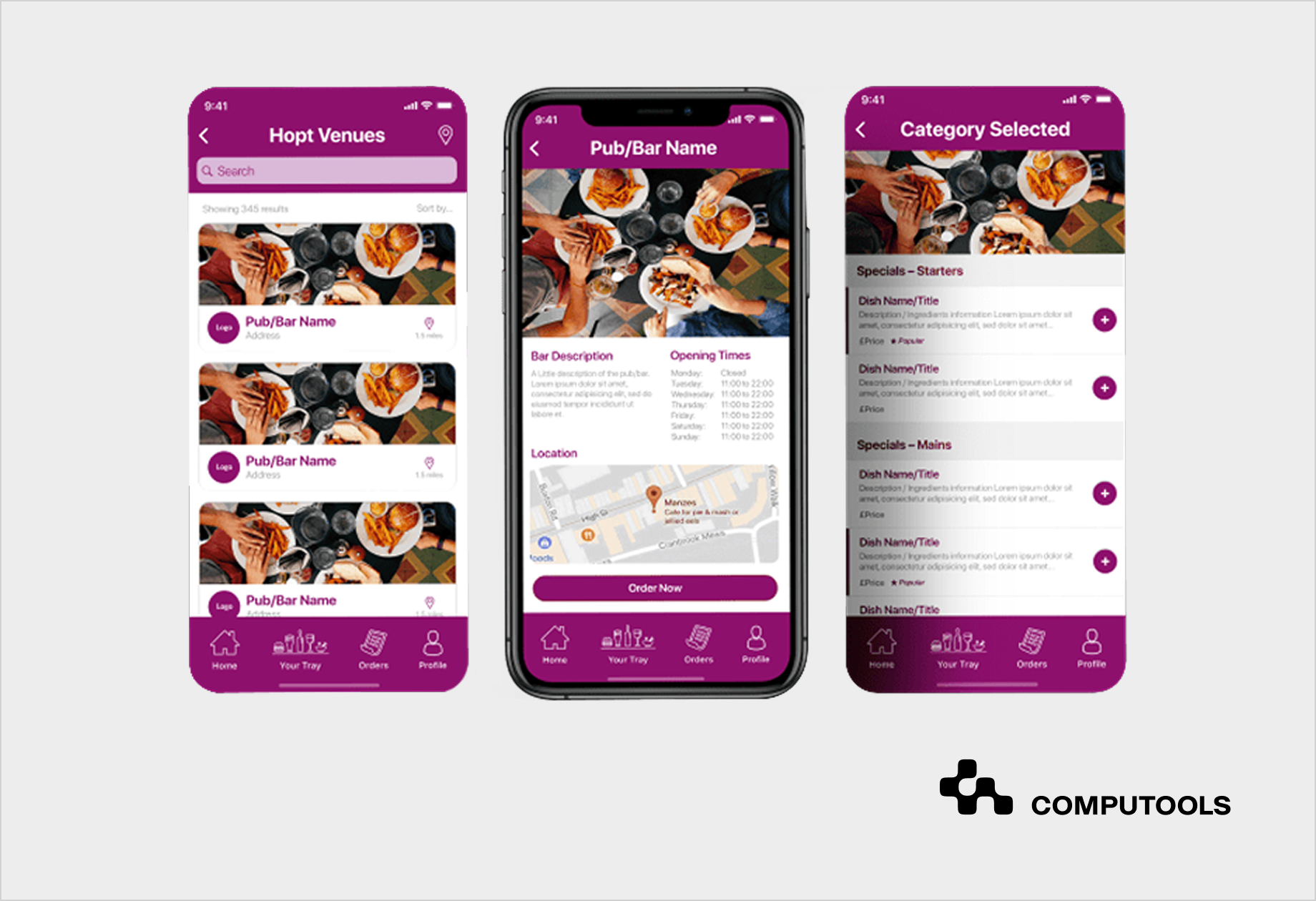
The completed solution improved both customer convenience and restaurant operations. Through better ingredient management, the platform reduced unfulfilled or modified orders by 85%, while cross-selling opportunities contributed to a 7% increase in top-line growth. The project demonstrates how a restaurant ordering product can improve revenue performance when order placement, availability control, payments, status tracking, and operational data work together in a single digital environment.
How to build an order management platform for restaurants: 11 steps
The features needed to develop a restaurant order management system depend on the venue format, ordering channels, fulfillment scenarios, and existing operational tools. They should be defined around real restaurant workflows, including order intake, menu availability, payments, kitchen execution, customer updates, integrations, and reporting.
Step 1. Analyze current ordering workflows and identify operational failures
Development should begin with a detailed analysis of how orders move through the restaurant before any new functionality is defined. The team needs to document every ordering channel currently in use or planned for launch, including table service, takeaway, delivery, website orders, mobile applications, QR menus, self-service kiosks, staff-held devices, and third-party platforms. For each channel, the analysis should cover the full path from menu selection and payment to kitchen preparation, handover, cancellation, refund, and management reporting.
The purpose of this work is to identify operational dependencies and failure points that directly affect fulfillment accuracy and service speed. Restaurants may receive orders through several channels while still relying on staff to manually check product availability, re-enter order details into a POS terminal, communicate modifiers to the kitchen, or update customers separately. These gaps increase the risk of ordering unavailable items, missing special requests, payments becoming disconnected from order status, or preparation delays going unnoticed until a customer complains.
A well-planned restaurant workflow management system should be based on documented operational scenarios rather than assumed user journeys. The discovery stage should establish which system owns menu data, how availability is updated, when payment is confirmed, how orders are routed to preparation stations, which events trigger customer notifications, and what information managers need for daily control. It should also define exception flows, such as an ingredient becoming unavailable after checkout, a failed payment, a delayed order, a customer-requested modification, or a refund.
For multi-venue platforms, this analysis must also distinguish shared functionality from restaurant-specific settings. Menus, working hours, table configurations, fulfillment methods, preparation times, tipping options, and reporting access may vary between locations. Establishing these differences early helps build a configurable platform that supports new restaurant partners without requiring a separate operating model for each.
Step 2. Define operating models, user roles, and configuration rules
Once the current order flows and operational failures are documented, the next task is to define how the product will support different restaurant formats without creating separate logic for every venue. A café focused on counter pickup, a full-service restaurant managing table orders, and a venue combining dine-in, takeaway, and delivery may use the same platform, but they require different order types, fulfillment rules, preparation times, payment options, and staff actions.
The product team should describe each supported operating model in detail. This includes how an order is initiated, whether it requires table assignment or customer address data, when payment is collected, whether tips are available, how preparation time is calculated, who confirms the order, and what marks it as completed. These rules need to be configurable at the venue level so new restaurants can be added without changing the core product architecture.
User roles must be defined with the same precision. Customers need access to menus, ordering, payments, notes, and status updates. Restaurant administrators need controls for menu items, prices, opening hours, tables, availability, fulfillment methods, and staff access. Operational teams need fast access to active orders, modifiers, timing, payment status, and actions such as confirmation, preparation updates, cancellation, or refund initiation. Platform administrators may also need visibility across multiple restaurant partners, configuration management, support tools, and aggregated reporting.
At this point, the team should create a configuration model covering:
- venue profile, location, operating hours, and service availability;
- menu categories, items, prices, modifiers, extras, and temporary availability;
- supported order types, including on-site, takeaway, scheduled pickup, or delivery;
- table structure and reservation-related data, where relevant;
- payment methods, tips, refunds, and cancellation rules;
- staff roles, permissions, and access restrictions;
- notification triggers and status-change responsibilities;
- restaurant-level and platform-level reporting access.
This configuration model is central to custom restaurant management software because it determines whether the product can scale from one venue to a broader network of restaurants without introducing fragmented workflows or manual workarounds. It also gives development and QA teams a concrete basis for validating role permissions, edge cases, venue setup, and order processing rules before launch.
For Tap App, the platform needed to support restaurants and cafés with varying menus, hours, table availability, and service scenarios while providing a consistent ordering experience. We integrated flexible venue data, on-site and off-site ordering, order notes, payment, tipping, and status tracking into one adaptable app. This enabled businesses to use the platform in line with their models while maintaining a coherent digital experience.
Step 3. Design order placement flows for each fulfillment scenario
Once operating models and venue configurations are defined, the product team should design the customer ordering process for each supported scenario. Dine-in, takeaway, scheduled pickup, and delivery orders may share the same menu catalog, but they require different data fields, timing rules, payment logic, confirmations, and operational handoffs.
For dine-in orders, the flow may require table identification, QR code validation, service-area restrictions, bill management, and the option to add items during an active visit. Restaurants that plan to support table-based ordering can also explore how to build a digital restaurant menu app with QR ordering, including menu logic, table sessions, payments, and POS connectivity. Takeaway orders require pickup timing, customer contact details, order-readiness updates, and clear collection instructions.
Delivery flows require address validation, delivery zone rules, fees, estimated arrival time, courier or delivery-partner handoff, and cancellation logic. Scheduled orders introduce additional rules for advance availability, preparation capacity, and menu restrictions by date or time.
An online restaurant ordering system should guide customers through these flows while preventing requests that the restaurant cannot fulfill. The user interface must display only available products and supported options, require the necessary modifiers, validate fulfillment details before payment, and clearly communicate preparation or delivery expectations. This reduces operational corrections after checkout and gives staff more complete order information from the moment a request enters the system.
The customer journey should include:
- venue selection or identification of the current restaurant location;
- menu browsing with accurate prices, item descriptions, modifiers, and availability;
- selection of fulfillment type and requested timing;
- table number, pickup details, or delivery address where required;
- order notes and special requests;
- payment method and optional tipping;
- order confirmation and estimated fulfillment time;
- live status updates or notifications until completion.
The design team should also define how the customer-facing flow responds to operational changes. If an item becomes unavailable during checkout, the user should be prompted to remove or replace it before payment. If the restaurant stops accepting delivery orders due to capacity limits, the channel should be disabled or alternative fulfillment options displayed. If preparation is delayed, updated timing should be communicated without forcing staff to handle each notification manually.
Step 4. Build menu, modifier, and availability control
After the customer ordering flows are defined, the product team needs to establish how menu data will be created, updated, validated, and presented across every active channel. Menu management affects much more than what customers see on the screen: it determines whether an order can be fulfilled accurately, whether staff receive complete preparation instructions, and whether restaurants can react quickly when products or ingredients become unavailable.
The system should maintain a structured menu model for each venue, including categories, individual items, sizes, variants, add-ons, required and optional modifiers, prices, tax rules, preparation notes, allergen information, images, and fulfillment restrictions. A burger may require a side selection, a pizza may have size-based pricing and additional toppings, while a drink may be available for dine-in and pickup but excluded from delivery. These rules need to be defined in the product data rather than managed through staff memory or manual clarification after the order is accepted.
Availability control requires the same level of precision. Restaurants should be able to temporarily disable individual items, modifiers, ingredients, or entire menu sections, either manually or via connected stock data. The platform should support venue-specific availability, daypart menus, seasonal offers, limited quantities, preparation-capacity restrictions, and channel-specific menus. For example, an item may remain available for dine-in orders but be disabled for delivery because it does not travel well or takes too long to prepare during peak hours.
A reliable food ordering management system should apply these rules before checkout. If a required modifier is unavailable, the product should not be submitted in an incomplete configuration. If an ingredient shortage affects several menu items, authorized staff should be able to update availability once and have the change reflected across relevant customer channels. If a customer has already started checkout when an item becomes unavailable, the application should clearly explain the change and allow the order to be adjusted before payment.
The product team should define the following capabilities during this step:
- menu hierarchy for categories, items, variants, and combinations;
- required and optional modifier rules;
- venue-specific prices, taxes, and promotional conditions;
- availability schedules by day, time, location, or fulfillment type;
- temporary item or ingredient disabling;
- channel-specific menu visibility;
- permission levels for menu and availability updates;
- audit records showing what changed, when, and by whom;
- behavior for items that become unavailable during checkout or after submission.
Restaurants with multiple venues must balance central menu control and local flexibility. A group can set shared products, prices, or brand offers centrally, while individual locations adjust availability for local stock, hours, or workload. This maintains consistency without making all venues operate the same.
In the Tap App project, the app aggregated menus, table availability, and opening hours for restaurants and cafés. Better ingredient management reduced unfulfilled or modified orders by 85%. This highlights that availability logic should be a core platform component, not just a content-management feature.
Step 5. Define order statuses, routing rules, and kitchen execution logic
Once customers can place orders based on accurate menus and availability, the next step is to define how those orders move through restaurant operations. The platform should provide a clear lifecycle for each request, from submission and payment confirmation to preparation, fulfillment, cancellation, or refund. Status logic needs to reflect the actual service model: dine-in orders may end with table delivery and bill completion, whereas takeaway and delivery orders require readiness, handover, or delivery confirmation.
Each status should be connected to a specific action and responsibility. For example, an order may be accepted automatically after successful payment or require staff confirmation before preparation begins. Once confirmed, its items should be routed to the appropriate stations: food to the kitchen, drinks to the bar, and special preparation instructions to the relevant staff member. Front-of-house teams still need a complete view of the order to manage customer communication, pickup, serving, and issue resolution.
A restaurant order processing system should support both order-level and item-level tracking. This matters when different parts of one order are prepared at different speeds or require separate actions. The platform should preserve the complete order for payments and reporting while allowing preparation teams to process individual items efficiently. Routing rules may depend on item category, fulfillment type, requested timing, modifier details, payment status, and venue-specific kitchen setup.
The product team should also define exception flows before development moves further. Restaurants need predictable handling for orders affected by unavailable items after checkout, delayed preparation, requested modifications, failed payments, cancellations, partial fulfillment, or refunds. In each scenario, the system should specify what staff see, which action they can take, whether the customer receives an update, and how the event is recorded for operational reporting.
In the Tap App project, order handling needed to support different restaurant and café scenarios within one application. Customers could place on-site and off-site orders, add notes, make payments and tips, and track order status, while restaurants received structured order information through the digital channel. This functionality helped connect customer-facing convenience with clearer fulfillment workflows for participating venues.
Step 6. Plan POS, payment, kitchen, and inventory integrations
A restaurant order platform rarely operates in isolation. Orders may originate in a mobile app or on a website, but they still need to connect with payment gateways, point-of-sale records, kitchen execution, product availability, refunds, and management reporting. Integration planning should therefore begin with a clear definition of which system owns each type of data and how updates move between platforms.
The development team should identify the required connections based on the restaurant’s operating model. A POS integration may synchronize menus, prices, taxes, completed sales, discounts, and payment records. A kitchen display system may receive confirmed orders and return preparation statuses. Inventory tools may update product availability when ingredients are limited or unavailable. Payment gateways need to communicate successful transactions, failed payments, tips, cancellations, and refunds without separating financial data from the related order.
Reliable restaurant POS integration solutions require more than API connectivity. The platform needs rules for data mapping, update frequency, duplicate prevention, failed synchronization, offline operation, access permissions, and audit history. For example, if a payment succeeds but the POS does not receive the order, staff need an alert and a recovery process rather than an invisible failure. If menu prices change in one system, the product must define when and how those changes appear in customer-facing channels.
The team should also determine the source of truth for key entities:
- menus, prices, modifiers, and taxes;
- product and ingredient availability;
- customer orders and fulfillment statuses;
- payments, tips, cancellations, and refunds;
- preparation updates and completion records;
- sales, operational, and performance reports.
For Tap App, secure payment gateway integration was a confirmed part of the solution, allowing customers to complete transactions and add tips within the application. The broader order flow also supported menus, opening hours, table availability, order notes, and status tracking across participating restaurants and cafés. For restaurant businesses that already rely on POS, kitchen, or inventory platforms, the same integration logic should be extended to keep digital orders aligned with daily operations and reporting.
Restaurants evaluating the technology behind connected ordering and payment workflows can also review the top restaurant POS software development firms in 2026, including the capabilities required for integrated, scalable restaurant operations.
Step 7. Create a centralized order orchestration layer
Once integrations are defined, the platform needs a central layer that receives order data, validates it, applies business rules, and coordinates each next action across connected systems. Without this layer, orders from a mobile application, website, QR menu, kiosk, or staff device may enter restaurant operations via separate flows, resulting in inconsistent statuses, duplicate records, delayed preparation, and fragmented reporting.
The orchestration layer should standardize every order before it reaches operational teams. It needs to verify venue, menu item, modifier, availability, fulfillment type, payment state, requested timing, and customer instructions, then direct the order to the correct restaurant location and preparation workflow. For multi-location businesses or platforms serving multiple venues, this structure allows each restaurant to retain its own menus, hours, service formats, and operational settings while using one consistent processing model.
Effective restaurant POS and order management software should coordinate information across customer-facing channels and restaurant-side tools. For example, an order submitted through an application may trigger payment verification, availability validation, ticket creation, kitchen routing, customer confirmation, preparation updates, completion status, and final reporting. Each system may perform a different function, but the orchestration layer keeps the order record consistent throughout the lifecycle.
During this step, the product team should define:
- how orders from different channels are normalized into one data structure;
- which validation rules run before an order is accepted;
- how venue-specific configurations affect routing and fulfillment;
- how payment, preparation, and status changes remain synchronized;
- how failed updates, duplicated requests, or disconnected integrations are handled;
- what order history is stored for support, reporting, and audit purposes.
This architecture is particularly important for platforms serving multiple restaurant partners, where consistent order processing must coexist with venue-specific menus, operating hours, fulfillment models, and reporting requirements.

Build a restaurant order management system that keeps up with peak-hour chaos, and launch in 1–3 months, not years.
Step 8. Design interfaces for customers, restaurant staff, and managers
The platform interface should reflect the different tasks performed by customers, operational teams, and restaurant managers. Customers need a simple ordering journey, but staff work under time pressure and require fast access to active orders, modifiers, payment status, fulfillment timing, and exceptions. Managers need a broader view of order performance, availability issues, sales activity, and service delays.
The customer-facing interface should make it easy to browse menus, select options, add notes, choose a fulfillment method, complete payment, and monitor order progress. Navigation, item configuration, checkout, and confirmation screens need to reduce uncertainty and prevent incomplete or unsupported requests from reaching the restaurant.
Operational interfaces should prioritize clarity and speed. Staff need to identify new orders immediately, view item details and special requests, confirm or update fulfillment statuses, and respond to problems such as unavailable products, payment issues, cancellations, or delayed preparation. The number of actions required during service should remain minimal, especially during high-volume periods.
Manager-facing functionality should provide visibility into both current operations and longer-term performance. Depending on the product scope, this may include order volume, fulfillment times, modified or rejected orders, revenue by channel, payment outcomes, and product availability problems. Effective digital order management for restaurants depends on presenting the right information to each role without overwhelming users with irrelevant data.
Interface design should therefore be based on role-specific scenarios and tested with realistic order flows: busy service periods, complex modifiers, unavailable items, failed payments, delayed preparation, refunds, and multi-venue management. These scenarios help validate whether users can complete essential tasks quickly and whether the interface supports operational control rather than creating new manual work.
Step 9. Automate notifications, alerts, and exception handling
Once orders, integrations, and user interfaces are connected, the platform should automate routine actions that would otherwise require staff to monitor multiple systems or manually contact customers. Automation is particularly valuable for communicating order status, handling delayed orders, resolving payment issues, managing unavailable items, processing order modifications, and handling fulfillment exceptions.
Customer notifications should be triggered by meaningful changes in the order lifecycle: order confirmation, payment acceptance, preparation start (where relevant), readiness for pickup, delivery progress, completion, cancellation, or refund. These updates reduce uncertainty for guests and lower the number of status inquiries that restaurant staff handle. Notifications may be delivered through the mobile application, email, SMS, push messages, or the ordering interface, depending on the product scope.
Operational alerts serve a different purpose. Staff and managers need immediate visibility when an order cannot proceed normally. The system should flag failed payments, unavailable menu items, preparation delays, unconfirmed orders, integration failures, duplicate requests, refund actions, or unusually high order volumes. Each alert should be linked to a defined response: who receives it, what action is available, whether the customer must be informed, and how the outcome is recorded.
Effective restaurant automation software solutions should automate predictable actions while leaving service-critical decisions under staff control. For example, the system can automatically send an order-ready notification after staff mark preparation as complete, but a substitution for an unavailable item may still require employee confirmation and customer approval. This approach improves processing speed without creating automated decisions that lead to incorrect fulfillment or poor customer experience.
Business process automation logic should also support reporting. Every notification, delay, correction, failed transaction, cancellation, and refund can provide useful information about recurring operational problems. Managers can use this data to identify menu items frequently affected by availability issues, service periods with recurring delays, channels that generate incomplete orders, or integration failures requiring technical attention.
In the Tap App project, customers could track order status directly in the application, while participating restaurants gained access to real-time business performance monitoring.
Restaurants planning broader operational changes can explore how digital transformation improves restaurant operations, from real-time kitchen dashboards to automated staff notifications and faster service coordination.
Step 10. Build reporting for revenue, fulfillment, and operational performance
An order management platform should provide managers with more than a record of completed transactions. It should capture operational data throughout the order lifecycle and convert it into reports that help restaurants improve service speed, menu decisions, staffing, channel performance, and revenue generation.
Reporting requirements should be defined before development is completed, because each metric depends on the data collected during ordering, payment, preparation, fulfillment, cancellation, and refund processes. The platform should record not only what was sold, but also how the order was processed: which channel generated it, whether it was modified, how long fulfillment took, whether an item became unavailable, and whether the customer completed or canceled the transaction.
A restaurant operations management software solution may provide visibility into:
- order volume by restaurant, location, channel, and fulfillment type;
- average order value and cross-selling results;
- popular items, modifiers, and product combinations;
- preparation and completion times;
- delayed, canceled, refunded, or modified orders;
- unavailable items and ingredient-related fulfillment problems;
- payment outcomes and failed transactions;
- demand patterns by day, time, or venue.
Real-time dashboards help restaurant teams respond during active service. Managers can see whether order volumes are increasing, whether preparation times are exceeding expected limits, or whether a particular venue is experiencing recurring availability or payment issues. Historical reporting supports broader decisions, such as changing menu structure, adjusting staffing, improving promotions, or prioritizing certain ordering channels.
For restaurant networks or platforms serving multiple venues, reporting should support both individual location performance and aggregated business visibility. Each restaurant may need access only to its own operational and revenue information, while platform administrators require a broader view of order activity, partner performance, system issues, and growth opportunities. Role-based access and consistent data structures are essential for keeping these reports accurate and usable.
In the Tap App project, real-time business performance monitoring was integrated into the digital ordering solution. The platform also supported cross-selling opportunities, contributing to a 7% increase in top-line growth, demonstrating how order data and customer-facing functionality can drive measurable commercial outcomes when connected within a single product.
Step 11. Select the technology stack and validate the platform before scaling
The technology stack should be selected after the product scope, operational workflows, and integration requirements are clear. A restaurant platform may need mobile ordering, web-based administration, real-time status updates, secure payment processing, multi-venue configurations, reporting, and connections to external systems. These requirements determine whether the software architecture can remain stable as order volumes, locations, and digital channels grow.
The backend should manage the core business logic: restaurants, menus, modifiers, availability, orders, payments, fulfillment statuses, roles, notifications, and reporting data. The database must support transactional accuracy because payment events, order changes, refunds, and status histories need to remain consistent and traceable. Customer-facing applications and staff interfaces should be designed for reliable performance during busy service periods, when delays or failed updates directly affect fulfillment.
A structured approach to restaurant technology software development should also include testing of complete operational scenarios, not only individual screens or features.
The QA process should verify:
- order placement across supported fulfillment types;
- modifiers, notes, tips, and payment processing;
- unavailable products and menu updates;
- status transitions and customer notifications;
- cancellation and refund scenarios;
- integration failures or delayed synchronization;
- role permissions and venue-specific configurations;
- reporting accuracy and transaction history;
- performance under higher order volumes.
For platforms designed to serve several restaurants or locations, scalability also depends on configuration management. New venues should be added through controlled settings for menus, opening hours, tables, payment options, staff roles, and fulfillment models rather than through separate product builds. Monitoring and post-launch support are equally important, as restaurants may need to refine workflows, add integrations, introduce new ordering channels, or respond to customer behavior after the product is released.
For Tap App, we delivered a cross-platform application built with React Native, PHP, PostgreSQL, and Flutter. QA specialists tested the application for stability and performance before launch, while ongoing support enabled further product development after release. The solution accommodated different restaurants and cafés, their menu structures, payment requirements, and ordering scenarios, providing a stable technical foundation for digital ordering across participating venues.
Why choose Computools to develop restaurant order management software
Restaurant order management requires a product team that understands how customer ordering, restaurant operations, integrations, and business reporting work together. Computools provides travel and hospitality software development services for businesses that need digital platforms connected with real operational workflows, from ordering and payments to fulfillment visibility and performance control.
Our software development services for HoReCa cover the functionality restaurants need to manage orders accurately across digital channels: menu and availability control, order processing, payment integration, status tracking, operational dashboards, and connections with existing restaurant tools. We also deliver web development services for customer-facing ordering channels and internal interfaces that support restaurant staff and managers throughout daily service.
Our experience includes Tap App, a cross-platform ordering solution developed for restaurants and cafés across the UK. The platform supported on-site and off-site orders, menus, table availability, payments, tips, order notes, status tracking, and real-time business performance monitoring, demonstrating our ability to connect customer ordering with practical restaurant operations.
Computools can help restaurant businesses define operational requirements, plan integrations, build customer and staff interfaces, test critical fulfillment scenarios, and launch a scalable platform designed for reliable order execution.
Build a restaurant ordering platform that connects customer demand with accurate daily operations. Contact us at info@computools.com.
Conclusion
Restaurant ordering platforms must coordinate every stage of fulfillment, from menu availability and order validation to payments, kitchen routing, customer updates, and operational reporting. When these processes are integrated into a single system, restaurants can handle digital demand more accurately, reduce manual corrections, and maintain clearer control over service performance across channels and locations.
Developing a reliable platform requires a detailed understanding of restaurant workflows, configurable venue logic, well-planned integrations, role-specific interfaces, and thorough testing of real operational scenarios. With the right architecture and implementation approach, restaurants can expand digital ordering while maintaining consistent, measurable, and scalable fulfillment.
Computools
Software Solutions
Computools is an IT consulting and software development company that delivers innovative solutions to help businesses unlock tomorrow.