
THE AUTHOR:

Smart navigation solutions are advancing rapidly, but not for the reason most expect. Analytics predict that the market size will reach $5.4 billion in 2034 with a 12.8% compound annual growth rate (CAGR). Yet, interestingly, the difference is not just in size. The most relevant change that dictates how to build a city navigation app nowadays is a more advanced functionality.
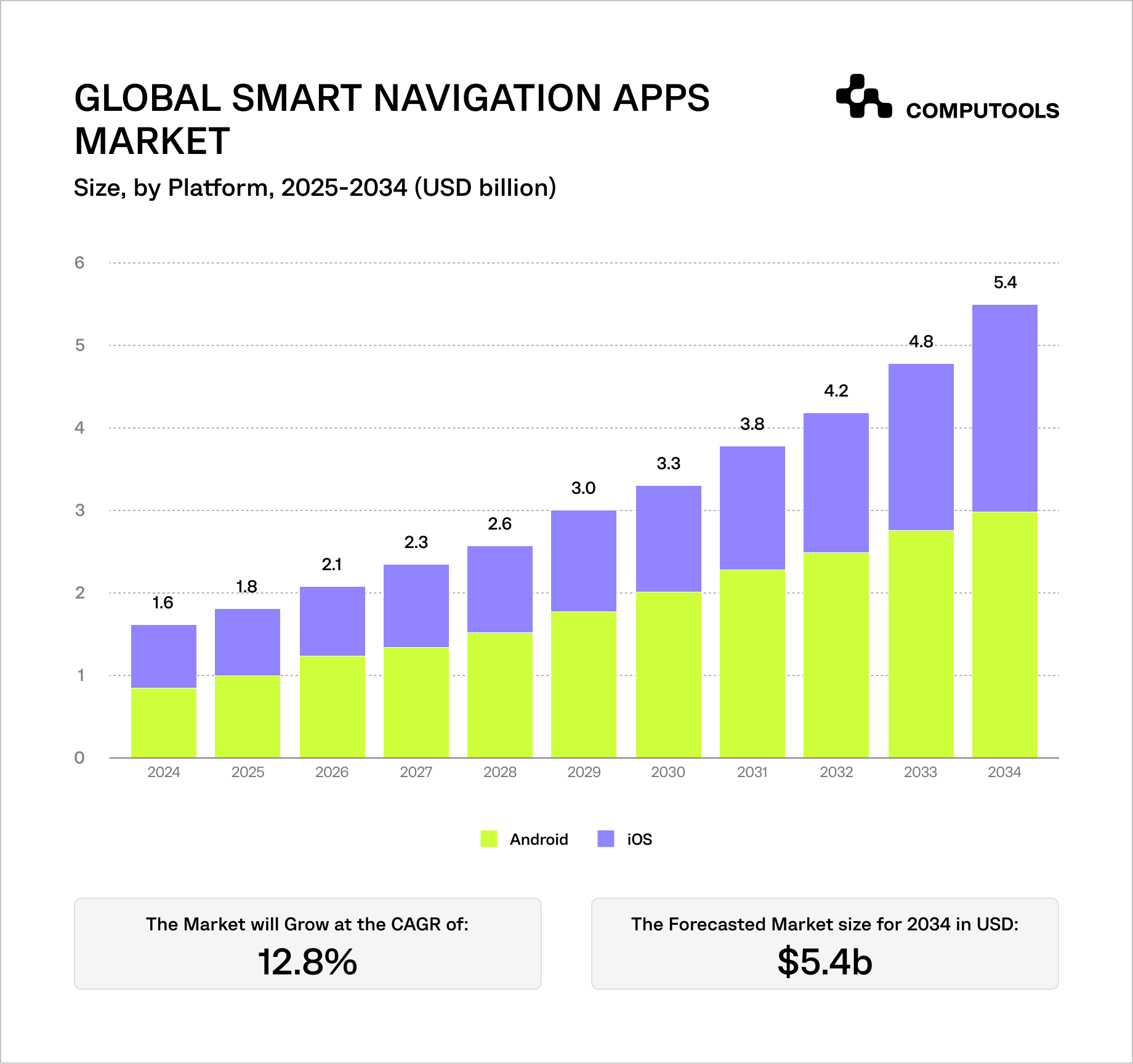
Navigation applications have evolved into intelligent decision systems. Users are no longer content to select routes. Now, they need to account for updates to the route due to traffic, provide alternate routes, and show the real-time status of roads without delays.
This is due to three ongoing trends:
- Real-time routing is becoming more important due to the increase in urban traffic and stronger reliance people place on navigation. Both commuters and logistics companies are routing real-time to save time and money.
- Navigation apps are made primarily for mobile devices (49.5% share), so they need to function while users are on the move, under poor connections, and on a variety of devices.
- The navigation app consumer market is the dominant segment (62.8% share), which raises the bar for frequent app updates, a simplified user interface, and always-available navigation features.
At the same time, the complexity of these systems is rising. Apps now combine traffic data, transport feeds, and user-generated signals, all of which can conflict or arrive late. Processing this data fast enough to stay relevant is the core challenge.
The result is a clear gap. Many apps can calculate routes, but far fewer can keep them accurate while conditions change every second.
This guide focuses on how to build a navigation system that actually keeps up.
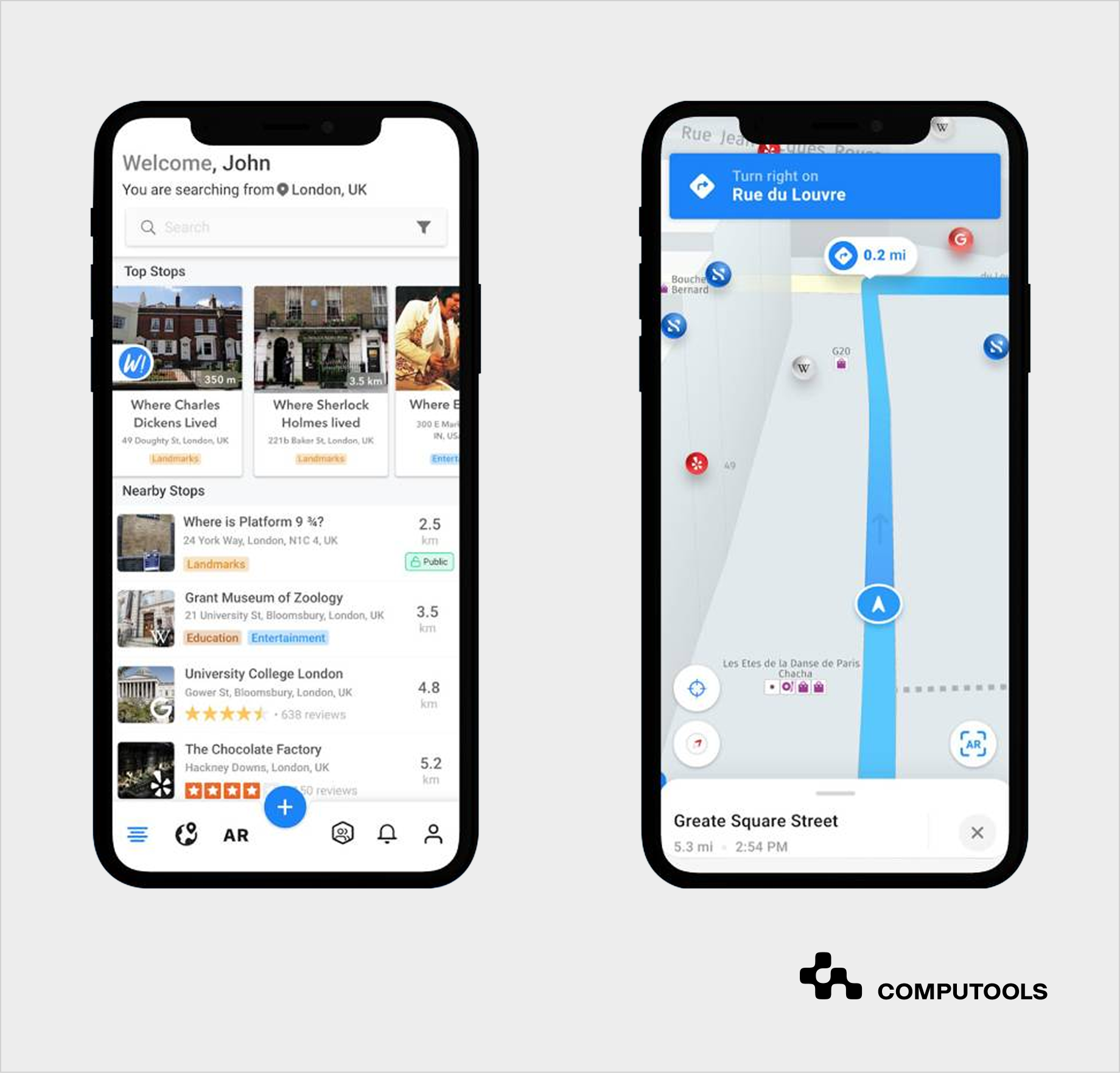
Case study: building a real-time city navigation experience
SMARTCITY is a great illustration of how a fully-functioning navigation app can use real-time updates to optimize routes along with offering engaging experiences.
The app helps users find nearby places, events, and useful information as they move through the city. To do this, it constantly receives location updates and matches them with nearby objects using fast geospatial queries. This allows the system to show relevant results instantly based on where the user is.
To keep location accurate, the application doesn’t rely on raw GPS alone. It filters noisy data and aligns the user’s position with real roads and places. This prevents jumps on the map and keeps navigation stable.
SMARTCITY also includes augmented reality and 3D navigation. This means digital elements must match real-world positions. To avoid visual errors, the system stabilizes location data before displaying it, so objects appear in the right place on screen.
Another important part is how the solution deals with updates. It doesn’t just track location. It also processes messages, shared content, and nearby data at the same time. All of this is handled through real-time data streams, so users see changes without delays or reloads.
On the mobile side, the app processes these updates as a continuous flow of events instead of separate requests. This keeps the interface responsive even when data changes every second.
In simple terms, SMARTCITY shows how a navigation app can go beyond directions. It keeps track of location, adds context, and updates everything instantly without slowing down the experience.
Essential features of a real-time location navigation app
A navigation application must be precise, swift, flexible, and intuitive when the user is on the move. This is possible when there is a clear line of communication across the UI design, backend navigation, and control logic.
1. User-Facing Features
These features are most important for application usability. Lagging, crashing, or poorly executed results will lead to immediate app abandonment.
- Location tracking
Real-time, with a 1 to 5 second update interval. It also must be accurate and consistent in dense urban areas.
- Dynamic route calculation
Creates a route in 1 or 2 seconds and instantly recalculates a new one when conditions change.
- Turn-by-turn navigation
Visual instructions with optional voice support. Must remain readable at a glance.
- Live rerouting
Adjusts routes based on traffic, delays, or missed turns without interrupting the session.
- Search & discover points of interest (POI)
Fast search with relevant results (places, services, landmarks) tied to user intent and location.
- Offline mode
Cached maps and routes ensure navigation works without a stable connection.
- Saved sites and navigation history
Straight shortcuts to frequently visited locations to reduce input time.
2. Advanced Capabilities
These are features that enhance product differentiation and help users make better decisions.
- Multi-modal routing
Integrates walking, public transport, and driving to optimize a single route.
- Real-time public transport tracking
Shows live transport arrivals, delays, and route changes, based on APIs.
- AI-based route recommendations
Routes are suggested based on prior behavior, transport preferences, and time patterns.
- Geofencing
Automated actions, alerts, and reminders are activated based on a user’s entry, presence, or departure from defined locations.
- AR navigation
Provides situational assistance and guidance within a vicinity to aid spatial orientation.
3. Admin & System Features
These functions ensure the app’s operation, the accuracy of critical data, and the system’s future scalability.
- Map and data management
Control over map layers, updates, and data sources.
- Traffic and event data ingestion
Regular updates from external sources such as APIs, sensors, and end-users
- Routing logic configuration
Set priorities for route creation (fastest, shortest, least transfer, etc).
- Analytics and monitoring
Evaluate and improve system efficiency and accuracy based on user behavior, route activity, and system performance.
Balancing all three layers makes a strong real-time GPS tracking app. User functions increase adoption, advanced capabilities optimize decision-making, and system functions ensure accuracy and scalability.
As navigation apps evolve into complex, integration-heavy systems, the choice of development partner becomes a technical decision. That’s why we recommend checking top 20 hospitality mobile app development companies.
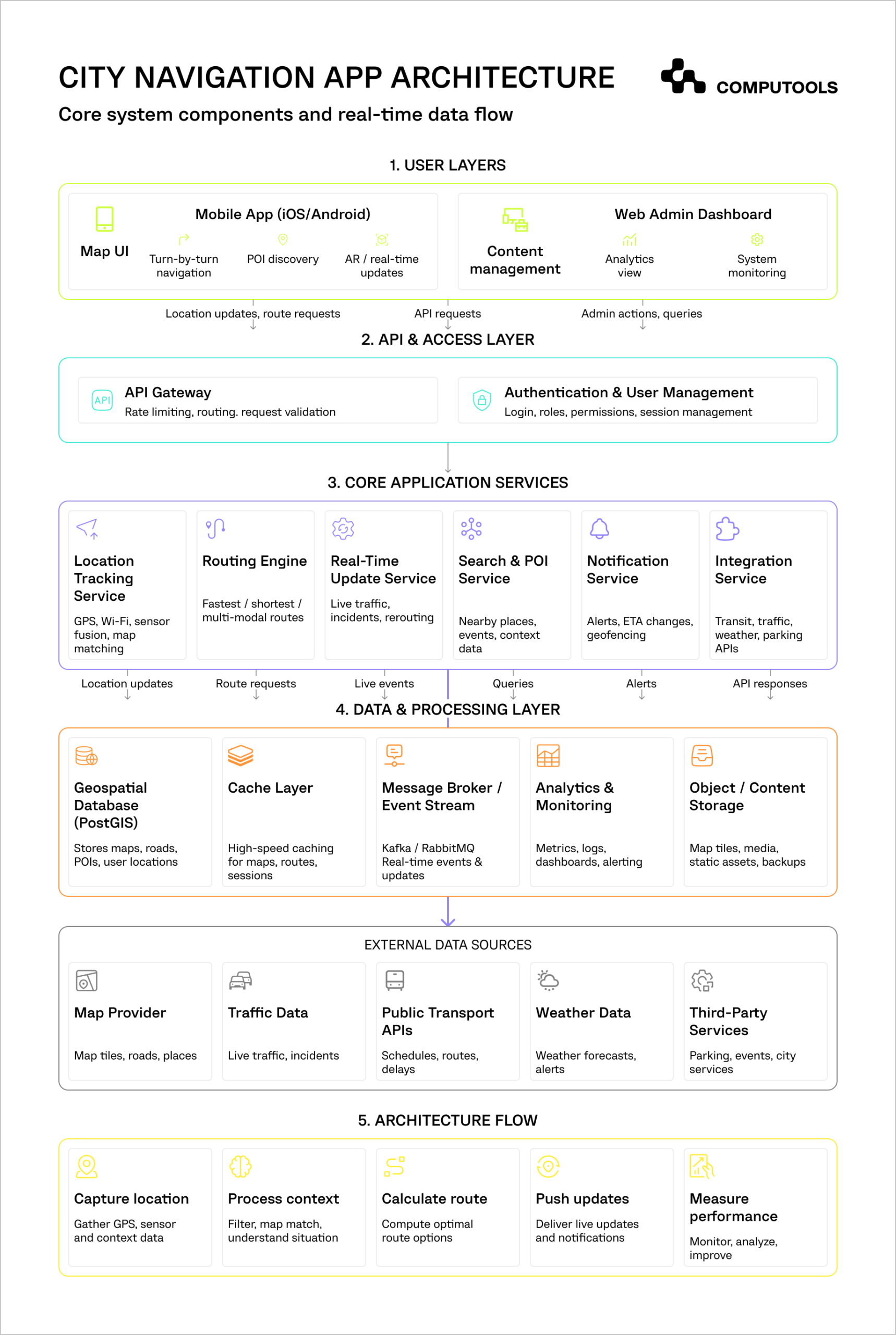
A step-by-step guide to build a city navigation mobile app
An urban navigation mobile app needs to understand movement, adjust to real-time changes in the environment, and process updates quickly. Each step below outlines the decisions that affect the system’s accuracy, reliability, and responsiveness in real-world scenarios.
Step 1: Define Use Case and Navigation Scope
The first step is establishing the decision-making specifics of the solution. For example, a navigation app for drivers will take into account changing traffic conditions. A public transport app must coordinate schedules, transfers, and delays. A solution for pedestrians will prioritize precision and orientation in dense environments.
Each type creates a different development challenge. Thus, a driving app would require updates in real time, whereas a pedestrian system would require less frequent updates but a higher position accuracy. For instance, in the SMARTCITY project, the goal was not just navigation, but helping users explore nearby places and events in real time. This expanded the scope from simple routing to a system that combines location tracking, content discovery, and user interaction.
This kind of scope immediately increases complexity. It requires more frequent updates, richer data sources, and a system that can handle multiple types of real-time input.
At this stage, it’s also important to define targets using measurable metrics. For instance, notifying users of a new route shouldn’t take more than a second, location drift should range from 20 meters to 100 meters in urban areas, and an ETA deviation shouldn’t exceed 5-10 percent. Without these benchmarks, it becomes difficult to evaluate whether the system is actually performing well.
Step 2: Choose Map and Data Providers
Map providers are treated as a simple integration layer. However, they determine how much control you have over the overall system. For instance, Google Maps is a good integration choice, as it provides quick development and reliable data. However, teams will face customization constraints and higher costs as usage grows. Mapbox and OpenStreetMap offer deeper control over map behavior and styling, but they require a larger upfront development investment.
As a product grows, it’s advisable to split map rendering and routing. An external provider will handle tiles and visualization, and the internal team will manage the routing and how the different data will combine and source.
This brings us to how map data will get delivered to the end-user. Under high demand, vector tiles are the best option as they allow for a more seamless rendering experience along with smoother zooming and rotation. In the case where thousands of users will be querying the service, and every request requires a near-real-time update, the API’s allocation and response time will become a major concern. If your location-based app cannot override or enrich map data, it will struggle to adapt to real-world conditions such as temporary road closures or events.
Step 3: Design Routing Logic
Routing is the key to the navigation experience, requiring a balance between speed, accuracy, and stability. Most geolocation mobile app solutions implement optimized A* algorithms to quickly work out the optimal way. However, the algorithm itself is only a small part of the overall picture. The true challenge lies in deciding how often a system should recalculate a route, and what should prompt these modifications.
Constant direction updates lead to a frustratingly unstable navigation experience. Alternatively, infrequent route recalibrations result in outdated outputs. To offset this, most systems implement and maintain a set of thresholds. For example, recalculation doesn’t take place until the accuracy of the ETA has changed by at least 10–15% or greater, or until the user has drastically strayed from the given route.
Another strong consideration should be given to dynamic weight adjusting. The cost of a road is not static and can change quickly due to traffic jams, road closures, or delays. The routing engine has to be smart enough to adjust routing weight quickly and continuously. In practice, this means backend calculations should complete in well under a second.
Step 4: Build Your Location Tracking System
Obtaining the most accurate point at a single moment is not the central goal in map and navigation app development. The key concern should be maintaining a stable and believable path over time. GPS systems report location in an inherently noisy manner due to environmental factors, most notably in urban areas, where signals are disrupted by buildings.
Fortunately, smart city navigation solutions can also obtain complementary data, like Wi-Fi positioning and device sensors, to alleviate the inconveniences of GPS. This data is then filtered to remove noise and smooth movement. Techniques like Kalman filtering help reduce sudden jumps, while map matching aligns the user’s position with actual roads or paths.
Aside from collecting data, teams will have to deal with data limitations and inconsistencies. This means the system will have to discard unreasonably rapid data points. Also, if GPS or other signals are temporarily lost, the system will have to continue tracking and inform the user where it approximates them to be at that time. If corrections are not deployed, navigation becomes unreliable very quickly.
In SMARTCITY, this was critical because features like AR and nearby discovery depend on accurate positioning. The system filters noisy GPS data and aligns the user’s position with real-world coordinates to avoid jumps or incorrect placement of objects.
Step 5: Build a Real-Time Data Pipeline
Continuous adaptation is a core function in a route-planning mobile app. A real-time stream pipeline is essential for dynamic interactions involving traffic and weather updates, as well as user-generated input.
Updates should not be processed as scheduled events, but rather as a continuous stream. For example, if a segment within the road loses traffic speed and sends an alert, the routing conditions will be adjusted. The app will then pinpoint and notify the impacted users.
This selective approach is a requirement for scalability. The system would quickly become overloaded if everyone were notified for each modification. Therefore, to be useful, the data pipeline should process each event and inform users in less than 1 or 2 seconds. Any slower than this, and the app loses its functionality.
Step 6: Implement Navigation UI/UX
The goal of a mobile navigation app with maps is to guide users along a particular path instead of allowing exploration. Therefore, the UI should be as intuitive and free of distractions as possible. This is especially important in addressing interface responsiveness and the impact of small delays that cause missed turns or lead to confusion.
An effective UI should anticipate the user’s next move rather than the entire route. It keeps the map centered and stable, reducing unnecessary movement on screen. From a technical perspective, optimizing for map centering means preloading map tiles and path segments and allowing for updates that only refresh a portion of the view.
Also, the system shouldn’t be overly responsive to location updates. This reactivity leads to a UI that is constantly shifting and therefore serves no value. Instead, it is better to group reactions to location updates along set intervals. This leads to a more consistent experience for app users.
In SMARTCITY, the UI had to display navigation, nearby content, and AR elements without overwhelming the user. This required:
- Prioritizing what is shown at each moment.
- Keeping the interface responsive under continuous updates.
- Ensuring smooth transitions between navigation and discovery.
Step 7: Add Integrations
Integrations are crucial for more advanced navigation functionality, but they can create complexity. The public transport, traffic providers, and mobility systems the system should work with offer data in various formats and with different degrees of reliability.
A location tracking mobile application should bring in these services under one roof. This requires the creation of a standardization layer that pre-processes the data before it goes into routing. An example is a transport system where a static schedule and a real-time value co-exist. These must be merged into a single, consistent view.
It is quite likely that the data received will have a conflict. For instance, one provider may indicate a traffic jam, while the other may not. The system must decide which data to trust and how to reflect uncertainty in the user experience. Without this layer, routing decisions become inconsistent and unpredictable.
In practice, these integrations often extend into travel and event ecosystems, where navigation, discovery, and booking are tightly connected, as explored in how to build an event discovery platform with ticket sales.
Step 8: Optimize Performance
When performance issues arise in navigation apps, they are a lot of small delays that add up. An API call that is slow, a single map tile that is late arriving, or a data query that is poorly formed, etc. This all can contribute to a noticeable lag.
Optimization should be done to remove work that is not necessary. For example, routes that are popular can be cached for future use, and in the client layer, only the users’ view can be updated rather than refreshing all the data.
Delays that come as a result of data processing, routing, and UI presentation should be no more than two seconds. The users start to distrust the system when delays become longer than this threshold.
Step 9: Ensure Scalability
Traffic apps process a nearly endless flow of data. Even nominal usage can create substantial load. For example, with 10,000 users, location updates must be done multiple times a second, putting the system under a processing load of 10,000 events per second.
To allow for such a load, the architecture must decouple many of the system’s responsibilities. This means that location tracking, routing, streaming updates, and more, should all exist as separate services.
In addition, one of the best strategies is to implement a regional partitioning framework. Data processing should occur as close as possible to the source of data generation to decrease latency and system performance.
Without decoupling approaches, developing the system to support additional users will prove impossible.
Step 10: Testing and Deployment
Simulating real-world navigation in a safe, controlled environment is exceedingly difficult, yet it is critical for quality assurance. This includes dense urban areas where signals are unreliable, underground environments where GPS is unavailable, and high-speed scenarios where delays are more noticeable.
Testing should also include failure conditions. The system must degrade gracefully and continue to provide usable navigation even when there are data delays, missing updates, or external API issues.
After deployment, monitoring becomes critical. Metrics like ETA accuracy, route recalculation frequency, and system latency provide early signals of problems. If these metrics start to drift, it usually points to issues in data processing or routing logic.
Systems that combine navigation, booking, and real-time data require the same level of engineering as large-scale travel platforms, which is why vendor selection becomes critical, as outlined in top 25 travel & hospitality software development companies.

Launch your city navigation app in 1–3 months instead of years. Deliver real-time routing, live traffic insights, and location intelligence that keeps users moving without delays.
Why choose Computools to build a city navigation app
Navigation systems stop working once data becomes continuous and unpredictable. With an established track record in travel and hospitality software development services, Computools engineers solutions that handle that pressure in real conditions, not just in demos.
1. When Real-Time Tracking Is a Necessity
In a railway logistics project, Computools built a system that employed IoT sensors and location data to track real-time fleet status with instant alerts. The same approach applies to GPS navigation app development where location updates must stay consistent every second.
2. When Data Is Constant and Needs Processing in Real Time
Computools designs event-driven systems that treat data as streams rather than batches. This allows routing and ETAs to remain accurate and real-time even with changes to traffic and other conditions mid-route.
3. When Raw Input Should Result in Usable Signals
Computools boasts experience with data-heavy projects like drone monitoring and analytics platforms, which process large volumes of raw data into structured, actionable insights. For custom navigation app development, this means deep expertise in filtering noisy GPS signals, applying map matching, and delivering consistent positioning.
4. When Engineering for Scale is Needed From Day One
With 250+ engineers and 400+ delivered projects, Computools has a level of experience and expertise to build distributed systems that maintain the quality of experience regardless of how many concurrent updates the app handles.
5. Reliable Cross-Platform Functionality is Important
Navigation software development for cities requires more than effective backend algorithms. Computools provides:
- Mobile app development services for smooth, real-time navigation UX.
- Web development services for analytics, admin panels, and dashboards.
- AI development services for predictive routing, ETA optimization, and behavior-based recommendations.
6. When Integration-Heavy Applications Should Stay Predictable
From transport APIs to traffic and third-party services, Computools constructs integration layers that harmonize competing inputs so that systems think and react in a unified way. Routing logic remains consistent and stable, even when data is uncertain and delayed.
This results in navigation that reacts immediately, remains accurate in motion, and operates under real city conditions without any lag or breakdown.
7. When Broader Industry Expertise Is Required
Computools is an established player in heritage tourism software development, where real-time discovery and navigation are core features.
Our expertise also extends to location-driven hospitality solutions, where navigation connects users with nearby venues, reservations, and services as part of our software development services for HoReCa.
Final thoughts
What separates the best navigation apps is how well they adapt to their environment. Location and traffic data are constantly changing. So are the users’ whereabouts. When a system fails to cater to these dynamic conditions, the experience is ruined.
The foundation of city navigation app development is mastering the core mechanics. To ensure operational reliability, location services and fast, seamless, and robust routing processes must operate together. Real-time data, changes to context, and live user input should also work as one.
The SMARTCITY project emphasizes the benefits of uniquely combining navigation, context, and real-time user interaction.
If you’re planning to build a city navigation app that stays accurate under load and scales with real usage, it’s worth getting the architecture right from the start.
Want your app to react in real time, not catch up seconds later? Let Computools build a navigation system that keeps pace with every movement. Contact our team at info@computools.com.
Computools
Software Solutions
Computools is an IT consulting and software development company that delivers innovative solutions to help businesses unlock tomorrow.