
THE AUTHOR:

Mobile ordering influences so many aspects of the business, including the burden on the kitchen, menu offerings, payment flows, inventory, customer interaction, delivery time, customer loyalty, and analytics. When mobile apps and POS systems are disconnected, every online order becomes a new task for the restaurant. Staff need to manually type in orders, updates to the menu fall behind, payments become more difficult to balance, and items that have sold out are still listed as available. This is why restaurant POS integration is so important for restaurant chains, quick service brands, cafes, food halls, operators with several venues, and delivery-first businesses.
The National Restaurant Association’s 2026 State of the Restaurant Industry report shows the direction of the market supports this shift. It recognizes digital ordering, automation, and data analysis as the top areas to level up operational efficiencies.
Additionally, analysts predict the international digital food delivery market will expand from $319.99 billion in 2025 to $728.83 billion in 2034, effectively doubling in ten years. This poses certain requirements for hospitality operators, as guests expect quick service, accurate menus, the ability to pay digitally, and real-time progress updates.
This article details common techniques for online ordering and POS integration. It lists the data that needs synchronization and the best tech choices for restaurants to reduce errors, delays, and reporting fragmentation.
Why restaurant POS integration with mobile ordering apps matters
Today’s restaurant POS systems provide integrated solutions for order processing, payment collections, inventory and customer data, kitchen management, operational reporting, and the flexibility to manage multiple locations.
Mobile ordering apps should sync with POS software because it contains the key operational data.
| Area | Why It Matters |
| Menu data | Keeps dishes, modifiers, prices, taxes, and availability consistent across channels. |
| Order routing | Sends mobile orders directly to the kitchen, bar, pickup station, or delivery workflow. |
| Payments | Connects order totals, tips, refunds, taxes, and transaction records. |
| Inventory | Helps prevent customers from ordering unavailable items. |
| Loyalty | Links mobile activity with guest profiles, points, offers, and repeat orders. |
| Reporting | Shows restaurant teams how dine-in, pickup, delivery, QR ordering, and app orders perform together. |
Without restaurant POS system integration, operators often face the same problems:
- Staff manually copy mobile orders into the POS.
- Menu changes need to be updated in several systems.
- A sold-out item can still appear in the app.
- Kitchen teams receive orders late or through separate devices.
- Refunds and cancellations require manual reconciliation.
- Managers cannot see accurate channel-level performance.
- The result is slower service, more order mistakes, poor guest experience, and unreliable data.
For restaurants that are still comparing technology options, Computools also provides a practical overview of the top restaurant POS software development firms to help operators understand what to look for in a reliable POS development and integration partner.
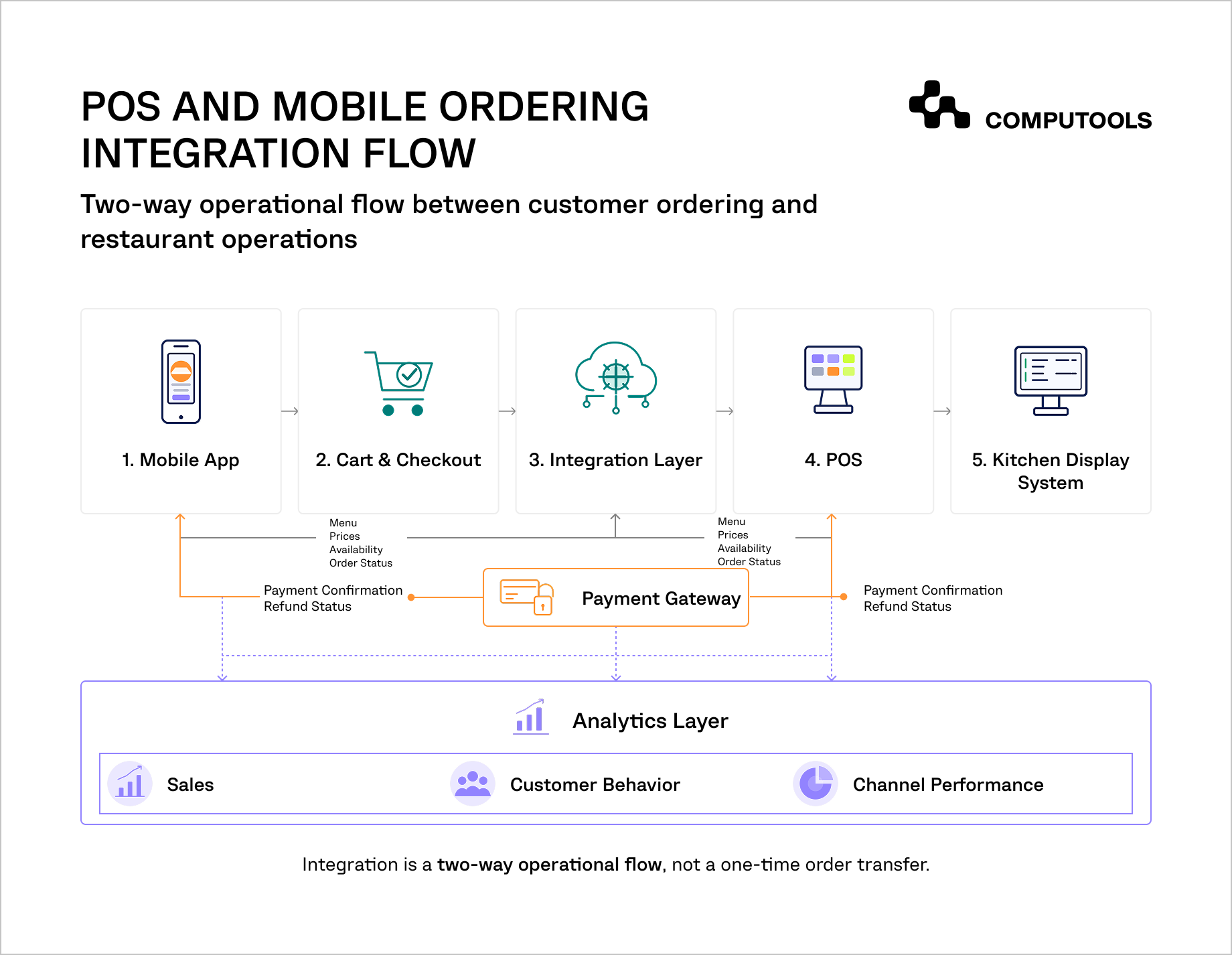
What data should sync between the POS and mobile ordering app
A strong restaurant ordering system integration should cover more than basic details transfer. The mobile app and POS must exchange the data needed to support the full order lifecycle.
| Data Type | POS to App | App to POS |
| Menu items | Item names, descriptions, categories, images, prices | Customer selections |
| Modifiers | Size, toppings, add-ons, substitutions | Selected modifiers |
| Availability | In-stock/out-of-stock status, time-based availability | Demand signals |
| Pricing | Taxes, discounts, service fees, delivery fees | Promo code use |
| Orders | Status updates, kitchen progress, pickup readiness | New orders, cancellations, notes |
| Payments | Payment status, refunds, tips | Paid order confirmation |
| Customer data | Loyalty profile, order history, preferences | Registration, app behavior, repeat orders |
| Inventory | Stock levels, ingredient availability | Order-based stock deduction |
| Analytics | Sales, channel performance, item-level data | App conversion and funnel data |
Common models of POS and mobile app synchronization for restaurants
Restaurant digital ordering integration usually follows one of four models.
1. Direct POS API Integration
The mobile ordering app connects directly to the POS through official APIs. This model works well when the POS provides reliable access to menus, orders, payments, webhooks, customer data, and inventory.
For example, Square’s Orders API can record purchase items, calculate totals, confirm payments, track order progress, and update catalog inventory. Toast also provides order-related APIs and webhooks that notify connected systems when orders are created or updated. Clover’s API enables developers to access merchant information for tasks such as inventory, order, and payment management. Clover also gives merchant-side updates with webhooks.
Best for: Restaurants that utilize API-friendly POS systems (Square, Toast, Clover, Lightspeed, Oracle Simphony, etc.)
Key advantage: POS API integration for restaurants provides operators with strong control over the flow and access of data as well as real-time sync.
Main limitations: API access, rate limits, structures of the data fields, and certification requests heavily depend on the POS provider.
2. Middleware-Based Integration
Middleware operates as a bridge between the mobile ordering application and the Point of Sale systems. It standardizes data, manages authentication, maps menus, and routes orders to the appropriate venue.
Best for: Multi-location restaurants, networks and franchises, food courts, and brands with many POS systems.
Main advantage: Advanced scaling across a variety of locations and POS providers.
Key constraints: Middleware creates another layer that must be controlled, secured, and sustained.
3. Aggregator or Integration Platform
Some operators subscribe to third-party integration platforms that connect their delivery apps, online ordering systems, and POS solutions.
Best for: Restaurants that have standard workflows and need a rapid rollout.
Main advantage: Shorter setup time.
Main limitation: Less flexibility for custom app logic, advanced loyalty, complex menu rules, or multi-brand workflows.
4. Custom Integration Layer
Tailored restaurant technology integration solutions are built specifically around the venue’s operational model. They can accommodate sophisticated ordering rules, custom multi-location routing, bespoke loyalty schemes and dynamic pricing, custom delivery and CRM connection, BI dashboards, and fallback flows.
Best for: Restaurant groups with complex operations and systems, extensive order volumes, custom mobile applications, or scalability needs.
Main advantage: Customizable for greater flexibility and control for the long-term.
Main limitation: Takes time for proper discovery, software architecture, and testing, along with ongoing support.
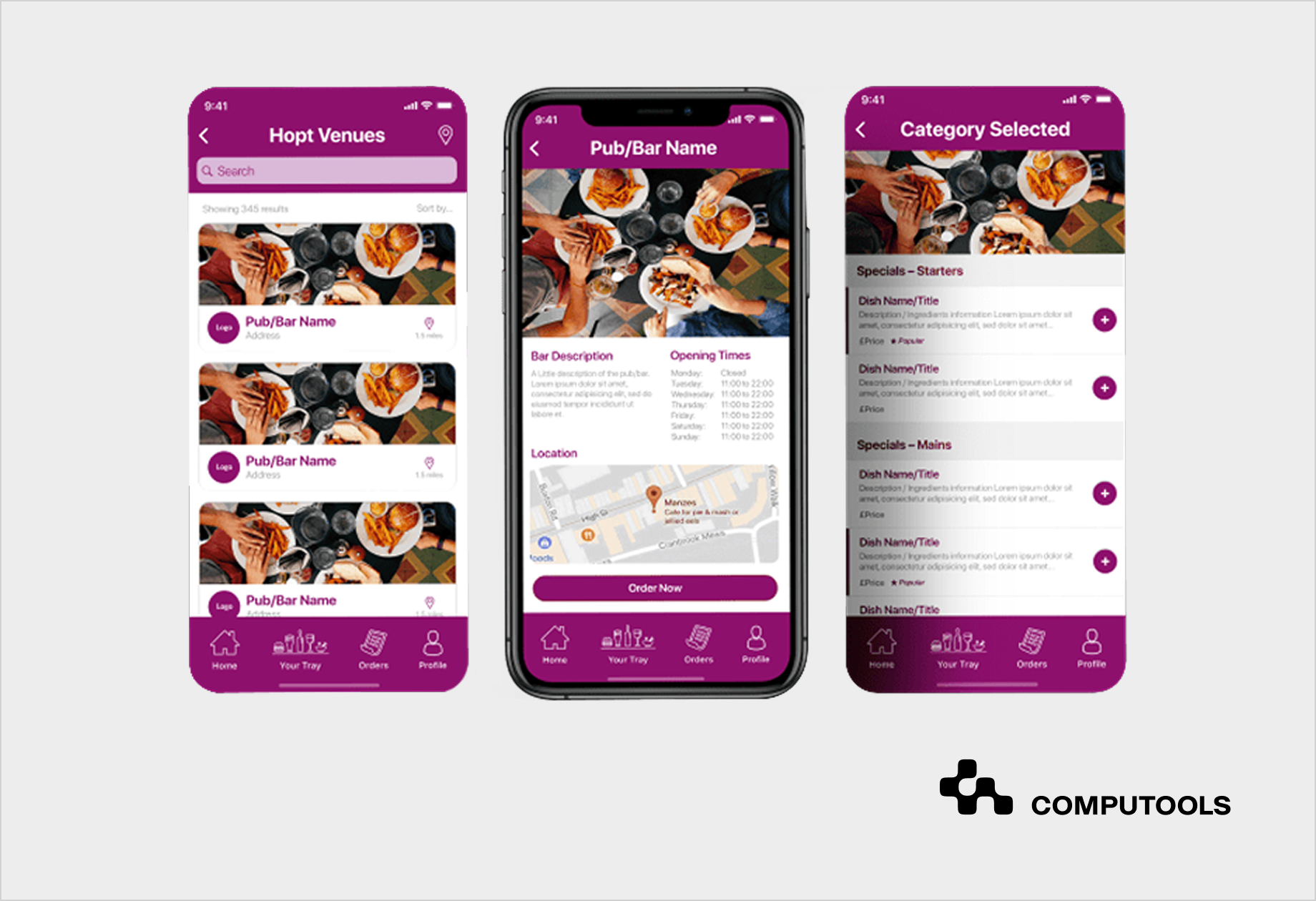
Tap App сase study: integrated ordering in practice
Tap App is a strong example of how restaurant ordering software can support real operational needs in addition to customer-facing convenience. Computools developed a cross-platform restaurant ordering application for a UK-based client that needed to connect multiple restaurants, varied menus, order tracking, payments, tips, and performance monitoring in one digital platform.
The solution was designed to aggregate menus, table availability, opening and closing times, on-site and off-site orders, payments, tips, order notes, and order status tracking. This gave venues a more controlled way to manage digital orders and keep operational data visible and organized.
From a technical perspective, Computools used React Native, PHP, PostgreSQL, and microservice architecture to support stable performance, scalability, and easier management of different restaurant workflows. This was important because each venue could have its own menu structure, availability rules, ordering flow, and customer interaction model.
The results were measurable: Tap App contributed to a 7% increase in top-line growth through cross-selling opportunities and reduced unfulfilled or modified orders by 85% through better ingredient management.
This project supports a clear point: restaurant app development should not stop at the customer interface. The real value comes when menus, availability, ordering, payments, and operational data work together in one connected workflow.
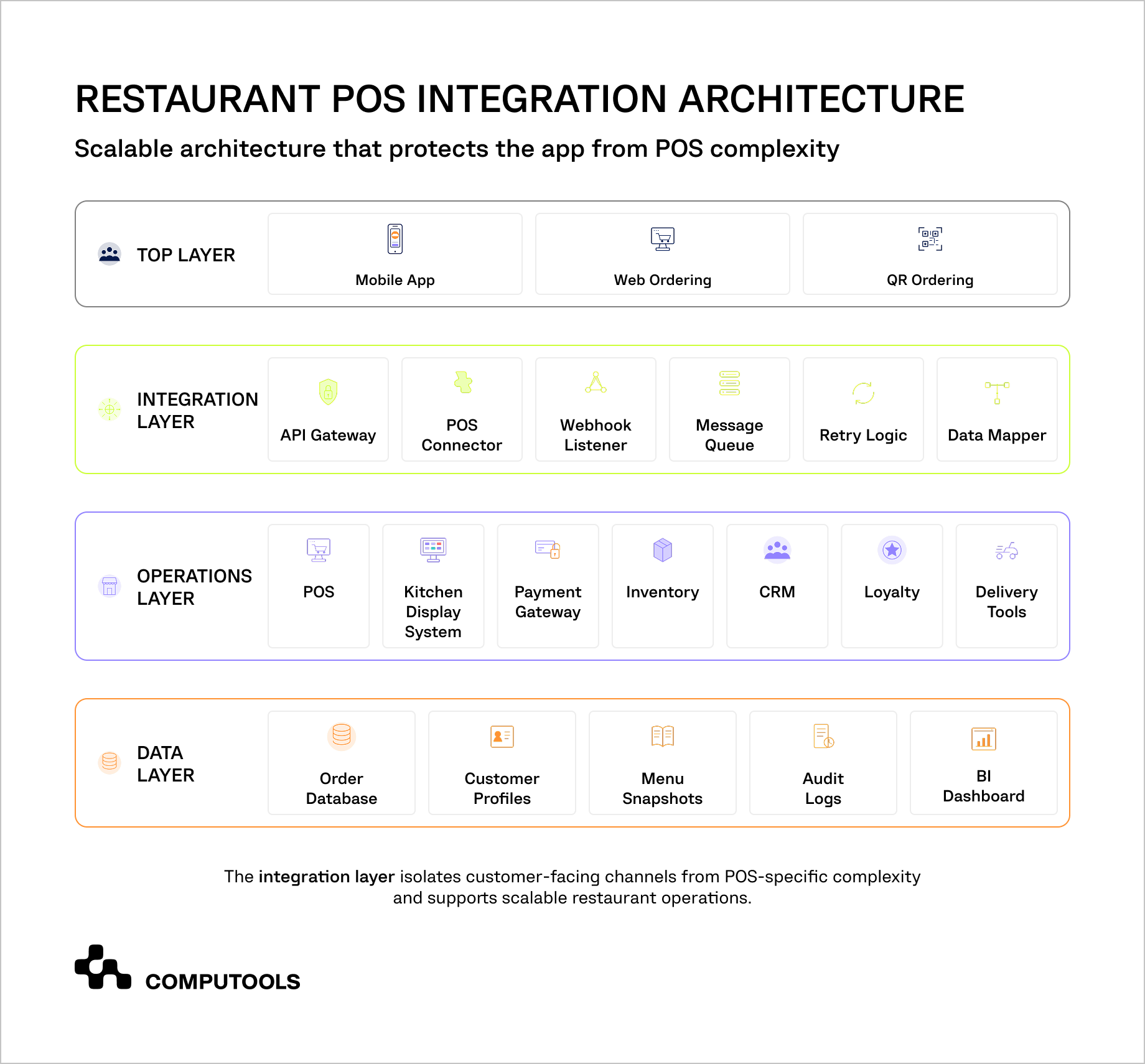
How to implement restaurant POS integration with mobile ordering apps step-by-step
The primary objective of custom integration is to make mobile ordering a natural and non-intrusive part of the restaurant’s operational structure. The mobile application, when fully and seamlessly synchronized, should be able to perform automated real-time communication and data exchange with the POS, kitchen, payment, inventory, and analytics systems.
Step 1. Audit the POS and Existing Restaurant Systems
The first step is to assess the current state and levels of available integration for the current POS. Certain POS systems are a bit more open and flexible and may provide application programming interface, webhooks, a sandbox, and more built-in integration options. Other solutions may require custom work, including a more elaborate integration strategy.
Key areas of evaluation are:
| Area | What to Check |
| POS API | Endpoints, limits, authentication, sandbox access |
| Menu data | Items, modifiers, taxes, prices, availability |
| Orders | Order creation, cancellation, status updates |
| Payments | Tips, refunds, failed payments, transaction IDs |
| Kitchen flow | KDS, printers, prep stations, order routing |
| Locations | Menus, prices, taxes, hours, delivery zones |
| Webhooks | Order, payment, menu, and inventory events |
This audit defines whether a direct connection can be established between the app and the POS, or a custom integration layer is required.
Step 2. Design the Custom Integration Architecture
For a single-location restaurant, direct POS API integration may be enough. For chains, franchises, or multi-brand operators, a middleware layer is usually safer.
A typical architecture includes:
- Mobile app for ordering, checkout, loyalty, and tracking.
- Backend for cart logic, validation, users, and business rules.
- Middleware for POS connectors, data mapping, retries, and webhooks.
- POS as the source of truth for menus, orders, pricing, taxes, and sales.
- KDS or printers for kitchen execution.
- Payment gateway for authorization, capture, refunds, and reconciliation.
- Analytics layer for sales, customer behavior, and channel performance.
This structure keeps the app independent from POS-specific limitations. If the restaurant adds a new POS later, developers can build a new connector instead of rebuilding the whole app.
Step 3. Create a Unified Data Model
Different POS systems store restaurant data differently. One POS may treat modifiers as product options, another as separate items, and another as nested groups.
A custom integration should create one internal data model for:
- Menu items
- Modifier groups
- Required and optional options
- Taxes and service fees
- Discounts and promo codes
- Availability windows
- Orders and order statuses
- Payments and refunds
- Customer profiles
- Locations
This model becomes the translation layer between the mobile app and the POS. It also reduces vendor lock-in because the app does not depend directly on one POS data format.
Step 4. Build POS Connectors
Each POS should have a separate connector or adapter. The connector translates app-side data into the format required by the POS and converts POS responses back into the app’s internal format.
A POS connector usually handles:
| Function | Technical Role |
| Authentication | Tokens, merchant IDs, refresh logic |
| Menu sync | Items, prices, modifiers, taxes |
| Order submission | Sending orders to the POS |
| Status updates | Receiving order progress |
| Payments | Matching orders with transactions |
| Refunds | Syncing cancellations and refund records |
| Errors | Converting POS errors into internal error codes |
| Rate limits | Controlling retries and request volume |
This makes the integration easier to maintain when POS APIs change.
Step 5. Set Up Menu Synchronization
Menu aggregation was one of the important parts of Tap App. The application needed to display menus from different venues as well as table availability, opening and closing times, order types, and item-level details. For POS and restaurant mobile ordering system integration, this is a useful example. Menu sync should not only transfer item names and prices. It should also reflect when, where, and how each item can be ordered.
The integration should support:
- Scheduled menu sync
- Real-time or webhook-based updates
- Menu versioning
- Location-specific menus
- Time-based availability
- Modifier validation
- Tax and fee rules
- Sold-out item handling
A practical flow is:
1. Pull menu data from the POS.
2. Normalize it in the backend.
3. Store a versioned menu snapshot.
4. Send clean menu data to the app.
5. Revalidate the cart before checkout.
This prevents customers from ordering unavailable items or invalid modifier combinations.
If the mobile ordering strategy also includes table-side or QR-based ordering, Computools’ guide on how to build a digital restaurant menu app with QR ordering explains how menus, availability, ordering flows, and payments should work together in a guest-facing digital menu.
Step 6. Validate Orders Before Sending Them to the POS
Before an order reaches the POS, the backend should verify that it is still valid.
The validation layer should check:
- Restaurant opening hours
- Location availability
- Item availability
- Modifier rules
- Pickup or delivery time
- Delivery zone
- Promo codes
- Taxes and fees
- Loyalty discounts
- Payment status
For example, if a customer selects a lunch item after the lunch menu has ended, the app should block the order before payment instead of sending an invalid request to the POS.
Step 7. Use Queues and Idempotency for Order Submission
In projects like Tap App, where the platform supports orders across different restaurants and order types, reliability becomes critical. The system needs to process orders without duplication, keep payment and order status aligned, and make sure restaurant teams receive accurate order details. For custom restaurant POS integration, this means using controlled order states, internal order IDs, retry logic, and clear tracking between the mobile app, backend, and restaurant-side systems.
A reliable custom flow should use:
- Idempotency keys to prevent duplicate orders.
- Message queues to process orders safely.
- Retry logic for temporary failures.
- Timeouts for slow POS responses.
- Dead-letter queues for unresolved orders.
- Internal order IDs and POS order IDs for traceability.
A stable flow looks like this:
Customer checkout → cart validation → payment authorization → internal order created → order queued → POS submission → POS confirmation → kitchen routing → app status update.
This helps the restaurant POS automation solution stay reliable during lunch rushes, campaigns, and high-volume periods.
Step 8. Define the Order Status Lifecycle
The app, POS, kitchen, and support team should use the same order status logic.
Common statuses include:
- Created
- Payment authorized
- Submitted to POS
- POS accepted
- In preparation
- Ready
- Completed
- Cancelled
- Refunded
- Failed.
This prevents confusion between customer-facing statuses and internal operational statuses.
Step 9. Sync Payments, Refunds, and Reconciliation Data
Tap App included payment gateway integration to support secure and convenient transactions for users. It also supported payments with tips, which is important for restaurant ordering because the payment record must match the order, venue, staff workflow, and final transaction amount. In POS integration projects, this same logic helps keep app payments, POS orders, tips, taxes, and reporting aligned.
The system should store:
- Internal order ID
- POS order ID
- Payment transaction ID
- Refund ID
- Location ID
- Customer ID
- Tax amount
- Tip amount
- Discount amount
- Payment status
- Refund status.
This helps restaurant teams reconcile app sales, POS sales, tips, refunds, and payouts without manual spreadsheet work.
Step 10. Connect Kitchen Routing
Tap App was built to make ordering efficient for both customers and restaurant staff. The app supported on-site and off-site orders, order notes, payments, tips, and order status tracking. For POS integration, this is the operational point: mobile orders should enter the normal restaurant workflow with all details the staff need to prepare and fulfill the order correctly.
The system should support:
- Pickup orders
- Delivery orders
- QR table orders
- Scheduled orders
- Item-level station routing
- Customer notes
- Staff notes
- Pickup codes
- Delivery handoff details.
For example, drinks can go to the bar station, hot meals to the kitchen, and desserts to a separate prep area while the customer sees one order status in the app.
Step 11. Add Webhooks and Fallback Polling
Webhooks help the app receive order, payment, menu, and inventory updates in near real time. However, they should not be the only update method.
A reliable setup should include:
- Webhooks for fast updates.
- Polling as a fallback.
- Event logs for traceability.
- Webhook signature checks.
- Duplicate event detection.
- Retry logic for failed events.
For example, if the POS sends a “ready” event, the backend updates the app and triggers a push notification. If the webhook fails, controlled polling can still update the order status.
Step 12. Add Monitoring and Alerts
POS integration should be monitored like a critical production system. Restaurant teams need to know quickly when orders, payments, or menu syncs fail.
Track:
- POS API latency
- Failed order submissions
- Payment without POS confirmation
- Failed webhooks
- Menu sync errors
- Duplicate order attempts
- Queue length
- Retry volume
- Location-specific failures
This helps technical teams fix problems quickly and gives restaurant managers visibility into operational issues.
Step 13. Secure the Integration
The mobile app should never expose POS credentials or sensitive payment logic. All critical communication should pass through a secure backend or middleware layer.
Security requirements include:
- Token-based authentication
- Encrypted API communication
- Secure credential storage
- Role-based access control
- Payment tokenization
- Webhook signature validation
- Audit logs
- Least-privilege POS access
- PCI-aware payment design
- GDPR-conscious customer data handling where relevant
This protects customer data, payment records, and restaurant business information.
Step 14. Test Real Restaurant Scenarios
QA testing should cover more than successful API calls. The integration must work under real restaurant conditions.
| Scenario | What to Test |
| Lunch rush | High order volume and queue behavior |
| Menu change | Updated prices, modifiers, and sold-out items |
| Payment success, POS failure | Retry, refund, and staff alert logic |
| POS timeout | Duplicate prevention and recovery |
| Webhook delay | Polling fallback and status sync |
| Multi-location order | Correct branch, menu, taxes, and kitchen routing |
| Scheduled order | Correct preparation timing |
| Partial refund | App, POS, and payment gateway alignment |
This helps catch problems before they affect guests or staff.
Step 15. Plan for Scaling and Future POS Changes
A custom integration should support future growth. The restaurant may add locations, change POS vendors, launch new ordering channels, or introduce loyalty and delivery features later.
To make the system scalable, use:
- POS-agnostic internal data models
- Adapter-based POS connectors
- Location-level configuration
- Versioned APIs
- Centralized monitoring
- Automated deployment pipelines
- Documentation for new connectors
This gives restaurant brands more control over their digital ordering infrastructure and reduces the cost of future changes.
For restaurants building a full ordering platform rather than a POS connector alone, Computools’ article on how to build a food ordering app for restaurants gives a broader view of customer flows, ordering logic, payments, delivery, and operational features.

Launch your restaurant ordering system in 1–3 months, not years, by integrating POS, mobile apps, payments, and delivery into one streamlined flow.
How Computools approaches restaurant POS and mobile ordering integration
For Computools, restaurant POS integration is not an API plug-in, but rather an operational architecture challenge. The intent is to have mobile ordering accommodate the realities of restaurant operations – menu, payments, kitchen, customer, and inter-store messaging, reporting, and logistics.
Our company offers all-encompassing software development services for HoReCa that include mobile and web platforms, integrations, data and service flows, and cloud infrastructure, plus all the necessary support after the product has launched.
In addition, we provide cross-platform mobile app development services with React Native and Flutter, allowing a more rapid launch of both iOS and Android apps with better performance and lower development costs.
In practical terms, this means Computools can help restaurant businesses:
- Audit existing POS, ordering, payment, loyalty, and inventory systems.
- Design the integration software architecture.
- Build POS connectors and middleware to integrate POS with mobile ordering.
- Develop customer-facing mobile ordering apps.
- Connect kitchen display systems and order routing.
- Set up a real-time menu and availability sync.
- Implement secure payments and refunds.
- Build admin dashboards for restaurant teams.
- Add analytics for sales, order accuracy, customer behavior, and location performance.
- Support scaling across new venues, brands, or regions.
This approach gives restaurant businesses more control over digital ordering. Instead of adding another disconnected channel, Computools helps build an integrated system where mobile orders move directly into restaurant operations, staff handle fewer manual tasks, and managers get clearer data across every location.
As an additional advantage, our domain expertise extends beyond HoReCa into broader travel and hospitality software development services. This helps hospitality businesses connect restaurant systems with booking platforms, guest apps, payment flows, CRM, loyalty, analytics, and operational management tools when the project requires a wider digital ecosystem.
Final thoughts
POS integration for food ordering apps has become a practical requirement for operators. An app that doesn’t connect to the POS may be convenient for the customer, but inefficient for the restaurant. It forces repeated orders, outdated menu items, imbalanced payments, service delays and incomplete sales records.
Proper cloud POS integration for restaurants should connect every part of the order lifecycle. Menus stay accurate. Orders move directly into the POS and kitchen workflow. Payments match transactions. Staff see fewer errors. Managers get better sales and customer data. Guests receive a faster and more reliable ordering experience.
For restaurants looking to add mobile ordering capabilities, the best strategy is to begin with a full review of the POS.
Planning to connect your restaurant POS with a mobile ordering app? Reach out to Computools to design an integration that keeps orders, payments, menus, kitchens, and customer data in sync.
Computools
Software Solutions
Computools is an IT consulting and software development company that delivers innovative solutions to help businesses unlock tomorrow.