
THE AUTHOR:

SIS LMS ERP integration remains a practical challenge for higher education institutions trying to connect student records, learning activity, finance, identity, and reporting across fragmented platforms. In the 2026 Inside Higher Ed/Hanover Research survey, 57% of campus technology leaders said their institutions needed better integration between administrative and learning systems to improve student success.
For universities running separate SIS, LMS, ERP, and IAM environments, the problem extends beyond APIs: inconsistent data models, ownership rules, and synchronization cycles can affect enrollment, access, billing, and reporting. A reliable integration strategy therefore depends as much on strong data engineering practices as on the applications themselves.
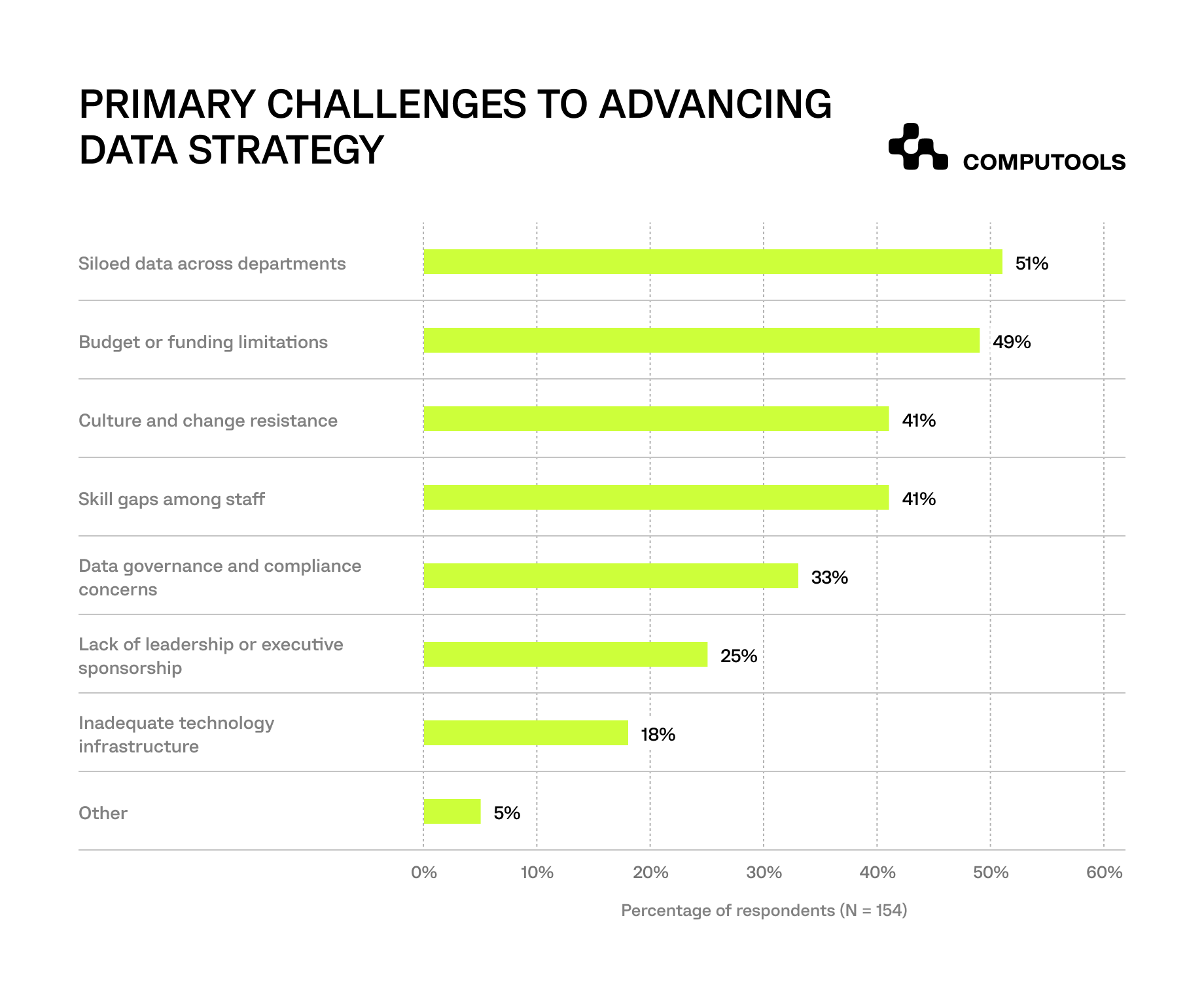
The data problem is just as significant as the system landscape itself. In EDUCAUSE’s 2025 Data Modernization and Management QuickPoll, 51% of respondents identified siloed data across departments as a challenge to advancing institutional data strategy.
When student records, course information, billing data, and access permissions are maintained in separate environments, even routine changes can require reconciliation across multiple platforms. Delays or inconsistencies can then affect enrollment, reporting, student services, and day-to-day academic operations.
How we delivered SIS LMS ERP integration for a multi-campus university
A UK-based private university group operating three campuses needed to connect three localized SIS environments with its LMS, ERP, IAM, reporting, and student-service systems. The institution served more than 25,500 students and 1,535 faculty members, but fragmented data structures and synchronization cycles complicated cross-campus reporting, scheduling, billing, and student services. Computools approached the integration project as part of broader education software development services, preserving the existing core systems while introducing a controlled integration layer above them.
The team first assessed the current architecture and mapped data ownership across student records, learning activity, billing, access control, and academic operations. The existing systems of record remained in place, while a new integration and data layer coordinated data flows between them. A unified model normalized student profiles, course structures, grading formats, billing references, schedules, and access roles.
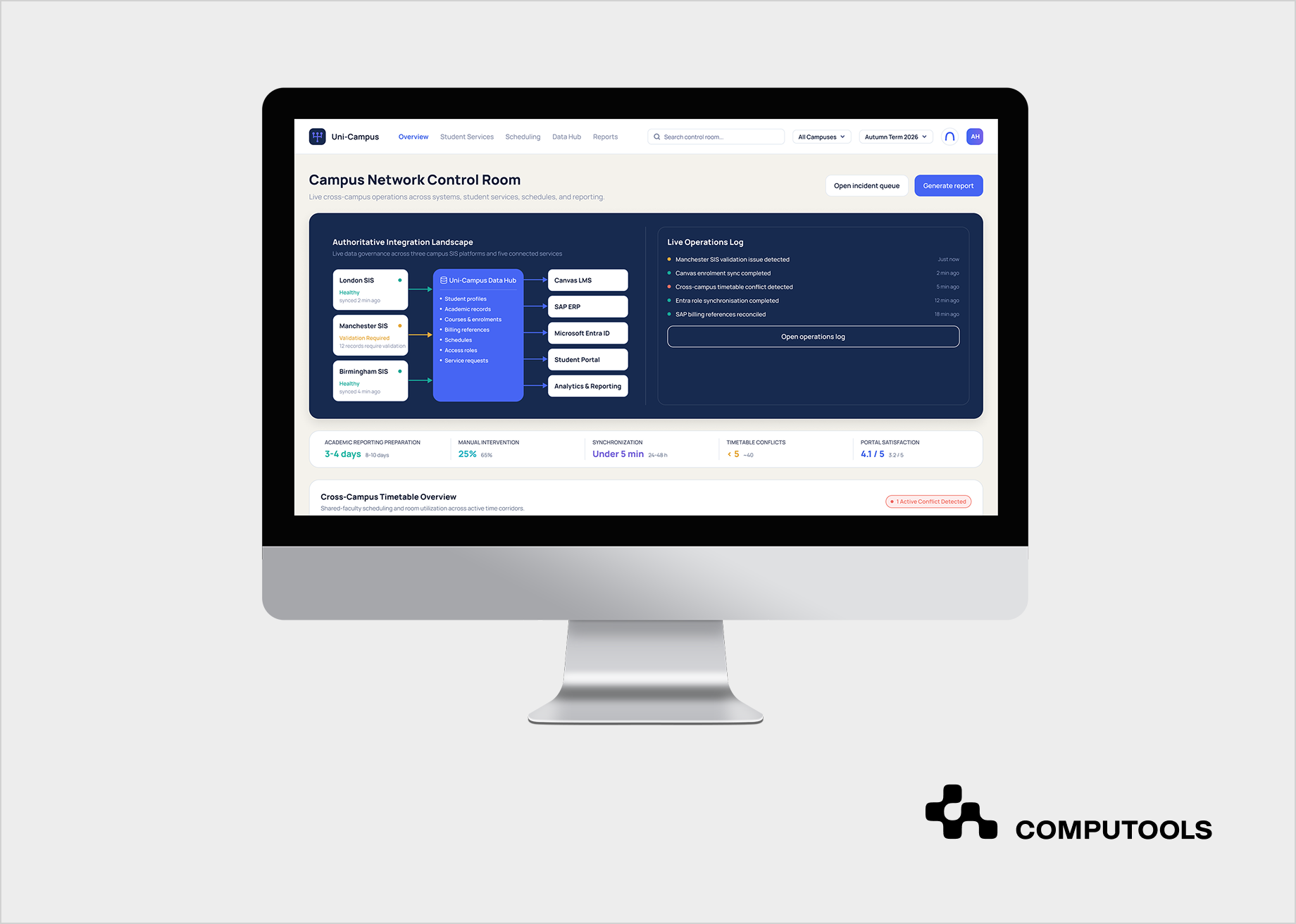
The technical layer used REST APIs, webhooks, scheduled synchronization jobs, LTI 1.3, and Microsoft Graph API to connect the three legacy SIS environments with Canvas LMS, SAP ERP, and Microsoft Entra ID. Our eLearning software development expertise supported the learning-side integration, while role-based access controls, audit trails, and centralized governance kept student, academic, financial, and operational data protected across the connected environment.
After rollout, cross-campus data synchronization improved from 24–48 hours to under five minutes, academic reporting preparation decreased from 8–10 business days to 3–4, and scheduling conflicts fell from about 40 per semester to fewer than five.
8 steps for integrating SIS, LMS, and ERP systems
For teams planning how to integrate SIS LMS and ERP systems, the project needs to be broken down into data ownership, integration contracts, architecture, synchronization rules, identity, testing, and production controls. The technical connection between platforms is only one part of the work. Common failure points include unclear ownership, incompatible data models, weak exception handling, and workflows that cover only standard scenarios
1. Map the current architecture, interfaces, and data dependencies
Start with a current-state architecture assessment that covers every platform involved in student, academic, financial, identity, and reporting workflows. A university may have one SIS and one LMS on paper, while the real campus technology infrastructure also includes departmental databases, scheduling tools, payment systems, identity providers, data warehouses, custom portals, third-party learning tools, and legacy exports maintained by individual teams.
Document each existing integration at the data-object level. The map should show which system originates the record, where it travels, how it is transformed, how often it moves, and which downstream processes depend on it. A nightly SIS export may feed the LMS, a reporting database, and a student portal through three separate jobs. Changing that feed can therefore affect several services that do not appear connected in the initial architecture diagram.
The assessment also needs to identify the integration mechanism behind each flow: REST or SOAP APIs, database views, CSV/SFTP exchanges, webhooks, message queues, scheduled ETL jobs, or manual uploads. Record authentication methods, vendor API limits, batch windows, transformation scripts, field-level mappings, and known operational failures. Undocumented transformations deserve special attention because business rules often end up buried inside old scripts. Map dependencies against the academic calendar. Enrollment, add/drop periods, examinations, grading, term rollover, and financial deadlines create very different load and risk profiles. An interface that performs adequately in July may become a bottleneck when large volumes of enrollment records change within a short period.
For Uni-Campus, Computools assessed three localized SIS environments, along with LMS, ERP, IAM, reporting, scheduling, and student-service workflows, before defining the target architecture. The team also mapped the existing flows and ownership boundaries across campuses.
The output should be an integration inventory detailed enough to answer three questions for any critical record: where it originates, which systems depend on it, and what happens if the transfer fails.
2. Assign an authoritative system to every data domain
Multiple platforms may store the same student, course, or employee data, but each field needs an agreed owner. University system integration becomes unstable when two systems can independently modify the same business record without deterministic conflict rules.
Define authority by data domain first, then by field where necessary. The SIS will commonly own academic status, enrollment, programs, sections, and official grades. The LMS may own assignments, course activity, and assessment-level results. ERP typically owns financial transactions, billing, procurement, and other administrative records. IAM controls credentials, authentication policies, and access lifecycle.
The distinction becomes more difficult with shared attributes. A student email address may appear in SIS, IAM, LMS, ERP, and the portal. The integration design needs to define which platform can change it, which systems receive the update, and which value wins if two records disagree. The same rule applies to names, program status, instructor assignments, course dates, and organizational affiliations.
Ownership should also account for derived and replicated data. A reporting warehouse can store a copy of an enrollment record without becoming authoritative for enrollment. A student portal can display a balance without gaining authority over the financial transaction. Keeping those roles explicit prevents downstream applications from gradually becoming unofficial systems of record.
Document the ownership model as part of the integration contract and review it with academic administration, finance, IT, student services, and security teams. Technical teams cannot determine every ownership rule alone because many conflicts reflect institutional policy, not software behavior.
3. Convert business processes into explicit integration contracts
SIS-to-LMS integration should be specified at the workflow level, with defined triggers, source and target systems, data fields, validation rules, latency requirements, and failure handling. Each integration contract should define the trigger, source and target systems, payload, ownership, latency target, validation rules, and failure behavior. The same discipline applies to broader higher education systems integration across finance, identity, and student services.
Take enrollment as an example. The specification should define the event that makes an enrollment valid, the identifier used to match the student, the course and section references, the target LMS role, the acceptable propagation time, and the action required after a withdrawal. It also needs rules for late enrollment, reinstatement, section transfer, duplicate records, and courses not yet provisioned in the LMS.
Grade transfer needs a separate contract. The integration should distinguish assignment-level scores from results that can become official academic grades. It should define approval status, grading-scale conversion, resubmissions, manual overrides, rounding rules, late-grade changes, and whether the transaction can be reversed.
The same discipline applies to financial and identity flows. Billing updates may depend on enrollment status, residency, program, or credit load. Access rules may depend on role, campus, course assignment, employment status, or active term. A broad “student updated” event is usually too ambiguous for reliable downstream processing.
Each integration contract should specify the source event, destination, required fields, optional fields, schema, direction, latency target, validation logic, retry policy, and business owner. Versioning also matters. If a vendor changes an API field or a university adds a new enrollment status, the receiving systems need a controlled way to absorb that change.
This step gives architects enough information to decide which flows need real-time APIs, which can use asynchronous messaging, and which can remain scheduled. It also gives QA teams concrete scenarios to test later.
4. Choose an integration architecture based on latency, scale, and system constraints
No single integration pattern fits an entire university. Higher education software integration often combines synchronous APIs, asynchronous events, scheduled jobs, middleware, and legacy file exchange within the same architecture.
Use synchronous APIs where the calling system needs an immediate response, such as validating a student record or retrieving current account information. Asynchronous messaging is better for events that need to reach several consumers without blocking the source system. Enrollment changes, role changes, course creation, and some account lifecycle events can fit that model.
Scheduled synchronization remains useful for large non-urgent transfers, historical data, nightly reconciliation, and platforms that cannot emit real-time events. File-based integration can still be necessary for older SIS or ERP environments, but it needs the same controls as an API flow: schema validation, encryption, auditability, duplicate protection, monitoring, and failure handling.
Middleware or iPaaS can reduce direct dependencies between platforms. The integration layer can handle routing, transformation, protocol conversion, authentication, orchestration, retries, and logging. This becomes particularly important when several campus systems use different schemas for the same student or course entity.
Point-to-point connections should be evaluated carefully as the number of systems grows. A direct SIS-to-LMS integration may be manageable. Add ERP, IAM, analytics, a portal, scheduling, CRM, and departmental systems, and each new connection introduces its own mappings and operational dependencies.
Uni-Campus used a hybrid architecture combining REST APIs, webhooks, scheduled synchronization jobs, LTI 1.3, and Microsoft Graph API across three legacy SIS environments, Canvas LMS, SAP ERP, and Microsoft Entra ID. The approach allowed legacy systems to remain operational while newer interfaces handled the data flows they could support.
The architecture also needs production controls from the beginning: centralized logging, correlation IDs, dead-letter handling, retry limits, API versioning, rate-limit management, and health monitoring. If you add observability only after deployment, incident diagnosis slows, and production failures become harder to isolate.
5. Normalize data models without erasing system-specific meaning
SIS, LMS, and ERP platforms rarely describe academic entities in the same way. A “course” can mean a catalog offering in one system, a scheduled section in another, and a learning space in the LMS. A student may be represented as a person, user, learner, customer, account holder, or several linked records.
A common data model can provide unified student data management across these platforms, but the model has to preserve the distinctions that affect business logic.
Start with core entities such as person, student, instructor, course, section, term, enrollment, program, organization, grade, account, and campus. Define identifiers, relationships, allowed values, lifecycle states, and mappings to each source system.
Identifiers deserve separate design work. Email addresses and usernames are convenient but mutable. Use stable institutional identifiers for matching wherever possible, and use cross-reference tables to connect them to LMS IDs, ERP account IDs, and IAM identities.
Data normalization also requires semantic mapping. Different campuses may use different codes for the same enrollment state, so the integration layer needs to translate them into a shared operational value.
Campus A SIS: ACTIVE ─┐
Campus B SIS: ENR ────┼──→ Integration layer ───→ Normalized status: Active enrollment
Campus C SIS: 1 ──────┘
│
└── Original source values retained for audit and troubleshooting
The same normalization approach applies to grade formats, course codes, term structures, names, addresses, and organizational hierarchies when source systems use different conventions.
Dates, time zones, grade formats, course codes, names, addresses, and organizational hierarchies create similar problems. Even apparently simple fields can carry different rules. A withdrawn enrollment may remain visible in SIS for transcript purposes, while access should already be removed from LMS.
In Uni-Campus, Computools created a unified model covering student profiles, academic records, grading formats, course structures, billing references, schedules, access roles, and service requests. We normalized the data before building broader portal functionality because the portal depended on consistent data across all three campuses.
The common model should standardize the fields required for exchange while preserving source-specific semantics.
Connected systems also create a stronger foundation for analytics. Our article on big data in education looks at how data quality, integration, and governance affect institutional analytics.
6. Design synchronization for failures, duplicates, and conflicting updates
Reliable student data synchronization requires explicit rules for direction, latency, ordering, validation, idempotency, retries, and conflict handling.
Define direction for individual objects and fields. Enrollment status may flow from SIS to LMS. Approved final grades may move from LMS to SIS. Billing status may move from ERP to a portal. Authentication status may originate in IAM. Treating an entire integration as “bidirectional” usually hides these distinctions and makes conflict resolution harder.
Idempotency protects the environment from duplicate processing. If an API call times out after the destination already created an enrollment, a retry must not create a second record. Unique transaction identifiers, idempotency keys, sequence numbers, or source event IDs can help the integration recognize a transaction it has already processed.
Ordering matters as well. A course must exist before a student can be enrolled in it. A user identity may need to exist before LMS provisioning succeeds. Event-driven flows should therefore account for dependencies, delayed events, and out-of-order delivery.
Retries need limits and classification. Temporary network failures can be retried automatically. An invalid course identifier will continue failing until the underlying data is fixed. Sending both cases into the same infinite retry loop only converts a data-quality problem into infrastructure noise.
Reconciliation provides the final control. Scheduled comparisons between authoritative and downstream records can detect missing enrollments, stale roles, unmatched users, or incomplete updates that real-time processing missed.
Production monitoring should expose failed records with enough context for teams to act: source system, destination, object type, institutional identifier, timestamp, error code, retry count, and last successful state. A generic “sync failed” message gives operations staff very little to work with.
7. Integrate identity, roles, and access as a separate control plane
Authentication, authorization, and academic data exchange should be designed as connected but separate concerns. IAM answers questions such as who the user is, whether the account is active, which authentication method applies, and which institutional roles the person holds. SIS, LMS, and ERP integrations move academic, learning, and administrative records.
A student can therefore authenticate successfully while still missing a course because enrollment provisioning failed. Conversely, an old LMS role can remain active after the academic relationship has ended if role revocation is tied only to login status.
Map the identity lifecycle across applicants, active students, graduates, faculty, adjunct instructors, staff, and external users.
Define when accounts are created, activated, suspended, renamed, merged, and removed. Temporary and overlapping roles need special treatment because a person may be both a student and an employee.
Role mapping also needs context. “Faculty” may be too broad if access depends on campus, department, course, or term. RBAC policies should reflect the minimum data and functionality each role needs, with audit trails for sensitive academic and financial actions.
Shared portals add another layer; web development services can provide one interface for timetables, billing, academic requests, and student services, but the portal should consume governed data from source systems through controlled services. Shared portals can provide one interface for timetables, billing, academic requests, and student services through web development services, while academic and financial records remain mastered in their authoritative systems.
For a deeper look at LMS connections with SIS, identity providers, analytics tools, and custom APIs, see our LMS integration guide.
8. Test real academic workflows, deploy around the calendar, and monitor continuously
Integration testing should reproduce the situations that create operational pressure across academic and administrative systems. Successful API responses cover only a small part of that work.
Testing should include late enrollment, add/drop activity, section transfers, duplicate students, merged identities, faculty replacement, course cancellation, grade correction, term rollover, account suspension, ERP downtime, expired credentials, schema changes, and partial failures across multi-step workflows.
End-to-end scenarios matter more than isolated interface tests. A new enrollment may need to update SIS, create LMS access, apply the correct IAM role, appear in the student portal, and become visible to reporting. Testing each API independently can still miss a failure in the overall sequence.
Performance testing should reflect real academic peaks. Registration periods, the first week of classes, grade submission, and term rollover can produce load patterns very different from normal daily activity. Measure queue depth, processing latency, rate limits, and retry behavior under those conditions.
Data reconciliation needs its own acceptance criteria. Teams should compare record counts, identifiers, statuses, timestamps, and key business attributes across systems before declaring a migration or integration release complete.
Rollout should follow academic risk, not a generic software calendar. Introduce lower-risk flows first, monitor them, and expand after validation. Critical enrollment, grading, or billing integrations need release windows that leave enough time for rollback and reconciliation before the next operational peak.
Computools phased Uni-Campus around the university’s academic calendar. Campus teams, IT stakeholders, student services, finance, and academic administration reviewed releases before wider deployment. The project used KPI-based acceptance criteria tied to reporting time, synchronization speed, scheduling accuracy, manual-intervention requests, and portal satisfaction.
Post-launch monitoring should continue tracking synchronization latency, failed transactions, reconciliation gaps, API errors, stale records, authentication failures, and volume anomalies. Integrations change whenever vendors update APIs, institutions modify workflows, or new systems enter the architecture, so production support remains part of the integration lifecycle.

Integrate SIS, LMS, and ERP systems within 1–3 months, eliminate duplicate data entry and disconnected workflows, improve data accuracy across departments, and reduce administrative costs with a unified higher education ecosystem.
What can go wrong when integrating SIS, LMS, and ERP systems?
Many integration issues appear after launch, when enrollment changes, grade updates, billing events, and access requests begin moving through several systems at once. Common causes include unclear ownership, weak synchronization rules, and monitoring gaps.
| Common issue | Operational impact | Recommended approach |
| Unclear data ownership | The same student, course, or status can be changed in several systems, creating conflicting records and unclear resolution rules. | Assign an authoritative system to each data domain and document field-level ownership where records overlap. |
| Too many direct system connections | Each new connection adds mappings, credentials, dependencies, and failure points. A change in one platform can affect several integrations. | Use a shared integration layer or middleware when multiple systems depend on the same data or orchestration logic. |
| Slow synchronization for time-sensitive changes | Enrollment, withdrawal, or access updates may arrive hours late, leaving students without course access or keeping permissions active after they should change. | Set latency requirements for each workflow and use APIs, events, or webhooks where updates need to propagate quickly. |
| Loose rules for two-way updates | SIS, LMS, or ERP can overwrite values managed by another system, especially for enrollment status, grades, roles, and profile data. | Define update direction for each object or field, including which system can create, change, or revoke a value. |
| No reconciliation after data transfer | Records can still be missing, duplicated, or stale even when API calls complete successfully. | Compare downstream records with authoritative sources on a schedule and track mismatches separately from transport errors. |
| Weak record matching | Email addresses, usernames, and names change over time, which can create duplicate or orphaned records when they are used as primary identifiers. | Use stable institutional identifiers and maintain cross-reference mappings for platform-specific IDs. |
| Testing only standard scenarios | Late registration, section transfers, grade corrections, duplicate identities, faculty changes, and system downtime expose gaps that normal test cases miss. | Build end-to-end tests around real academic exceptions and peak periods. |
| Poor release timing | A small defect can become a major operational issue during registration, examinations, grading, or term rollover. | Plan releases around the academic calendar and reserve time for monitoring, rollback, and reconciliation before critical periods. |
Institutions reviewing a broader modernization program can also explore our overview of education management software, including data migration and integration challenges.
Why choose Computools for higher education system integration?
Computools brings together architecture, integration engineering, application development, QA, security, and rollout support for education platforms that have to work across existing institutional systems. Computools has 250+ experts on board and has delivered more than 40 education software projects, with experience spanning SIS, LMS, assessment, finance, credentialing, analytics, student services, and multi-campus environments.
Through our EdTech software development expertise, we work with vendor APIs, webhooks, SAML/OIDC, SCIM, LTI 1.3/LTI Advantage, governed data pipelines, and event-driven synchronization. This allows us to connect existing platforms while preserving the systems that already run critical academic and administrative operations.
Our work also covers adjacent education environments. For Corporate Skillum, Computools connected HR, learning, and collaboration systems across a workforce of about 3,530 employees; monthly learning participation increased from 22% to 48%, while course-authoring time decreased from 80 to 24 hours.
For the British Council, the team modernized a web portal through UX and service design, portal development, hosting, analytics integration, and full lifecycle delivery.
For Uni-Campus, the scope extended across three legacy SIS environments, Canvas LMS, SAP ERP, Microsoft Entra ID, analytics, and student-facing services. The team covered architecture assessment, data modeling, synchronization logic, IAM, governance, QA automation, phased deployment, and post-launch support.
Once governance, data quality, and access controls are in place, the same data foundation can support AI development for student-service automation, academic analytics, or early-risk indicators.
Conclusion
Universities can connect SIS, LMS, ERP, and IAM incrementally by preserving authoritative systems and modernizing the data flows between them. Clear ownership, governed interfaces, reconciliation, and production monitoring improve the reliability of enrollment, billing, access, reporting, and student-service workflows.
Computools
Software Solutions
Computools is an IT consulting and software development company that delivers innovative solutions to help businesses unlock tomorrow.