
THE AUTHOR:

How a catering operations workflow connects every event stage
A catering operations workflow coordinates the work between the first customer inquiry and the final financial review. Sales captures requirements, event managers confirm timelines and venue conditions, kitchen teams plan production, staffing coordinators assign employees, and logistics teams allocate vehicles and equipment. Any change to guest count, menu, service time, or location must reach all affected teams before purchasing, preparation, and dispatch begin.
Catering becomes harder to scale when catering order management is divided across spreadsheets, email, messaging apps, paper production sheets, and separate systems. Teams may work from different menu versions, reserve the same stock, approve conflicting shifts, or miss changes to delivery requirements. These gaps increase manual checks, urgent purchasing, overtime, waste, and billing errors.
The risk grows when several events share the same kitchen, staff, vehicles, and service equipment. Effective catering operations management gives managers one view of deadlines, dependencies, resource conflicts, and unresolved changes across the schedule. This guide follows the complete event catering workflow, covering qualification, pricing, menus, production, staffing, logistics, execution, and reporting.
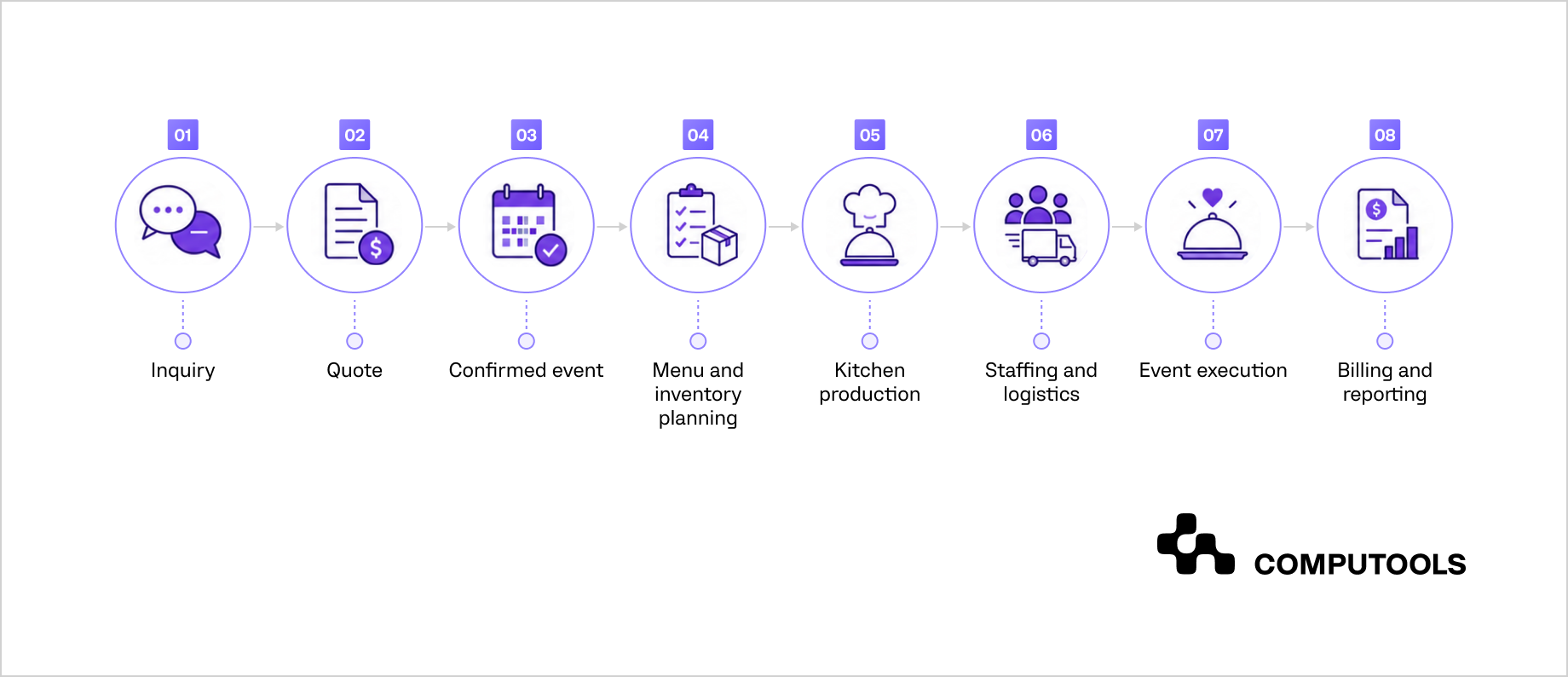
Figure 1. End-to-end catering event lifecycle
How the full catering process works
Each team contributes different data to the event record. Sales adds client requirements and commercial terms. Event managers turn them into deadlines, venue instructions, and assigned tasks. Kitchen, procurement, staffing, logistics, and finance then use the approved scope to plan and record their work.
Effective catering workflow management depends on controlled handoffs. A menu revision changes ingredient demand and production tasks, while a higher guest count may affect staffing, equipment, transport, and billing. Keeping approved requirements, current versions, task owners, and statuses in one record reduces reconciliation and gives managers a consistent view of progress.
| Team | Main responsibilities | Required operational data |
| Sales | Inquiry qualification, quotes, contracts, client communication | Event date, venue, guest count, budget, service format |
| Event management | Timeline, venue coordination, task ownership, change control | Approved scope, access times, contacts, service plan |
| Kitchen | Recipes, production batches, preparation, packing | Menu, portions, allergens, deadlines, dispatch time |
| Procurement | Ingredient availability, supplier orders, substitutions | Stock levels, reserved quantities, delivery dates |
| Staffing | Roles, availability, schedules, time tracking | Skills, shift times, venue, labor requirements |
| Logistics | Vehicles, equipment, loading, delivery, returns | Route, capacity, access window, resource allocation |
| Finance | Deposits, supplier costs, payroll, invoices, margin review | Contract value, actual costs, additional charges |
Table 1. Catering teams, responsibilities, and required operational data
From inquiry to a qualified event
The first inquiry should capture enough information to evaluate both commercial fit and operational feasibility. Basic contact details are insufficient because the event date, guest count, venue, menu expectations, service format, access conditions, and delivery requirements determine whether the business can fulfill the request within its available capacity.
A structured intake form should collect:
- event date and service time;
- venue address and access restrictions;
- estimated guest count;
- event type and service format;
- target budget;
- menu preferences;
- dietary and allergen requirements;
- setup and breakdown expectations;
- staffing requirements;
- equipment and rental needs;
- delivery or on-site service requirements;
- decision deadline.
Consistent intake improves catering order management because sales and operations begin with the same set of requirements. Event managers spend less time requesting missing details, while kitchen, staffing, and logistics teams can assess the request before a quote is issued.
1. Check operational capacity before preparing the quote.
A profitable event can still create operational losses when it overlaps with existing commitments. Sales teams should confirm whether the business has enough production capacity, staff, vehicles, equipment, and supplier availability for the requested date. This early review connects sales decisions with wider catering business operations and helps prevent overtime, urgent rentals, rushed purchasing, and delivery conflicts.
The capacity check should cover:
- kitchen workload during preparation and dispatch windows;
- availability of chefs, servers, bartenders, drivers, and supervisors;
- vehicle and route capacity;
- equipment already reserved for other events;
- supplier lead times;
- venue access and loading restrictions;
- expected setup and breakdown duration.
Each resource should be assessed across the full calendar of confirmed and probable events, including the new request. Two events may appear manageable separately while creating a production peak, staffing conflict, or delivery overlap when combined.
2. Separate confirmed data from working assumptions
Early inquiries often contain estimated guest counts, provisional menus, and incomplete venue details. The event record should distinguish confirmed requirements from assumptions that still require client approval.
This distinction helps teams avoid treating provisional information as final. Procurement should not reserve the full ingredient volume from an unconfirmed estimate, and staffing teams should not lock critical employees into a tentative event without a defined approval rule.
A clear status model may include:
- new inquiry;
- qualification in progress;
- awaiting client details;
- capacity review;
- ready for quotation;
- quote sent;
- awaiting approval;
- confirmed;
- declined or lost.
Status ownership also matters. Every inquiry should have a responsible sales or event manager, a next action, and a due date. Requests without an owner often remain in shared inboxes until the response window has passed.
3. Flag requirements that increase delivery risk
Some conditions need additional review before pricing:
- complex allergen controls;
- off-site cooking restrictions;
- limited loading access;
- short preparation windows;
- remote venues;
- unusually high equipment demand;
- several service formats within one event;
- late-night breakdown;
- guest counts outside normal production volume.
These requirements may affect labor hours, transport, rentals, insurance, contingency planning, and margin. Identifying them during qualification gives the business a stronger basis for pricing and prevents operational teams from discovering hidden commitments after the contract is signed.
4. Define the output of qualification
A qualified inquiry should provide enough information for the next team to prepare an accurate proposal. The output should include the approved scope, outstanding assumptions, capacity status, operational risks, required services, and the date by which the client needs a response.
This handoff gives sales a reliable pricing basis and gives operations early visibility into potential workload. It also prevents the business from accepting events that depend on resources already committed elsewhere.
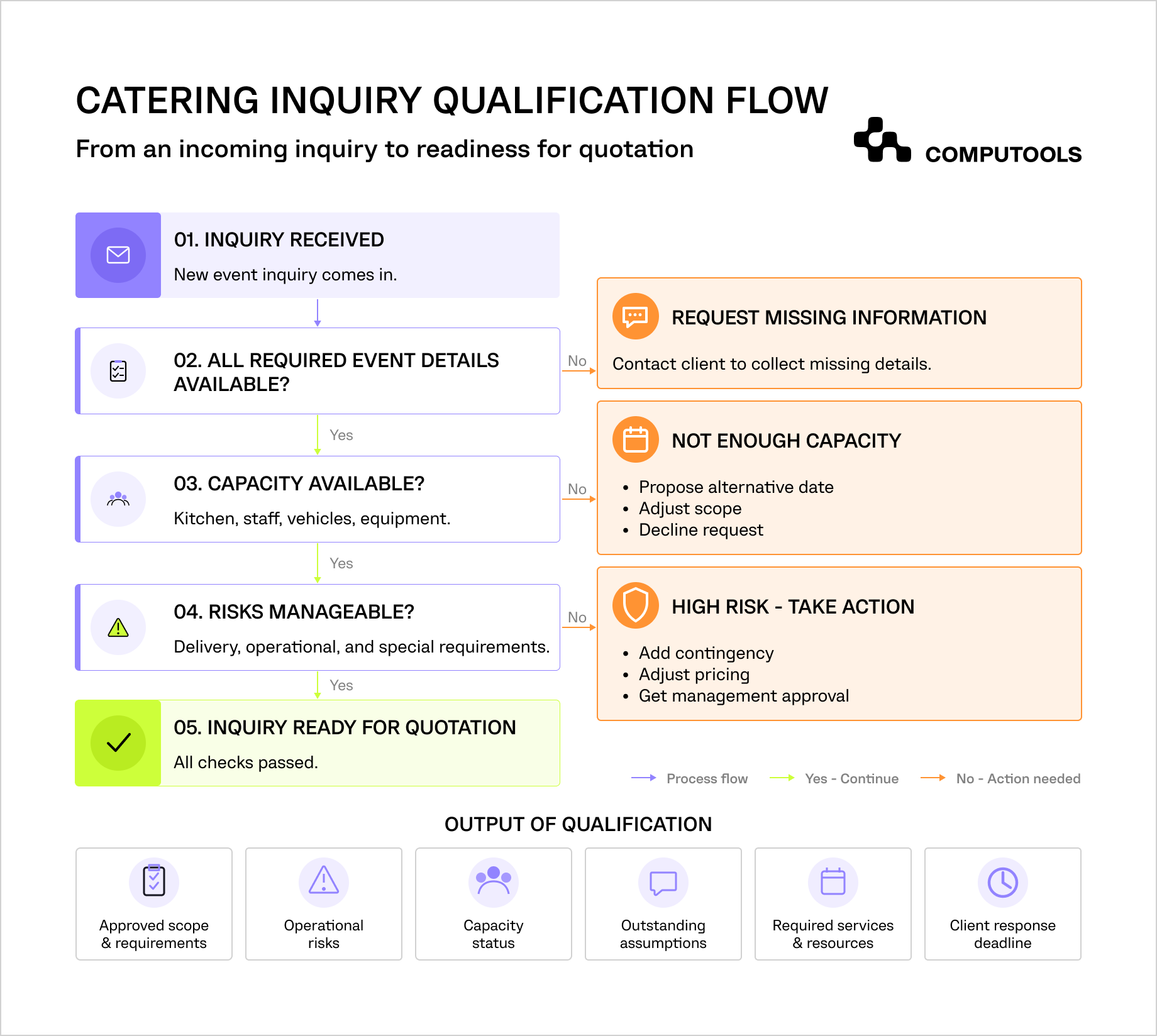
Figure 2. Catering inquiry qualification flow
From qualification to an approved quote
A qualified inquiry gives the sales team enough operational data to prepare a realistic proposal. The quote should reflect the complete delivery scope, including food, kitchen labor, service staff, transport, equipment, rentals, setup, breakdown, venue requirements, taxes, and contingency costs. Pricing based mainly on menu items can leave significant labor and logistics expenses outside the margin calculation.
| Cost area | What the quote should include |
| Food and beverages | Portions, ingredients, dietary variants, substitutions |
| Kitchen labor | Preparation, production, packing, quality checks |
| Event staff | Setup, service, supervision, breakdown |
| Logistics | Vehicles, fuel, loading, delivery, collection |
| Equipment and rentals | Furniture, linen, refrigeration, tableware, service stations |
| Venue requirements | Parking, access fees, permits, utilities, waste removal |
| Commercial terms | Deposit, taxes, payment schedule, cancellation conditions |
Table 2. Cost components included in a catering quote
Current ingredient prices, recipe costs, labor rates, supplier fees, and transport expenses should feed the estimate. Catering management software can connect these inputs with approved menu packages and event requirements, helping teams prepare quotes faster while keeping pricing assumptions visible to operations and finance.
1. Control quote versions
Catering proposals often change several times before approval. Clients may adjust guest numbers, replace menu items, extend service hours, or add rentals and venue services. Each revision should create a separate version with the date, author, updated scope, price, margin estimate, and approval status.
The quote history should preserve:
- the original client request;
- each proposed menu and service package;
- guest-count revisions;
- discounts and additional charges;
- operational assumptions;
- client comments and approvals;
- the final accepted version.
Version control prevents sales, kitchen, operations, and finance teams from working with different figures. It also provides evidence when a late client request changes the agreed price or delivery conditions.
2. Apply commercial and operational approval rules
Routine quotes can move through a standard approval path, while events with higher cost or execution risk need additional review.
Approval thresholds may depend on:
- total contract value;
- expected margin;
- discount level;
- production volume;
- staffing requirements;
- delivery distance;
- specialist equipment;
- short lead time;
- cancellation exposure;
- complex dietary or venue conditions.
Operations should review requests that may exceed kitchen, staffing, or logistics capacity. Finance should approve significant discounts, unusual payment terms, or events with limited projected margin. Defined approval rules shorten routine decisions and prevent sales from committing resources before feasibility and profitability are confirmed.
3. Convert the approved proposal into a contract
The contract should reflect the final quote and define what the company has agreed to deliver.
Core terms usually cover:
- approved menu and service format;
- estimated or guaranteed guest count;
- final-count deadline;
- event date, venue, and service hours;
- staffing and equipment included;
- deposit and payment schedule;
- cancellation and refund rules;
- change-request deadlines;
- additional charges;
- responsibilities for venue access and utilities.
The accepted quote, signed contract, and deposit status should remain connected in the same event record. This gives finance a clear basis for billing and gives operations a verified scope before resources are reserved.
4. Record changes after approval
Client requests may continue after the contract is signed. Each change should be evaluated for its effect on pricing, ingredient quantities, production time, staffing, transport, equipment, and deadlines.
The change record should include:
- the requested revision;
- date and requester;
- affected cost areas;
- operational impact;
- updated price;
- internal approval;
- client acceptance;
- teams that must be notified.
A proposal is ready to move into event scheduling when the scope, price, contract terms, deposit requirements, approval history, and remaining assumptions are recorded and accessible to every responsible team. The accepted version becomes the commercial baseline for the event catering workflow, giving operations a verified reference for resource planning, production, delivery, and billing.
Build the event schedule
An approved quote defines the delivery scope, while the event schedule connects client deadlines with purchasing, production, staffing, logistics, service, and post-event work. Teams should begin with fixed milestones such as the event date, venue access time, service start, and breakdown deadline, then work backward to set preparation and approval dates.
A complete schedule may include:
- contract approval and deposit payment;
- final menu and guest-count confirmation;
- supplier order cutoff;
- ingredient and rental delivery;
- kitchen preparation and production;
- quality control, packing, and loading;
- staff arrival and briefing;
- venue access and setup;
- service and breakdown;
- equipment return, cost reconciliation, and final invoicing.
Real-time availability rules are also central to restaurant reservations, where a booking must immediately update capacity and prevent conflicting assignments. Our guide on how to build a restaurant table reservation system explains how availability, time slots, guest flow, payments, and operational integrations can be coordinated within one platform.
1. Connect milestones with operational dependencies
Each deadline should show which activities depend on it. The kitchen cannot finalize production quantities before the guest count is confirmed, procurement needs approved recipes and stock data, and logistics needs packing volumes and production completion times.
If a client misses a deadline, the system should flag the affected purchasing, production, staffing, and billing tasks. The event manager can then assess feasibility, revise the delivery commitment, or apply an additional charge.
2. Reserve time and resources across teams
Kitchen stations, employees, vehicles, refrigeration units, serving equipment, and suppliers may be shared across several events. Catering scheduling software can display these reservations in one calendar and flag overlapping production windows, double-booked vehicles, unavailable supervisors, and late equipment returns.
Reservations should distinguish tentative, confirmed, changed, released, and completed allocations. Tentative bookings need expiration rules, while confirmed reservations should update when the date, venue, guest count, or approved scope changes.
OpsCore Hospitality applied a related model by connecting schedules, workload data, and operational priorities. Catering managers can use the same principle to identify cross-event capacity conflicts before production or delivery begins.
3. Apply cutoffs and escalation rules
Menu revisions, guest-count updates, staffing changes, equipment additions, and venue instructions should have defined cutoffs based on supplier, kitchen, rental, and transport lead times. Approved exceptions must show their cost and operational impact.
Each milestone also needs an owner, due date, and escalation path. Overdue approvals, unconfirmed supplier orders, missing venue documents, unfilled critical roles, and unavailable transport should be surfaced when they can still be resolved.
A confirmed event is ready for detailed planning when its milestones, dependencies, resource reservations, owners, and outstanding risks are visible in one schedule.
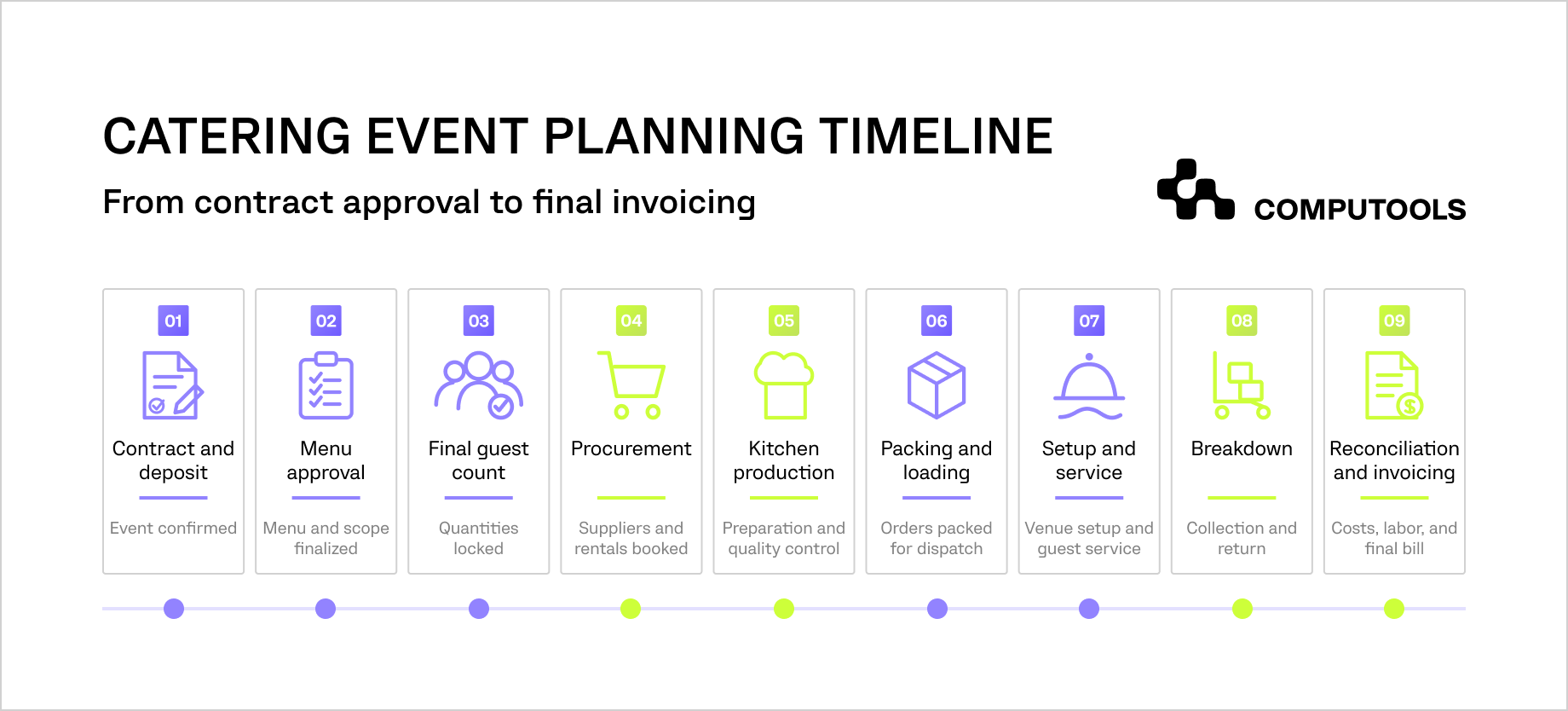
Figure 3. Catering event planning timeline
Keep customer communication and approvals under control
Client communication continues after the quote is approved. Guest counts change, menus are revised, venue instructions arrive, dietary requirements are clarified, and service times may shift. Each update can affect purchasing, production, staffing, logistics, equipment, pricing, and billing, so the event record should preserve the latest approved information and the complete decision history.
Emails, attachments, contracts, floor plans, menu versions, payment records, and client approvals should remain connected to the event. Shared access gives sales, event managers, kitchen teams, logistics coordinators, and finance the same source of information. Teams spend less time checking personal inboxes or confirming which document contains the current requirements.
1. Define approval deadlines
The event plan should specify when the client must approve information required by operations.
Common deadlines include:
- final menu selection;
- guaranteed guest count;
- dietary and allergen details;
- venue access instructions;
- floor plan and service layout;
- equipment and rental requirements;
- setup and breakdown times;
- deposit and final payment.
Each request should have an owner, due date, and visible status. Automated reminders can support routine follow-up, while overdue approvals should be escalated when they threaten procurement, production, staffing, or delivery deadlines.
2. Record every approved change
A client request should not update the operating plan until its commercial and operational impact has been reviewed.
The change record should include:
- the original requirement;
- the requested revision;
- the person who submitted it;
- the date and approval status;
- affected teams and resources;
- additional cost;
- revised deadlines;
- client acceptance.
This history protects the business when late changes require extra labor, urgent purchasing, specialist equipment, or additional transport. Finance can invoice from the approved scope, while operations can verify that every affected task has been updated.
3. Connect changes with affected teams
A single change may trigger several operational actions.
| Client change | Operational impact | Teams to notify |
| Higher guest count | More ingredients, portions, staff, equipment, and transport capacity | Kitchen, procurement, staffing, logistics, finance |
| Revised menu | New recipes, allergens, supplier needs, production tasks, and pricing | Kitchen, procurement, event management, finance |
| Later service time | Updated shifts, production windows, vehicle schedule, and venue access | Staffing, kitchen, logistics |
| New venue instructions | Changes to loading, parking, setup, equipment, or delivery timing | Event management, logistics, service team |
| Additional service | Revised labor, rentals, task plan, contract value, and invoice | Sales, operations, staffing, finance |
Table 3. How client changes affect catering operations
The system should notify only the teams affected by the revision and create the required follow-up tasks. This reduces manual coordination and gives managers a clear view of incomplete actions before the change reaches production.
4. Maintain a single approved event record
The confirmed record should contain the current scope, menu version, guest count, schedule, venue instructions, payment status, resource reservations, approved changes, and unresolved risks. This gives every delivery team the same operational baseline and reduces errors caused by outdated documents or informal client requests.
Managing orders, menus, inventory, and kitchen operations
Once an event is confirmed, the approved guest count and service scope must be converted into recipes, ingredient demand, production tasks, packing requirements, and dispatch deadlines. These activities share the same order data, so a menu revision or quantity change should update every affected record before purchasing and preparation begin.
1. Convert the approved menu into production requirements
Effective catering menu management keeps menu items connected with portions, dietary variants, allergens, prices, preparation methods, service equipment, and packaging rules. Event teams can customize approved packages without losing the operational data the kitchen and procurement teams need.
Menu planning should account for the event format, guest profile, service sequence, venue facilities, seasonal availability, and production capacity. A menu that fits the client’s budget may still require adjustment when the venue lacks refrigeration, hot holding equipment, or sufficient preparation space.
Each menu item should link to a controlled recipe that defines:
- ingredients and quantities;
- portion size and expected yield;
- preparation and cooking instructions;
- allergens and dietary classifications;
- production station;
- storage and temperature requirements;
- packaging and labeling rules;
- required utensils and service equipment.
Structured recipe management allows the system to recalculate ingredient quantities when the guest count changes. It also improves cost estimates by connecting each portion with current ingredient prices, expected yield, and production requirements.
2. Synchronize ingredients, stock, and purchasing
The confirmed menu should generate ingredient demand and compare it with available, reserved, and incoming stock. Inventory management must distinguish physical availability from quantities already allocated to other events. Without reservation controls, several teams may plan to use the same ingredients because the overall stock figure still appears sufficient.
The stock record should show:
On-hand stock
↓
Subtract quantities reserved for other events
↓
Add confirmed incoming deliveries
↓
Check expiry dates and supplier lead times
↓
Apply approved substitutions, if needed
↓
Calculate the remaining purchasing requirement
↓
Reserve stock for the event
This sequence gives procurement a reliable purchasing requirement and prevents the same stock from being allocated to several events.
The same synchronization becomes more complex across several venues, each with different menus, availability rules, preparation times, and fulfillment models. The article on how to build a multi-restaurant food marketplace platform examines the architecture and operating logic required to keep these variables controlled as the network grows.
3. Build the kitchen production plan
Kitchen production scheduling converts event requirements into timed batches and station-level tasks. The schedule should work backward from packing, loading, and service deadlines, giving each team enough time for preparation, cooking, cooling, assembly, quality control, and labeling.
Production tasks may be organized by:
- event and dispatch time;
- menu item or recipe;
- kitchen station;
- preparation batch;
- employee or team;
- completion deadline;
- storage zone;
- packaging type.
A controlled food preparation workflow gives kitchen employees the current quantities, recipe version, allergen instructions, assigned station, and completion time. Supervisors can see delayed batches, missing ingredients, production bottlenecks, and tasks that may affect dispatch.
The kitchen should also record actual yield, substitutions, waste, completed quantities, and quality-control results. These records help managers compare planned and actual ingredient use, refine future estimates, and identify menu items that regularly create excessive preparation time or waste.
4. Control orders through packing and dispatch
The order record should move through clear operational statuses from production release to delivery, as shown in Figure 4.
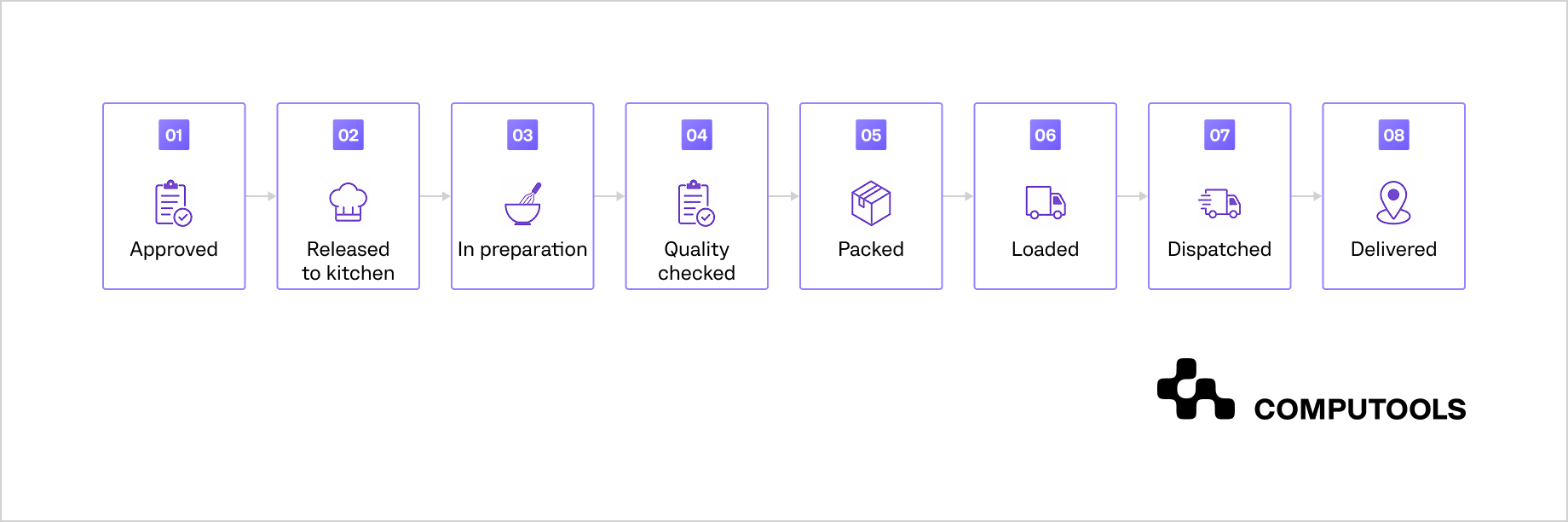
Figure 4. Catering order status flow
Reliable order fulfillment requires more than confirming that food has been prepared. Packing teams must verify portions, labels, dietary orders, serving equipment, utensils, beverages, rental items, and venue documents before loading.
A final dispatch check should confirm:
- all menu items and quantities;
- allergen and dietary labels;
- hot and cold holding requirements;
- packaging integrity;
- serving and setup equipment;
- vehicle and driver assignment;
- venue access instructions;
- delivery contact and arrival window.
Customer-facing ordering channels should follow the same menu, payment, kitchen, and fulfillment rules as internal event records. Our guide on how to develop an online food ordering system for restaurant websites explains how menu data, order processing, payments, and fulfillment updates work within one connected product.
Catering operations software can connect order statuses with kitchen dashboards, packing checklists, delivery schedules, and event records. Event managers gain current visibility into preparation and dispatch without requesting updates through calls or messages.
For example, one of our cases, the TAP App, demonstrates how digital ordering, menu availability, payments, order notes, and status tracking can operate within one product. A similar data flow in catering keeps the approved order connected with kitchen execution and gives front-of-house, production, and delivery teams access to the same current information.
Managing staff, logistics, and event execution
Once production requirements are clear, the operations team must align people, equipment, transport, and venue activity around the event schedule. These resources are often shared across several bookings, so managers need to see availability, travel time, setup windows, and operational conflicts before assignments are confirmed.
1. Plan staff around the full service window
Staffing requirements depend on guest count, service format, venue layout, menu complexity, travel, setup, and breakdown. The schedule may include chefs, kitchen assistants, servers, bartenders, drivers, captains, setup crews, and event supervisors.
Effective catering staff management connects each role with employee availability, skills, certifications, hourly rates, and location. Shift scheduling should cover preparation, travel, setup, briefing, service, breakdown, and return time, giving managers a more accurate view of labor demand and event cost.
The system should flag:
- overlapping assignments;
- unfilled critical roles;
- missing qualifications;
- overtime risk;
- insufficient travel time;
- late cancellations;
- differences between planned and actual hours.
2. Allocate equipment before conflicts appear
Events may depend on vehicles, refrigeration units, hot boxes, tables, linen, glassware, portable bars, serving stations, and rented equipment. Each item should have an availability status, location, assigned event, return time, and condition record.
| Resource | Key planning data | Common risk |
| Staff | Role, skills, availability, shift time | Double booking or overtime |
| Vehicles | Capacity, route, loading time | Overlapping deliveries |
| Equipment | Quantity, location, return deadline | Allocation to several events |
| Rentals | Supplier, delivery, collection | Late arrival or missing items |
| Venue access | Parking, loading zone, setup window | Delayed unloading or setup |
Table 4. Shared resources and common planning risks in catering operations
Reservation rules help teams prevent the same resource from being assigned to overlapping events. Returned equipment should also pass through collection, inspection, cleaning, and release before becoming available again.
3. Connect delivery planning with kitchen readiness
Delivery schedules should reflect production completion, packing time, vehicle capacity, travel duration, venue access, and service deadlines. Planning transport separately from the kitchen creates avoidable waiting, rushed loading, and late arrival.
A loading plan should show:
- food and beverage containers;
- service equipment;
- rental items;
- venue documents;
- loading order;
- destination and access point;
- responsible driver;
- dispatch and arrival times.
Real-time status updates help event managers identify whether an order is ready, loaded, dispatched, delayed, or delivered. Exceptions can then be assigned before they affect venue setup or guest service.
4. Coordinate work at the venue
Venue coordination covers access, unloading, setup, staff briefing, service transitions, breakdown, and handover. The on-site supervisor needs the current event plan, contact list, menu, allergen information, floor plan, staffing roster, equipment checklist, and escalation contacts.
The same controls support banquet operations, where kitchens, service teams, rooms, equipment, and schedules may be shared across several functions. Mobile checklists and status updates give managers visibility into setup completion, service readiness, open issues, and equipment return without relying on calls and message threads.
OpsCore Hospitality also demonstrates how mobile task updates and escalation rules can support service execution. Catering teams can apply this approach to track venue setup, assign on-site issues, and confirm that service and equipment-return tasks are completed across several locations.
5. Manage resources across multiple events
A single event may appear fully staffed and supplied while the wider schedule contains conflicts. Managers need a consolidated view of kitchen demand, employee hours, vehicle routes, equipment reservations, setup windows, and return times across all active events.
Useful exception views include:
- production peaks;
- double-booked employees;
- overlapping deliveries;
- equipment shortages;
- incomplete rental confirmations;
- late venue access details;
- events without assigned supervisors;
- tasks that may delay setup or service.
This view helps operations teams reassign resources, adjust preparation windows, arrange additional rentals, or revise delivery plans before the event day. It also gives sales clearer information about available capacity when new inquiries arrive.
6. Close the event and reconcile performance
After service, teams should record the actual guest count, ingredient use, waste, employee hours, transport expenses, rentals, damaged or missing equipment, approved additions, and operational incidents. Finance can then issue the final invoice and compare actual food, labor, logistics, and equipment costs with the approved quote.
The post-event review should identify major cost variances, recurring preparation or delivery errors, late client changes, and tasks that affected service quality or margin. These findings give managers a stronger basis for updating recipes, staffing assumptions, supplier rules, production times, pricing, and operational checklists for future events.

Launch your catering operations management platform in 1–3 months, not years, and give your team the tools to manage events, orders, menus, and staffing in one workflow while reducing manual work and operational costs.
Modern catering operations architecture
A catering platform usually connects several specialized systems while retaining the tools that already support core operations. The architecture should define where each type of data is created, which system owns it, and how updates move between sales, event planning, kitchen, logistics, and finance.
| System | Primary role | Data exchange |
| CRM | Manages leads, contacts, communication, quotes, and sales status | Client details, event requirements, approved proposal |
| Catering and event management system | Maintains the central event record, tasks, timelines, documents, and changes | Scope, guest count, menu, owners, deadlines, event status |
| Inventory and procurement layer | Tracks stock, reservations, supplier orders, and deliveries | Ingredient demand, available stock, shortages, purchase orders |
| Kitchen Display System | Routes production tasks and records kitchen progress | Recipes, quantities, batches, deadlines, completion status |
| POS and ordering channels | Processes direct orders, payments, taxes, and menu availability | Products, prices, order details, payment status |
| Delivery management | Coordinates packing, vehicles, routes, drivers, and proof of delivery | Dispatch time, loading plan, route, delivery status |
| Accounting and payroll | Records deposits, invoices, supplier costs, labor hours, and margins | Revenue, expenses, payroll data, final event cost |
Table 5. Systems and data flows in a modern catering architecture
The catering and event management system normally acts as the operational hub. It receives approved client and commercial data from the CRM, sends menu demand to inventory and kitchen systems, passes delivery requirements to logistics, and transfers actual costs and billing data to accounting.
Reliable integrations require shared event, menu item, employee, supplier, and order identifiers. Status definitions must also remain consistent across systems. For example, a kitchen order marked as packed should update the event dashboard and release the related loading task without manual re-entry.
POS and mobile ordering integrations require consistent synchronization of menus, modifiers, prices, taxes, stock availability, orders, payments, kitchen routing, and status updates. The guide on integrating restaurant POS systems with mobile ordering apps covers the main data flows, integration models, and controls needed to prevent duplicate orders and fragmented reporting.
Profitento demonstrates a similar integration model in hospitality. The delivered environment connected CRM, PMS, POS, booking, restaurant, and analytics data, giving different teams access to current operational and commercial information. Catering businesses can apply the same approach to connect event records, menu demand, stock, kitchen progress, delivery status, labor, and financial performance.
Well-structured catering software solutions give each team the tools required for its work while preserving one consistent operational record. Managers can see delayed tasks, failed integrations, resource conflicts, and cost deviations without reconciling data manually across separate platforms.
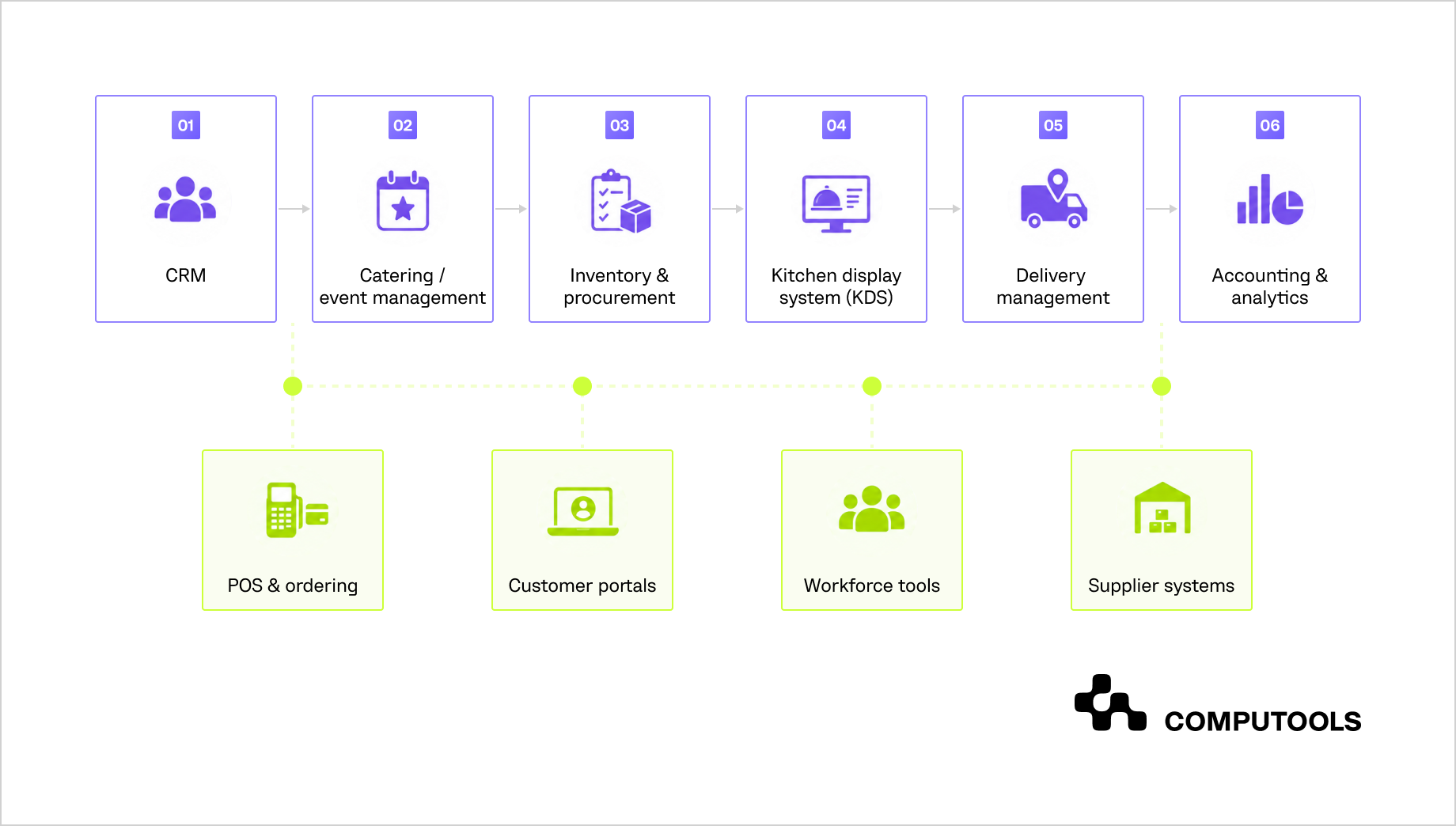
Figure 5. Modern catering operations architecture
POS, customer portals, workforce tools, and supplier systems exchange data with the relevant stages through APIs and controlled integration services.
Workflow automation and operational best practices
Automation is most useful when it connects a clear trigger with an assigned action, deadline, and escalation rule. In catering, common triggers include contract approval, guest-count changes, stock shortages, production delays, unfilled shifts, and missed delivery milestones.
Catering workflow automation reduces manual coordination by updating related tasks and records when event data changes. A revised guest count, for example, can recalculate ingredient demand, flag staffing requirements, update packing quantities, and notify finance that the commercial scope may need revision.
| Operational area | Automation trigger | Automated action | Practical value |
| Event planning | Quote approved | Create tasks, deadlines, owners, and reminders | Faster operational handoff |
| Menu and inventory | Guest count or menu changed | Recalculate quantities and identify shortages | Lower purchasing and preparation risk |
| Kitchen | Production task delayed | Alert the supervisor and update dependent tasks | Earlier response to dispatch risk |
| Staffing | Shift remains unfilled | Notify the coordinator and suggest available employees | Fewer last-minute staffing gaps |
| Logistics | Order marked as packed | Release loading and dispatch tasks | Better coordination between kitchen and delivery |
| Finance | Event completed | Collect actual labor, food, rental, and transportation costs | Faster margin reconciliation |
Table 6. Automation triggers and actions in catering operations
1. Forecast demand and resource needs
Demand forecasts can use confirmed events, weighted inquiries, guest counts, menu mix, historical consumption, and supplier lead times to estimate ingredient, kitchen, staffing, transport, and rental needs. Teams should be able to review the underlying assumptions and adjust forecasts for unusual event requirements.
AI development services can support forecasting, shortage detection, workload recommendations, and anomaly alerts using current event, inventory, labor, and production data.
2. Optimize staffing and inventory
Staffing optimization estimates labor demand from event type, guest count, service format, venue complexity, travel time, and historical hours. It then compares required roles with employee availability to flag overtime, skill gaps, and scheduling conflicts.
Inventory optimization uses confirmed demand, reserved stock, incoming deliveries, expiry dates, and supplier lead times to recommend purchase quantities and identify shortages, unusual consumption, or expiry risk. Managers still review recommendations against dietary controls, substitutions, employee qualifications, and event-specific constraints.
3. Monitor KPIs and exceptions in real time
Dashboards should focus on events and tasks that require action.
Useful operational indicators include:
- overdue client approvals;
- unconfirmed supplier orders;
- delayed kitchen batches;
- unfilled critical shifts;
- orders waiting for quality checks;
- late vehicle departures;
- unresolved venue issues;
- food and labor cost variance;
- events at risk of missing the planned margin.
Real-time operational visibility consolidates updates from kitchen, staffing, delivery, and venue teams into one dashboard, helping managers track active events without relying on calls or messages. Alerts should be ranked by impact so delivery-critical delays receive immediate escalation and lower-priority tasks remain in the standard queue.
Automation should be introduced in phases, starting with workflows that create the most manual work or operational risk. Each release needs clear ownership, measurable KPIs, exception handling, and performance review before further expansion.
Real-world hospitality workflow case studies
1. OpsCore Hospitality: centralized operational control
For OpsCore Hospitality, Computools mapped workflows across front desk, housekeeping, maintenance, guest services, and workforce planning. The client had relied on calls, messages, spreadsheets, and manual status updates, which limited visibility into workload, delayed task handoffs, and increased labor and operating costs.
The delivered platform connected request routing, task ownership, staff schedules, room readiness, maintenance coordination, escalation rules, and operational dashboards. Computools used role-based web development to give managers and department teams access to current tasks, workloads, and operational exceptions from one environment.
Within three months of adoption, the client reported a 20% reduction in OPEX, 20% lower labor costs, 70% faster guest request processing, 30% higher housekeeping efficiency, and 20% lower maintenance costs.
2. Profitento: connected data across hospitality systems
Profitento addressed a different coordination problem: operational and commercial data was distributed across the PMS, channel manager, booking engine, CRM, POS, OTA platforms, spa systems, restaurant systems, and spreadsheets. Computools integrated these sources into one revenue and decision-support environment for a 420-room U.S. resort.
Role-based workspaces gave revenue, reservations, marketing, front office, restaurant, spa, finance, and management teams access to current pricing, demand, guest, channel, package, and service data. Within six months, the resort reported an 11.4% increase in RevPAR, 7.8% higher ADR, 24% growth in direct bookings, 18% lower OTA dependency, and a 32% improvement in forecast accuracy.
For catering operators, this integration pattern can connect CRM records, approved event plans, menus, stock, kitchen progress, staffing, delivery status, payments, and actual costs. Teams retain specialized systems while managers gain one consistent view of operational and financial performance.
3. TAP App: digital orders connected with restaurant execution
For TAP App, Computools delivered mobile app development services for a cross-platform product that aggregated restaurant menus, table availability, operating hours, on-site and off-site orders, payments, tips, order notes, and status tracking.
The product had to support restaurants and cafés with different menu structures and operational requirements while meeting a tight launch schedule. The client reported 7% top-line growth through cross-selling and an 85% reduction in unfulfilled or modified orders through better ingredient management.
The same principles support catering platforms: approved menu data can move directly into preparation, packing, delivery, and customer updates, reducing manual re-entry and keeping front-of-house, kitchen, and logistics teams aligned with the current order status.
The product also shows how a shared mobile codebase can support venue discovery, menu access, payments, order notes, and status tracking across iOS and Android. The article on how cross-platform mobile apps transform restaurant ordering examines how mobile ordering products connect customer interactions with restaurant operations and further product growth.
How Computools supports catering operations
Computools provides software development services for HoReCa to companies that need to connect event planning, orders, kitchen work, staffing, logistics, payments, and analytics within one operational model.
Its travel and hospitality software development services cover workflow analysis, product strategy, UX, integrations, engineering, AI-supported automation, analytics, launch, and further scaling. Delivery can begin with one high-risk process, such as production planning or staff coordination, and expand after the team validates the workflow and KPIs.
Computools also brings experience in heritage tourism software development, which is relevant to venue-based guest journeys and location-specific service workflows. Its expertise in land-based casino software development supports projects that require coordinated on-site operations, staff workflows, and real-time service visibility.
For companies that need to validate the product before a wider rollout, MVP development services provide a phased route from workflow mapping and prototype validation to a production release. Clear checkpoints, operational KPIs, and pilot feedback reduce execution risk and give the business a measurable roadmap to ROI.
To discuss a catering platform, workflow modernization, or system integration project, contact Computools at info@computools.com.
Conclusion
A scalable catering operation depends on one current event record and controlled handoffs across sales, kitchen, staffing, logistics, and finance. Connected systems reduce data re-entry, expose resource conflicts earlier, and link event execution with actual cost and margin. A phased rollout allows teams to validate the highest-risk workflow against clear KPIs before extending automation across the wider operating model.
Computools
Software Solutions
Computools is an IT consulting and software development company that delivers innovative solutions to help businesses unlock tomorrow.