
THE AUTHOR:

If you plan to develop an event ticketing system, you need to factor in traffic spikes, accurate seat availability, and fast processing of guest activity from seat selection to payment.
Even if ticket demand is in the thousands, a developed app should be able to process all transactions in real time. In this guide, we will cover the key features, core architecture, and practical steps needed to build a custom event ticketing software that performs under any conditions.
Trends affecting event management and ticketing software in 2026 and beyond
The global online ticketing market is valued at $68.4 billion in 2026 and is projected to reach $109.4 billion at the beginning of the 2030s, and keep growing. An impressive number of tickets are issued every year. For instance, in 2024, 1.3 billion tickets were sold for sporting events, and roughly 600 million for concerts. This indicates the concentrated demand within the market. Yet, the demand isn’t steady and is characterized by sudden peaks. Massive spikes are seen during major sports and concert events. Compared to other sectors, ticketing platforms need more emphasis on real-time accuracy, as sales can jump within minutes.
Industry reports also show growing numbers of mobile ticketing, varying from 58% to 68% of total sales, depending on the source. This directly changes system requirements. Users expect to discover events, select seats, and complete checkout in seconds, often on unstable networks and under time pressure.
Events tickets market outlook 2025-2026
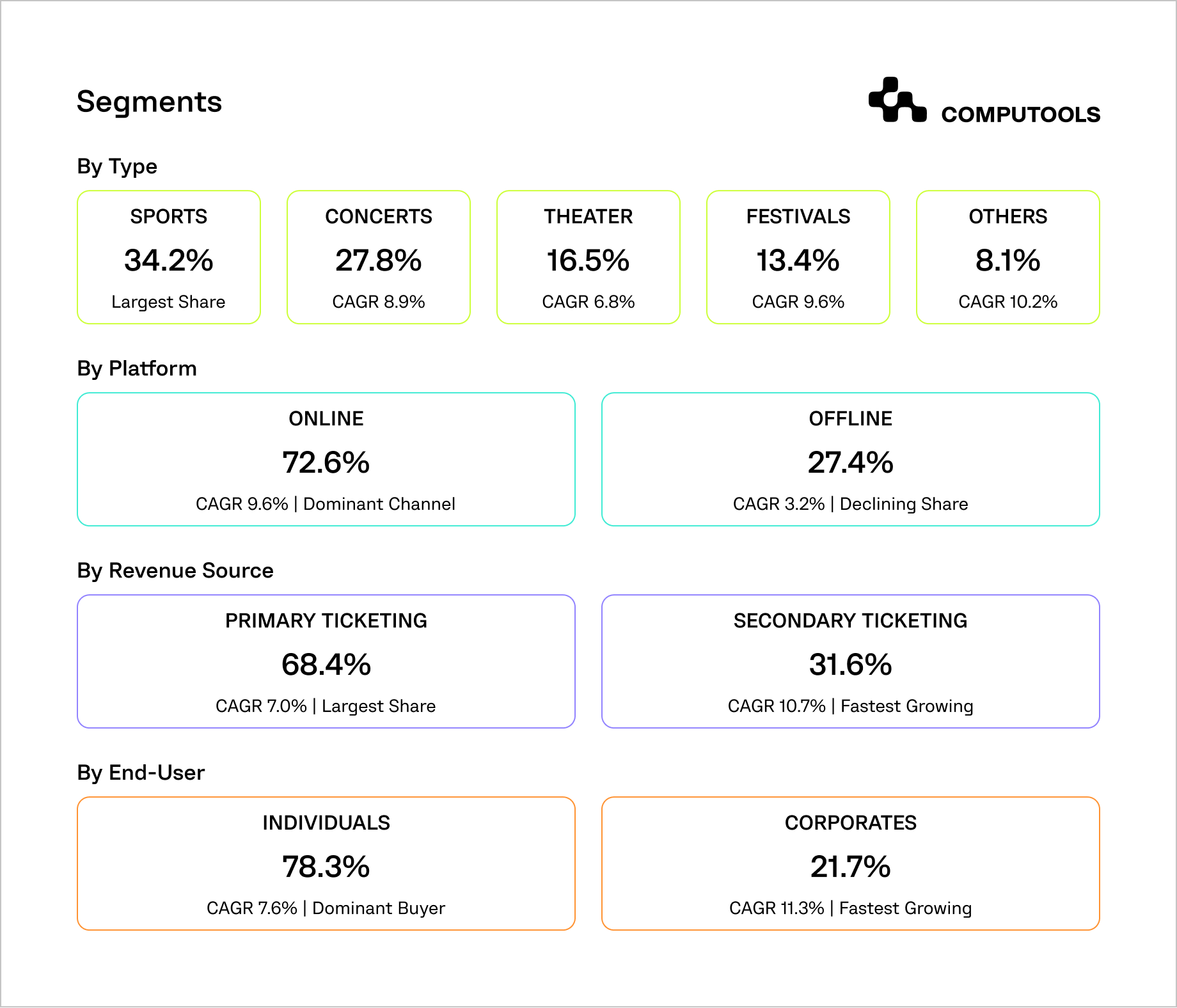
Pricing is becoming more demand- and data-driven. Premium and VIP ticket purchases represent the fastest-growing revenue segment, responsible for ~$550 million, with approximately 4.5% CAGR. Around 66% of ticket purchase revenue is attributed to standard ticket sales. This shows a clear shift: an event ticketing solution should offer tools to optimize revenue through pricing strategies, bundles, and segmentation.
Finally, fraud and resale pressure affect ticket sales platform development. About 24% of users consider fraud a barrier to buying tickets on the Internet, resulting in the need to invest in anti-bot and additional ticket verification systems. At the same time, the secondary ticketing market, with tens of millions of transactions every year, demonstrates how quickly tickets can move after a primary ticket release.
Taken together, these numbers point to one conclusion. Modern ticketing systems should be high-load, mobile-first, data-driven, and handle real-time demand, pricing, and access control at scale. The next step is understanding which features are required to support this level of complexity.
Core features of a digital ticketing system for events
Currently, a modern ticketing solution should support the buyer experience, the organizer’s control panel, and real-time operations at the venue.
1. Customer-Facing Features
This is the area that determines revenue potential. Growth in revenue requires a fast, predictable, responsive sales flow.
With that in mind, here’s a MUST-HAVE feature list:
- Event search and discovery tools with filters for date, location, and category, and with personalized recommendations.
- Interactive seat maps that show real-time availability status.
- Quick and simple checkout in one or two steps.
- Instantly delivered digital tickets, in the form of QR or NFC codes.
- Order management via refunds, ticket transfers, and rebooking.
2. Organizer and Admin Features
Whether for an event or other purposes, full control of the key business drivers for performance (inventory, pricing, and revenue) should not be in the hands of the engineering team.
The following functionalities are critical:
- Inventory and event management, featuring venues, zones, ticket types, and quotas.
- Flexible pricing controls, including dynamic pricing, discounts, and presales.
- Analytics around transactions and performance, real-time demand, and conversion tracking.
- Use of Customer Relationship Management (CRM) for audience segmentation and remarketing.
- Tools for campaign controlling, promotional codes, early access, and partner allocations.
3. Operations and Venue Layer
This layer is often overlooked, but it directly affects the event experience and operational efficiency.
A production-ready online ticket booking system should include:
- Access control tools, such as QR scanning with instant validation.
- Real-time attendance tracking, so that organizers can monitor entry flow.
- Fraud detection mechanisms, including duplicate ticket detection and anomaly flags.
- Queue and traffic control, especially for large-scale ticket releases.
Solving a real ticketing system problem
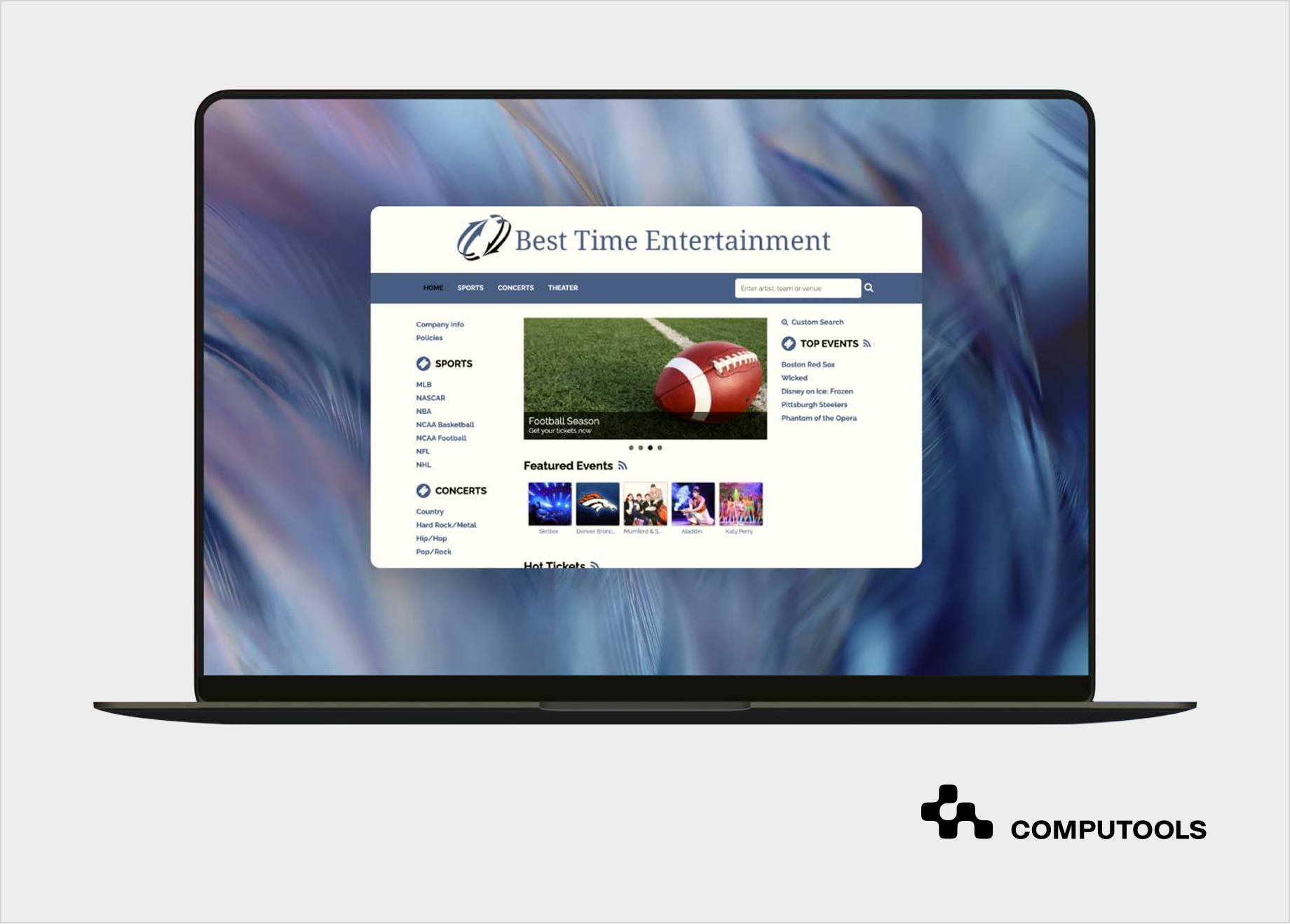
The Multitrading platform developed by Computools is an example of an event ticketing solution designed to meet real industry demand.
The client’s existing platform was insufficient due to poor interface flow and an inability to handle the required number of visitors. Customers experienced multiple system timeouts, failed transactions, poor navigation and overall experience during peak moments. The main goal was to improve the app’s flow and usability to accommodate a growing user base.
1. High-Load Performance and Concurrency
During special events, the platform had to process millions of simultaneous requests. Computools addressed this issue by building a multi-threaded web application using C# and the Task Parallel Library (TPL). This accomplished the ability to process booking queries in parallel, better CPU use under load, and reduced response times in heavy traffic.
The system did not queue requests. Rather, they were handled concurrently, resulting in a drastic decrease in wait times for users.
2. Scalable Data Handling and Availability
Dealing with traffic is only a part of the larger picture. The platform also had to access and store booking data without the system lagging.
Our team implemented a combination of:
- MongoDB serves as a distributed database to ensure horizontal scalability.
- Better data organization to facilitate quick writing/ reading.
- Real-time handling for booking and availability.
These changes allowed users to continue browsing and using the system even when demand and usage increased.
3. Reducing Latency in the Booking Flow
The platform had system delays with slow page loads and processing of booking requests. Computools optimized the entire flow – streamlined reservation logic with custom algorithms, reduced unnecessary processing steps, and improved request handling between services.
As a result, the waiting time to view and book tickets dropped significantly, which directly improved conversion rates and user satisfaction.
4. Continuous Background Processing
For uninterrupted operation, the system used Windows Services to perform background tasks. With this method, core processes continued to function reliably, regardless of front-end traffic.
5. Data Collection and API Integration
Computools designed the platform for business decision-making in addition to transactions. We integrated data collection and storage pipelines, API connections for external services, and web scraping to enrich data around events. These developments allowed the client to understand demand, predict user behavior, and improve service offerings.
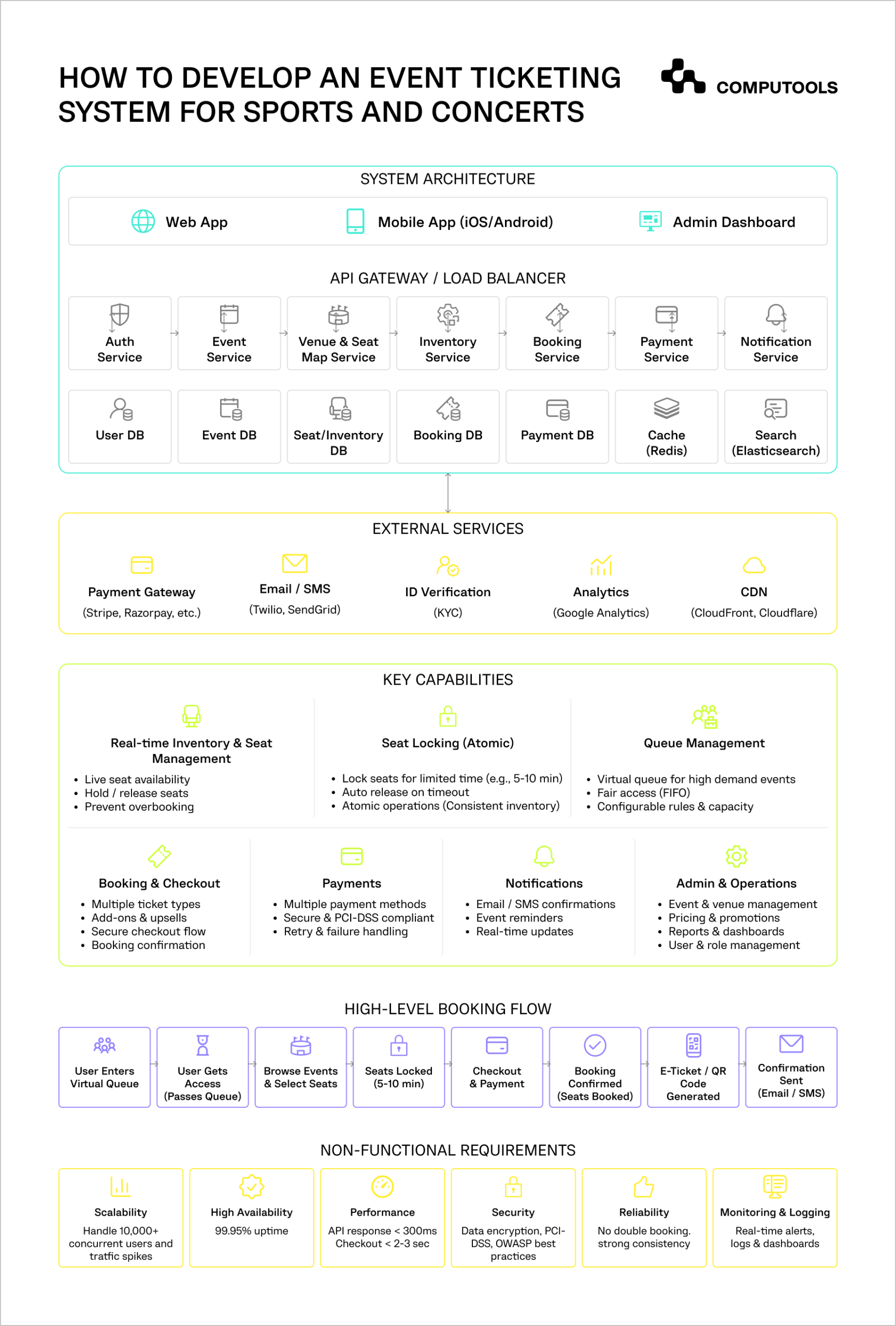
Step-by-step guide to develop an event ticketing system
The first question about event ticketing system development is: “What could potentially go wrong when demand is the highest?” This will influence everything from the data model to the way the platform handles checkout recovery.
Step 1: Develop the Data Model
The first thing ticketing applications try to solve is an inventory problem. Before designing seat maps or event pages, determine how tickets will reside in the system.
Dev teams must define:
- Venues, sections, rows, seats, and standing zones.
- Ticket types: standard, VIP, presale, partner, and accessible seating.
- Allocation rules: how many tickets each sales channel can access.
- Seat states: available, locked, paid, cancelled, refunded, and transferred.
The system’s inventory must contain a single source of truth. If each interface (web, mobile, admin) stores availability differently, preventing double booking becomes nearly impossible.
Step 2: Use Temporal Locks
The platform cannot reserve ticket inventory indefinitely. Yet, it is equally unacceptable for a user to lose a seat because they take a long time to fill in payment details. This is the reason why ticket services implement temporary inventory locks. When a seat is selected, the system locks it for a limited time (typically 5-10 min). At the end of this period, if the payment is not successful, the seat returns to the inventory and is again available for sale.
Temporal locks should include a selected seat or ticket type, user/session ID, expiration time, payment attempt status, and release rules after timeout or failure. This logic should be handled in an atomic way. Two users should not be able to lock an inventory item simultaneously.
Step 3: Separate Browsing Traffic from Booking Traffic
During a large concert drop, users primarily browse, refresh, filter, and view a seat map or two. Not everyone reaches the payment and checkout pages. If all activities are treated the same by the system, it results in its overload. That’s why a stronger architecture separates read-heavy traffic (event pages, seat maps, schedules, prices) from write-heavy traffic (seat locks, checkout, payment confirmation).
Static and semi-static content should be sent to a CDN and cache layer before it gets to the system. Booking actions should bypass the CDN and cache and directly access the system based on a strict consistency model. This significantly lowers the impact on the database when a great, concentrated demand occurs.
In Multitrading, Computools implemented a multi-threaded web architecture using C# and the Task Parallel Library (TPL). This allowed booking requests to be processed concurrently rather than queued, reducing wait times and preventing system overload during peak ticket drops.
Step 4: Design the Queue
While a virtual queue is just a waiting screen, it is a good thing to have to help protect the booking engine from traffic it cannot safely process.
A well-thought-out queue should:
- Gradually admit users.
- Stabilize queue positions.
- Limit refreshed page access.
- Block duplicate sessions where needed.
- Prioritize presale or verified users when required.
Without this measure, sudden demand loads the most sensitive parts of the system, which are the inventory and payment processing.
Step 5: Make Payment Failures Recoverable
Payments are one of the most delicate steps in the flow because they depend on third-party services. The user may close the page, banks may decide to cancel the payment, or providers may experience a latency.
Therefore, an event booking platform should handle the following situations:
- Pending payments
- Failed payments
- Duplicated payment callbacks
- Delayed confirmation from payment gateways
- Automatic release of seats after failed payments.
Use idempotency keys so repeated payment requests do not create duplicate charges or bookings.
Step 6: Integrate Real-Time Changes
Users want to see the live seat availability change. However, constant polling can overload the system. The best way to get around this issue is to limit real-time status to the following: seat locked, seat released, seat sold, payment confirmed, and change in queue position.
WebSockets or event streaming can also assist here, but not every update needs to be instant. For example, the seat map can be updated in small increments of time, rather than having the layout completely refreshed every few seconds.
For real-time seat availability, Multitrading used MongoDB as a distributed database and optimized data reads/writes to maintain consistency under heavy load. The system could handle millions of simultaneous requests while keeping availability accurate across all channels
Step 7: Design Integrations from the Start
A ticket management system depends on multiple external services. If integrations are unstable, the whole platform suffers during peak demand.
You need to plan integrations for:
- Payments should allow for multiple providers for reliability and support refunds, chargebacks, and different currencies.
- Notifications should include email and SMS for confirmations and updates, as well as real-time alerts (ticket delivery, queue status).
- CRM and analytics should support user segmentation, campaign triggers, and tracking of user behavior across channels.
- Venue and external systems, such as QR scanning and access control at entry, partner platforms, and resale channels.
For instance, Multitrading included seamless integration with payment gateways, email/SMS notifications, and external event platforms. We isolated each integration so that a failure in one service couldn’t block booking or payment flows. This approach ensured uninterrupted operations even during traffic spikes.
Step 8: Create Admin Controls for Live Operations
Organizers should be able to respond to sales as they happen. The admin side should enable users to suspend sales for a particular event, manage the distribution of tickets, alter pricing policies, see checkout failure rates, estimate queue size and sale conversion rates, and monitor flagged activity in the system.
Live ticket sales are real-time, operational events, and teams need complete control in these situations to respond to unexpected demand.
Step 9: Protect Booking, Payments, and User Data
In ticketing, system safety directly affects revenue. Suppose bots lock the inventory, real users and sales will be gone. For that reason, it’s critical to secure three key areas.
- Booking and inventory access. Apply rate limiting on seat selection and checkout, session control, and behavioral checks to detect non-human activity.
- Payment flow. Use PCI DSS-compliant processing, idempotency keys to prevent duplicate charges, validation of payment callbacks, and automatic seat release on failed or abandoned payments.
- User data and system access. Protect sensitive data and admin actions with encryption in transit and at rest, role-based access control, and audit logs for bookings, refunds, and changes.
Step 10: Test the System Like a Real Ticket Drop
Don’t rely on basic QA. Test scenarios must include hundreds, thousands, or millions of guests joining, multiple users picking the same seats, delays in the payment gateway, expired seat locks, users refreshing the page in a bot-like manner, an email or social traffic sudden surge, and the database system going offline during payment.
It’s not enough for the app to remain online. Teams need to assess whether inventory is kept accurate, payments are reconciled, and users are awarded tickets post-purchase.

Launch your real-time event ticketing platform in 1–3 months instead of years. Eliminate ticket fraud, overselling, and checkout bottlenecks, and scale seamlessly to 50,000+ users during peak-demand sales.
Here’s why businesses choose Сomputools to develop an event ticketing system
Ticketing software for sports events and concerts reveals its breaking points at peak demand, simultaneous bookings, and real-time adjustments. Computools builds systems that stay fast and reliable under pressure, drawing on expertise in travel and hospitality software development services and a track record of high-load projects across major domains.
1. Manage High Load Without Lag
In projects like Multitrading, we designed systems to support huge volumes of concurrent requests through multi-threading and complex backend optimization.
With Computools, clients get:
- Stable performance for high-volume traffic.
- Rapid seat selection and checkout.
- Minimal failed transactions.
2. Optimize Flow Efficiency
For booking systems, such as Tap App, Computools eliminates unnecessary steps in selection, checkout, and payment, along with latency. This results in smoother checkout and higher transaction completion rates.
3. Keep Inventory Accurate in Real Time
In systems where availability changes constantly, Computools ensures real-time synchronization across all services. With us, clients avoid double bookings, inconsistent seat availability, and failed reservations during peak demand, as demonstrated in this guide on building high-load ticket booking platforms for events.
4. Build to Scale from Day One
Due to distributed databases (e.g., MongoDB) and scalable ticketing system architecture, the platforms are ready to grow without rework.
5. Turn Data Into Measurable Business Growth
Computools integrates analytics and data collection into the core system, even for projects as complex as SMARTCITY. Clients benefit from a better understanding of user behavior, improved control over pricing and discounting, and increased engagement and spending
6. Keep Interfaces Fast & Frictionless
Most ticket transactions happen on mobile. Therefore, performance on small screens directly affects sales. Computools maximizes revenue by creating mobile flows that are user-friendly, flexible, and easy to use. Our mobile app development services and web development services are for clients who want to provide a consistent user experience across desktop and mobile, and maintain responsiveness even on unreliable networks.
7. Use the Power of AI
We make sure that concert and sports event ticketing software contributes to revenue and business growth strategies. With AI development services, Computools empowers clients to forecast demand and control ticket sell-out, create dynamic price adaptation, and provide smarter recommendations for users.
8. Backed By Engineering Scale and Proven Delivery
- 250+ engineers
- 400+ delivered projects
- ISO 9001 and ISO 27001 certified
This allows Computools to handle complex, high-load platforms with structured processes and strong quality control.
9. Extended Capabilities
With time, ticketing solutions often become components of a wider digital ecosystem, and Computools aids in that growth with experience in heritage tourism software development and software development services for HoReCa. These offerings make it possible for the platform to connect with other services, reduce the complexity of operations across different venues, and create a more diverse experience for your users.
Computools goes beyond ticketing app development for concerts and sports. We assist clients in engineering scalable, multi-dimensional platforms that accommodate event management, hospitality activities, and tour services within one digital space.
Learn how Computools supports complex workflows in restaurant table reservation systems and multi-property hotel booking platforms.
Final Thoughts
There is little margin for error when selling tickets. Delays during purchasing, out-of-date availability, or payment issues turn strong demand into lost revenue within minutes.
To mitigate these issues in event and concert ticketing platform development, an effective foundation is essential. A unified inventory system aids in consistent availability across all booking channels. Include atomic seat locking to block double sales. During busy periods, the system should utilize virtual queuing to manage user flow. When customer demand spikes, take advantage of the virtual queue.
Plan for short, predictable checkouts with ultra-fast payment processing. Engineer the system with horizontal scaling in mind. This is a design strategy that can help achieve consistent peak usage to meet modern demand needs.
Computools works with high-load, real-time platforms where every second and every transaction counts. If you’re building or rethinking a ticketing platform, you can discuss your project with our team at info@computools.com.
For a broader, more strategic view of today’s software vendor landscape, explore our curated overview of the top 25 travel & hospitality software development companies.
Computools
Software Solutions
Computools is an IT consulting and software development company that delivers innovative solutions to help businesses unlock tomorrow.