
THE AUTHOR:

According to the National Restaurant Association, nearly three out of four restaurant orders are now placed for off-premises consumption. For restaurants planning to develop an online food ordering system for their websites, direct digital ordering has become an essential operational channel. Customers expect to access available menu items, customize meals, select delivery or pickup, complete payment, and receive accurate order updates within the restaurant’s own website.
Customer expectations make the restaurant website especially important: 84% of consumers who ordered restaurant delivery in the previous six months would use a restaurant’s website to place an order if that option were available. The report also found that 79% would use contactless or mobile payment options, while 73% would pay using a digital wallet. A restaurant website ordering system, therefore, needs to connect a convenient customer-facing checkout with accurate menu availability, fulfillment rules, payments, and order processing.
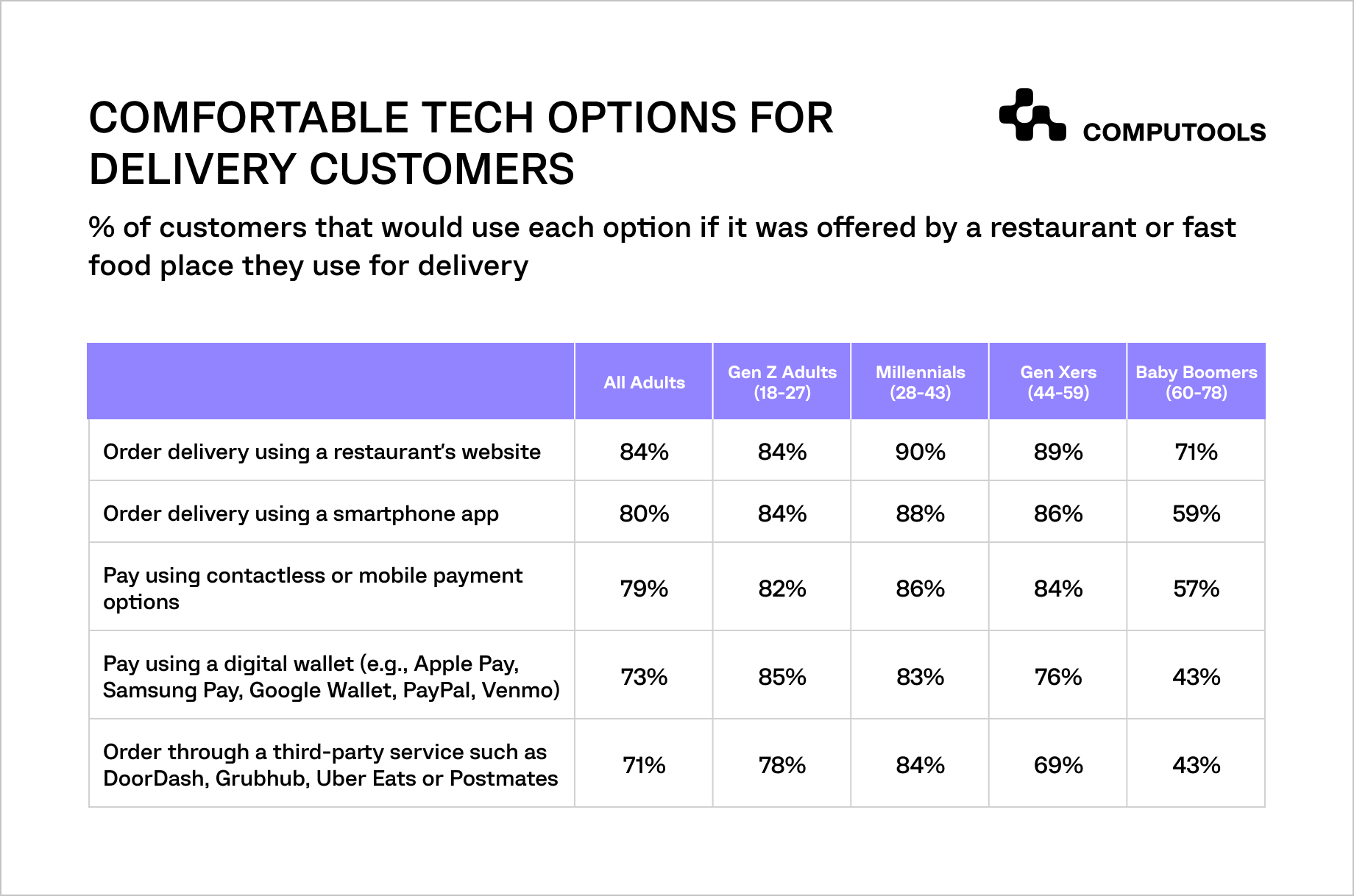
Delivery customers show strong demand for restaurant-owned digital ordering and payment options.
For restaurant businesses, a website-based ordering channel also affects day-to-day operations. Incorrect availability, disconnected payment handling, unclear pickup times, or delayed order routing can lead to modified orders, lost sales, and poor customer experience.
How Computools helped Tap App develop an online food ordering system
Tap App needed a scalable product to simplify food and drink ordering for customers while supporting diverse operational requirements across restaurants and cafés in the UK. The platform had to accommodate varied menu structures, opening hours, table availability, on-site and off-site ordering scenarios, secure payments, and a tight launch schedule.
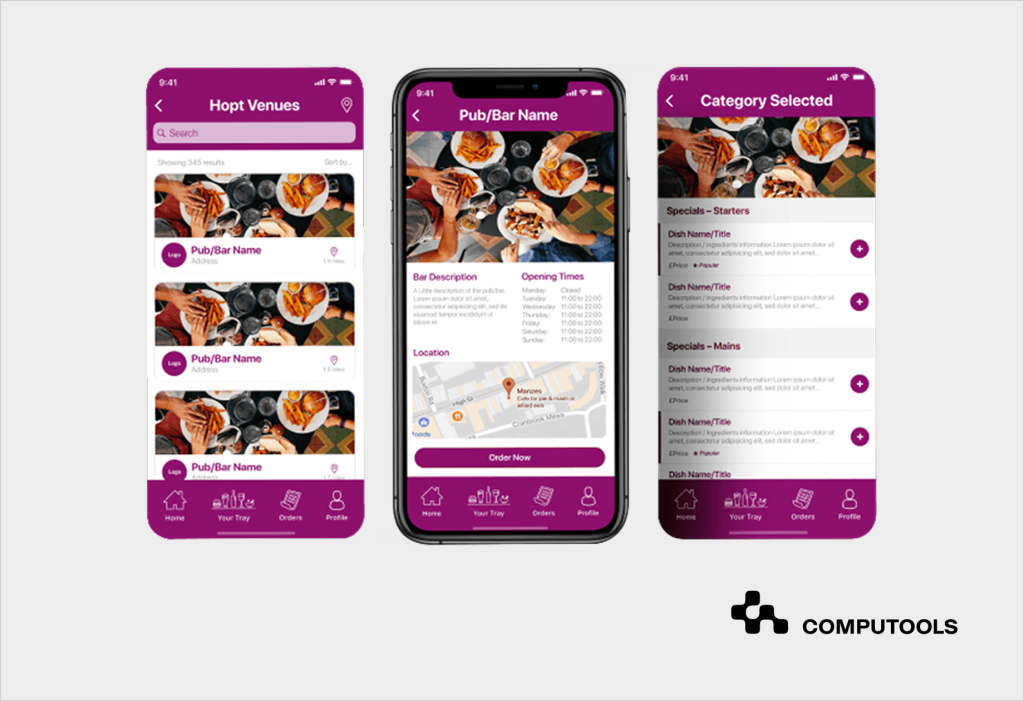
As part of our software development services for HoReCa, we analyzed restaurant workflows, defined the application architecture, selected the technology stack, and coordinated development from requirements analysis to launch and further support. Our team designed the solution as a flexible restaurant online ordering system that could connect multiple venues within a single customer-facing product without forcing restaurants into a single service model.
We built a cross-platform application that allows users to browse restaurant menus, check relevant venue information, place on-site or off-site orders, add notes, track order status, make payments, and include tips. For restaurants, the product provides real-time visibility into business performance and supports more structured order processing across different menu and service configurations.
Through our mobile app development services, we delivered a cross-platform application for iOS and Android, integrated payment gateways, developed an intuitive ordering interface, and tested the product for stability and performance before launch. The architecture was designed to support the addition of new restaurants and cafés as the platform expanded.
The implemented solution contributed to a 7% increase in top-line growth through cross-selling opportunities and reduced unfulfilled or modified orders by 85% through better ingredient management. The Tap App case demonstrates how integrating ordering logic, payments, operational data, and a convenient customer interface can improve both restaurant revenue opportunities and order-fulfillment accuracy.
How to build an online food ordering system for restaurant websites: 9 steps
A restaurant website ordering channel needs to connect the customer journey with menu availability, fulfillment rules, payments, restaurant operations, and performance tracking. The following steps explain how to structure this functionality for direct web ordering and scale it as the business grows.
Step 1. Define ordering channels, fulfillment rules, and restaurant roles
The first development decision concerns how customers place orders and how the restaurant fulfills them. A digital ordering system for restaurants may support delivery, pickup, scheduled pre-orders, curbside collection, dine-in ordering, or QR-based ordering from a table. Each scenario changes the required workflows, screens, notifications, integrations, and staff responsibilities.
The product team should document:
- restaurant locations, brands, and service areas included in the rollout;
- available ordering modes for each location;
- opening hours, preparation windows, order cut-off times, and peak-hour limitations;
- delivery zones, minimum order values, fees, and estimated delivery times;
- pickup slots and rules for scheduled orders;
- dine-in logic, including table numbers and QR-based ordering where applicable;
- roles for managers, kitchen staff, front-of-house teams, couriers, and administrators;
- order statuses, cancellation rules, refund scenarios, and customer notification requirements.
This stage prevents development from being based on an idealized checkout scenario that does not match restaurant operations. For example, delivery may require address validation and courier assignment, while dine-in ordering requires table identification and direct routing to the relevant service team.
In the Tap App project, we analyzed the requirements of various restaurants and cafés rather than designing around a single fixed venue model. The application supported on-site and off-site orders, restaurant opening and closing times, table availability, and different menu structures. This gave the platform the flexibility required to serve a growing set of hospitality businesses.
Restaurants that also plan to introduce table-side ordering can review our guide to building a digital restaurant menu app with QR ordering.
Step 2. Audit the existing website and design the ordering entry points
A restaurant website needs to move customers from discovery to checkout without unnecessary redirects or broken experiences. Before building ordering functionality, the team should review the existing website structure, CMS, mobile usability, page performance, authentication options, analytics setup, and available APIs.
A restaurant eCommerce ordering solution may be implemented as a fully custom web module, a separate ordering frontend connected to the restaurant domain, or an embedded ordering component backed by an external platform. The appropriate approach depends on the business scale, integration needs, brand requirements, existing infrastructure, and the level of operational control the restaurant requires.
The audit should cover:
- where the “Order Online” call to action appears across the website;
- whether customers can reach menus and checkout easily from mobile devices;
- whether the website supports location-specific menus and service availability;
- whether guest checkout is available or account creation is required;
- which content, analytics, CRM, payment, and POS systems already exist;
- how tracking will capture menu views, cart additions, checkout starts, completed orders, and abandoned orders;
- whether the restaurant needs multilingual ordering, accessibility support, or several regional domains.
Tap App was built as a cross-platform application, so the website audit was not the core delivery task in that project.
However, the same customer journey requirements apply: users need immediate access to available venues, menus, order options, payment methods, and order tracking, without operational inconsistencies between what they see and what the restaurant can deliver.
Step 3. Create a structured menu and availability model
Restaurant ordering begins with accurate menu data. Static PDF menus or visual menu pages are insufficient when customers need to customize items, view available options, place orders, and receive accurate totals. Custom food ordering software should store menu information as structured data that can be updated by location, time period, availability, order mode, and promotion.
The menu model should include:
- categories, items, descriptions, photos, prices, and tax rules;
- portion sizes, variants, and required or optional modifiers;
- extras, substitutions, preparation notes, and allergen information;
- item availability, sold-out status, and scheduled menu periods;
- location-specific pricing and product availability;
- breakfast, lunch, dinner, seasonal, or limited-time menus;
- cross-selling options, such as drinks, sides, desserts, or meal upgrades;
- rules preventing unavailable combinations or incomplete orders.
Availability management matters operationally because a customer should not pay for an item the restaurant cannot prepare. If menu updates remain disconnected from actual ingredient availability or venue operating hours, the restaurant will face substitutions, cancellations, refunds, and unnecessary staff communication.
For Tap App, we built a product that aggregated restaurant menus, opening and closing times, table availability, and other ordering information across participating venues. Improved ingredient management contributed to an 85% reduction in unfulfilled or modified orders, underscoring that availability logic needs to be part of the product foundation rather than handled manually after an order arrives.
Step 4. Build a fast checkout and secure payment flow
Customers ordering food expect the transaction to be completed quickly, especially on mobile devices. The checkout flow should retain selected items and modifiers, calculate charges correctly, validate fulfillment availability, offer appropriate payment methods, and confirm the order immediately after successful payment.
An online takeaway ordering system should support:
- guest checkout and optional customer accounts;
- saved delivery or pickup details for returning customers;
- delivery address validation and service-zone checks;
- pickup date and time selection;
- promotion codes, loyalty rewards, tips, taxes, and service charges;
- credit or debit card payments and digital wallets where required;
- payment failure handling and safe retry scenarios;
- confirmation messages with order number, fulfillment type, expected timing, and order status access.
The payment gateway should process sensitive payment details securely, while the ordering system stores the transaction state, order reference, payment result, refund information, and reconciliation data required for restaurant operations and reporting.
In Tap App, customers could place orders, add notes, make payments, include tips, and track order status within one ordering flow. We also integrated payment gateways to enable secure, convenient transactions. For a restaurant website, these capabilities need to be presented within a checkout journey that works smoothly from search, landing pages, local promotions, or direct repeat visits.
Step 5. Design delivery, pickup, and dine-in order workflows
Order fulfillment determines whether a digital order results in a completed sale or a service issue. A food delivery ordering system needs to manage more than just the customer’s checkout request: it must define what happens from order acceptance through preparation, dispatch, completion, cancellation, and refund.
The workflow should include:
- order submission and payment confirmation;
- restaurant acceptance, rejection, or automatic acceptance rules;
- preparation status and estimated ready time;
- pickup notifications and collection confirmation;
- courier assignment, dispatch, tracking, and delivery confirmation, where delivery is provided;
- dine-in routing by table number or service zone;
- modification, cancellation, refund, and failed-fulfillment scenarios;
- customer notifications at the operational statuses that matter.
Restaurants offering several order modes should keep the underlying status structure consistent while adapting the details to each fulfillment scenario. For example, a delivery order may require a courier status and a delivery address, while a pickup order may require a ready-for-collection notification and a collection time slot.
Tap App supported both on-site and off-site orders, along with table availability, order notes, digital payments, tips, and status tracking. These requirements illustrate why restaurants need a clearly defined order lifecycle before implementing interfaces or automation.
Step 6. Connect ordering with payments, POS, kitchen, inventory, and notifications
Online ordering becomes difficult to manage when staff must manually transfer order information among a website, a payment dashboard, a POS terminal, a kitchen printer, and a delivery tool. A reliable restaurant ordering system integration strategy should define how data moves between customer-facing ordering functionality and the operational systems used by restaurant teams.
Typical integrations may include:
- payment gateways for transaction processing, refunds, and reconciliation;
- POS systems for order registration, pricing, taxes, and sales reporting;
- kitchen display systems or kitchen printers for preparation workflows;
- inventory or ingredient management tools for availability updates;
- CRM and loyalty platforms for customer profiles, rewards, and repeat-order campaigns;
- delivery providers or in-house courier management tools;
- email, SMS, or push notification services;
- analytics and business intelligence tools.
The integration design should also cover failed transactions and delayed updates. The platform needs rules for preventing duplicate orders, webhook retries, failed payment callbacks, unavailable items after checkout, status synchronization errors, and staff alerts when an order cannot progress through the normal fulfillment flow.
In Tap App, the confirmed integration scope included payment gateways and real-time business performance monitoring. A restaurant website connected directly with in-house operations may extend this layer to POS, kitchen, inventory, and delivery systems, depending on how the restaurant processes incoming orders.
For a broader view of operational systems related to ordering and payments in restaurants, explore our overview of restaurant POS software development firms.
Step 7. Build a scalable backend and restaurant administration environment
Customer-facing ordering pages represent only one part of the system. The backend needs to manage menus, locations, orders, payments, fulfillment rules, user roles, promotions, notifications, integrations, and reporting. For chains, franchises, multi-brand restaurants, or food courts, these capabilities should also support local variations without fragmenting the platform.
During food ordering platform development, the architecture should provide:
- centralized management of locations, menus, hours, prices, and promotions;
- configurable fulfillment options by restaurant or branch;
- role-based access for restaurant managers, platform administrators, and support teams;
- order history, transaction records, status changes, and refund tracking;
- dashboards for sales, fulfillment accuracy, item performance, payment issues, and peak ordering periods;
- APIs for website interfaces, integrations, and possible future mobile channels;
- monitoring, error logging, backups, and support workflows;
- capacity for traffic peaks during lunch hours, evenings, events, or promotional campaigns.
For the Tap App, we created a flexible application architecture that supports restaurants and cafés with varied menu structures and operational needs. The platform combined customer ordering functionality with real-time business performance monitoring, allowing restaurants to use the product as an operational channel rather than only a customer interface.
Step 8. Test ordering accuracy, security, and peak-time performance
QA testing should cover complete restaurant workflows, not isolated screens. During online food ordering system development, QA teams need to verify that a real customer can select items, configure an order, pay, receive confirmation, and receive accurate fulfillment updates, while the restaurant receives usable information for preparation and completion.
Testing scenarios should include:
- menu categories, modifiers, extras, unavailable items, and allergen information;
- correct totals for taxes, discounts, delivery fees, tips, and loyalty rewards;
- invalid addresses, unsupported delivery zones, unavailable pickup slots, and closed locations;
- successful, declined, interrupted, duplicated, and refunded payment transactions;
- notifications for customers, kitchen staff, restaurant managers, and couriers;
- order status updates and synchronization with connected tools;
- mobile browser usability, accessibility, and ordering performance;
- administrative permissions and protection of customer and transaction data;
- concurrent order volumes during expected peak periods;
- system behavior when an integration or notification service temporarily fails.
In the Tap App project, our QA specialists conducted comprehensive testing to verify application stability and performance before launch. After release, we continued to support and update the product, which is especially important for ordering systems that need to adapt as venues, menus, customer demand, and operational requirements change.
Step 9. Launch, measure performance, and plan further digital channels
A restaurant should launch ordering functionality with measurable operational and commercial indicators in place. Restaurant online ordering software generates valuable data about customer behavior and service execution, but that data needs to be connected with decisions on menus, fulfillment, promotions, staffing, and customer retention.
The restaurant should monitor:
- menu-to-cart and cart-to-checkout conversion;
- payment failures and abandoned orders;
- average order value and cross-selling performance;
- completed, modified, rejected, canceled, and refunded orders;
- preparation, pickup, and delivery completion times;
- item availability issues and substitution frequency;
- sales and demand by location, day, time, channel, and order type;
- repeat orders, loyalty activity, and promotion performance;
- technical errors, integration failures, and support requests.
A controlled launch can begin with selected locations, service zones, menu categories, or customer segments before expanding to the full restaurant network. This makes it easier to detect fulfillment problems, correct menu logic, train staff, and validate integrations before a larger volume of orders reaches the system.
Tap App included real-time business performance monitoring and delivered measurable improvements in cross-selling and order-fulfillment accuracy. For website-based ordering, the same analytics foundation helps restaurants understand whether the new channel is converting customer demand into fulfilled, profitable orders.
Once website ordering is stable, restaurants may consider food ordering app development for frequent customers who benefit from faster reordering, personalized promotions, loyalty functionality, or push notifications. The web and mobile channels should use shared menu, customer, payment, and order-management logic rather than becoming separate systems with inconsistent data
Restaurants evaluating this expansion can also read our guide on how to build a food ordering app for restaurants.

Stop giving away margins to third-party apps. Launch your own branded food ordering system in 1–3 months, not years, and turn repeat orders into predictable revenue.
Common mistakes when building online ordering for restaurant websites
Implementing restaurant digital ordering technology without aligning it with actual restaurant workflows can create more manual work instead of improving service. The most common issues appear when menu data, fulfillment rules, payments, and operational systems are designed separately.
1. Keeping online menus separate from actual availability
Customers should not be able to order unavailable items, select inactive modifiers, or choose fulfillment options a restaurant cannot provide. Menu availability, operating hours, prices, and location-specific rules need to be managed within the ordering logic.
2. Building checkout before defining fulfillment rules
Delivery zones, pickup slots, preparation times, minimum order values, fees, tips, payment states, and cancellation scenarios should be specified before checkout development. Otherwise, the system may accept orders that staff cannot fulfill accurately or on time.
3. Postponing operational integrations
Payments, POS, kitchen workflows, inventory updates, delivery tools, notifications, and analytics affect the full order lifecycle. Defining them after interface development often leads to manual order transfer, delayed preparation, and inconsistent status updates.
4. Tracking sales without tracking order quality
Restaurants need to monitor completed, modified, rejected, canceled, and refunded orders, as well as average order value, cross-selling results, payment failures, fulfillment times, and repeat purchases. These indicators show whether online ordering improves revenue without damaging service quality.
What trends are shaping online ordering on restaurant websites?
The National Restaurant Association’s 2026 industry outlook identifies digital ordering and payments, loyalty programs, automation, and targeted marketing among operators’ current technology investment priorities. For restaurants planning to develop an online food ordering system, these trends point to a product that should connect direct website orders with payment convenience, operational efficiency, and customer retention workflows.
1. Direct website ordering connected with digital payments
Customers should be able to browse a menu, customize items, choose delivery or pickup, pay securely, and receive confirmation within a single mobile-friendly website journey. Digital wallets, payment status handling, and order updates reduce friction at checkout and help restaurants manage transactions consistently.
2. Customer data supporting loyalty and repeat orders
A restaurant-owned ordering channel can capture order history, promotion responses, and repeat-purchase behavior. When connected with loyalty functionality, this data helps restaurants create more relevant offers and maintain direct engagement with returning customers.
3. Automation supporting delivery and pickup operations
Website orders need to move into fulfillment without unnecessary manual steps. Availability controls, order routing, payment status updates, notifications, and reporting help restaurant teams process demand more accurately across locations and ordering models.
Why choose Computools for restaurant website ordering software
Computools provides travel and hospitality software development services for businesses that need customer-facing digital products connected with payments, operational workflows, analytics, and scalable architecture. Our relevant expertise covers online booking and reservation systems, payment management platforms, CRM and loyalty solutions, guest-facing mobile products, and automation for service operations.
For restaurant ordering, our most relevant project is Tap App, a cross-platform HoReCa product developed for restaurants and cafés in the UK. We implemented menu-based ordering, on-site and off-site order flows, payment integration, tips, order tracking, and real-time business performance monitoring. The solution contributed to a 7% increase in top-line growth through cross-selling opportunities and reduced unfulfilled or modified orders by 85% through better ingredient management.
Our wider hospitality experience also includes Radesso Prime, a web booking platform for an Austrian hotel chain. Within six months, direct bookings increased from 10% to 55%, supported by an improved direct-booking journey, direct incentives, and repeat-customer communication.
Computools has 250+ experts on board and has delivered 40+ travel and hospitality projects globally. For businesses planning to build an online ordering system for restaurants, we combine customer-facing web and mobile experience with payment flows, integrations, operational automation, analytics, and scalable product architecture.
Contact us at info@computools.com to discuss a direct restaurant-ordering platform tailored to your locations, fulfillment models, integrations, and growth priorities.
To sum up
A restaurant website can become a reliable direct ordering channel only when customer convenience is connected with actual operational logic: structured menus, accurate availability, fulfillment rules, secure payments, integrations, testing, and performance tracking.
This step-by-step guide to develop an online food ordering system shows how restaurants can turn website traffic into manageable, measurable orders across delivery, pickup, and other service models. A well-designed product connects the customer journey with order accuracy, operational visibility, and the data restaurants need to improve direct sales over time.
Computools
Software Solutions
Computools is an IT consulting and software development company that delivers innovative solutions to help businesses unlock tomorrow.