
THE AUTHOR:

Urban services are expected to work faster, share data, respond to residents, and do so with greater accountability and transparency. Road maintenance, public transport, utilities, emergency alerts, and citizen requests rely on separate, department-specific systems and involve phone calls, obsolete databases, and spreadsheets. This fragmentation makes it difficult for city leaders to analyze the demand for a service, allocate resources, and plan infrastructure with confidence. A solution is to build a city information system with connected workflows, GIS data, field tools, analytics, and smarter service delivery.
There is a growing interest in the practical implementation of smart city technology. More sophisticated transportation networks, utilities, safety, and citizen services are driving the expected growth of the smart city market from $699.7 billion in 2025 to $1.45 trillion in 2030. Governments are also making investments in digital public infrastructures. This includes systems for digital identity and data sharing, public registries, and providing secure access to public services. The OECD states that 18 out of 33 its countries have implemented secure digital identity systems for accessing public services.
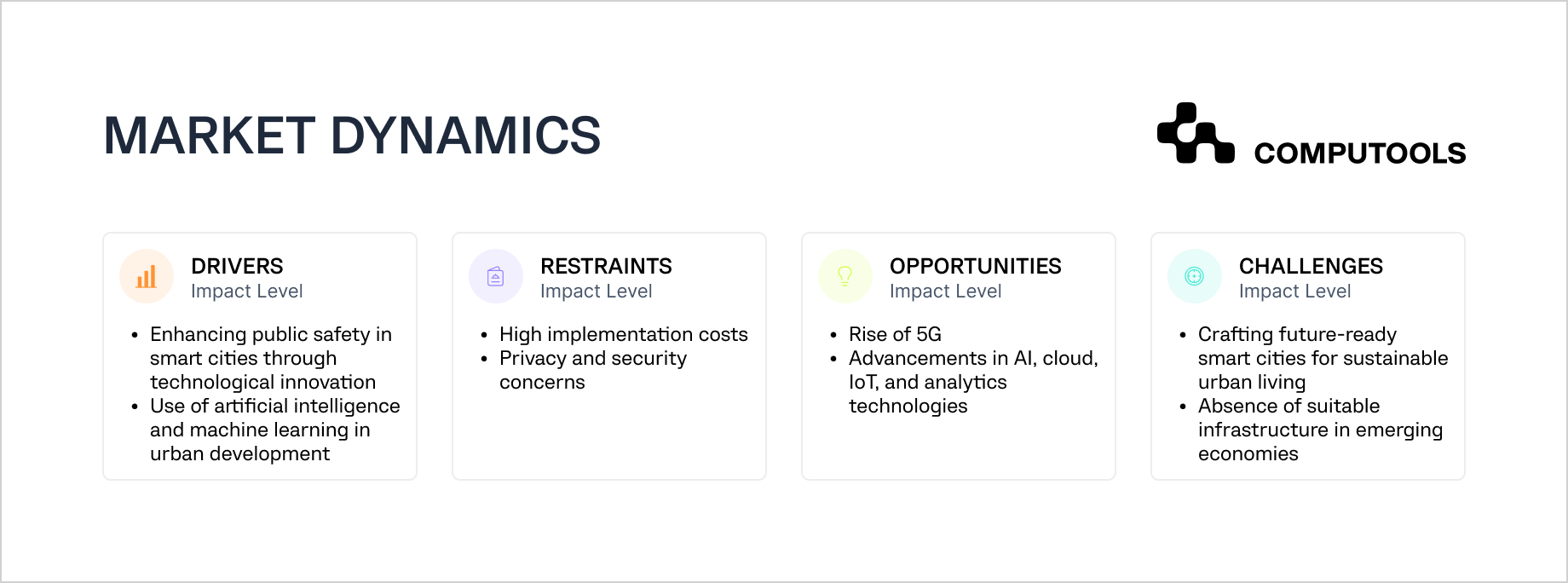
For cities, this transformation impacts the functionality of their systems. Posting announcements, gathering complaints or running separate service portals is not enough anymore. An advanced city information platform integrates the residents, city departments, urban assets, field teams, IoT and GIS data, and the city’s analytics and workflows into a single system.
AI, together with real-time data and automation, can help cities improve how citizen requests are classified, predict infrastructure services, monitor issue patterns, and help in decision-making processes. Yet, these tools offer a good return on investment when a city has a good data foundation, a secure system architecture, a defined governance model, and people who understand how to use the system. The 2025 Digital Progress and Trends Report states that before any of the other components can be in place, the city must first secure the foundations of connectivity, compute, and context.
This article explains how to build a city information system, the components and technologies that support it, and helps set the city on the path of data-driven and safe urban operations.
Example platform: building SMARTCITY as a geolocated urban experience app
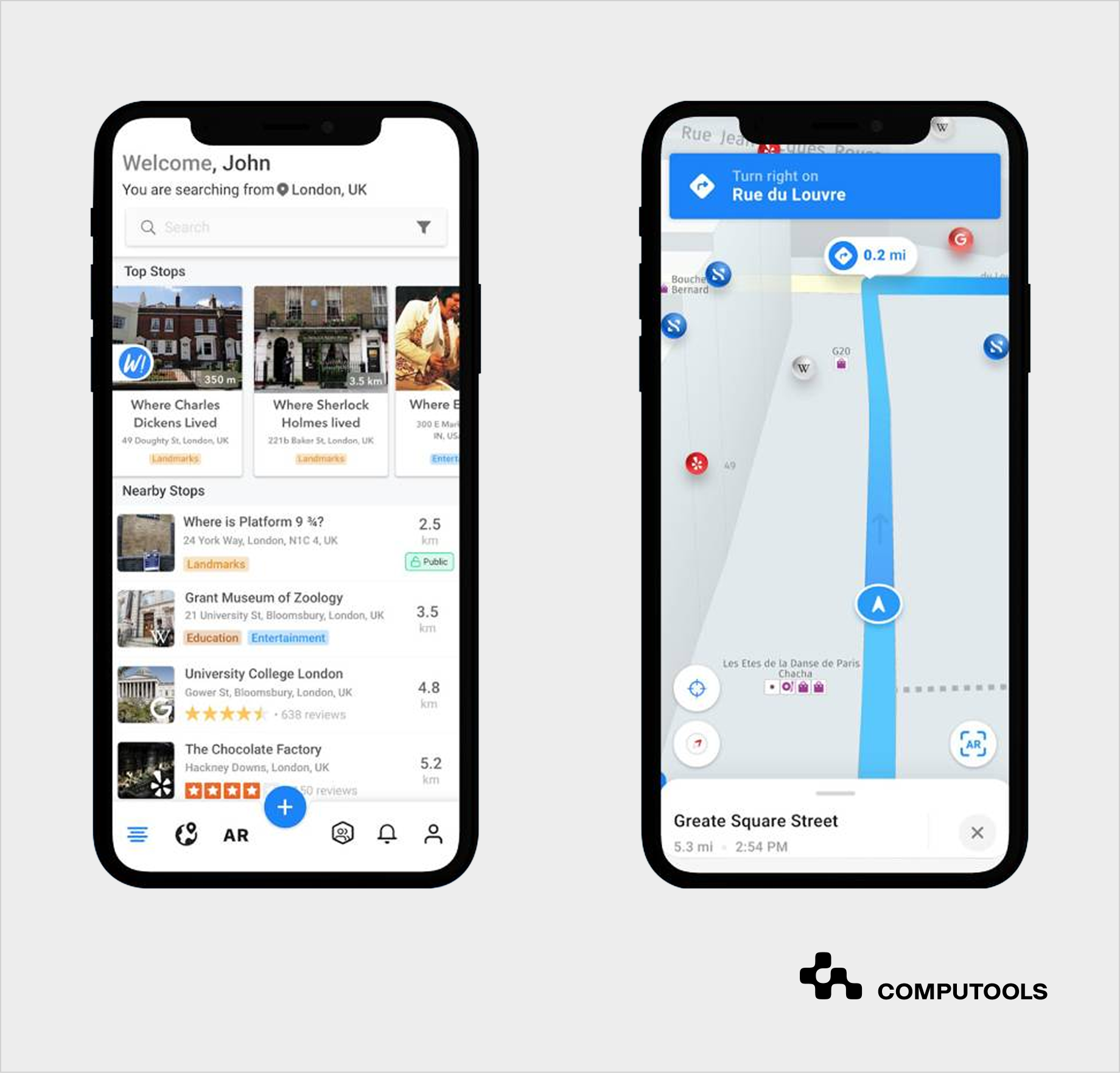
SMARTCITY is an example of a city information system that Computools developed for a travel startup. We built a mobile application that connects users to places, happenings, businesses, and other travelers using geolocation, social networking, instant messaging, and augmented reality. Rather than serving as a passive static guide, this smart city information system turns location data into an interactive experience.
This solution is centered around the willingness of users to know what is around them in real time. To meet this goal, Computools designed a geospatial search and augmented reality object discovery. Users can find nearby locations of interest along with information from Wikipedia and Google Places, tag items seen in photos, and discover other objects through augmented reality.
From a technical standpoint, the platform includes:
- a geolocation engine to identify nearby places, attractions, events, and user-generated content;
- an AR layer to bind digital information to the physical world;
- integrated content aggregation to pull dynamic, location-specific information from outside sources;
- a messaging module to facilitate private, public, and group messaging;
- media object support for images, tagged objects, location data, and weather;
- a mobile-first design and architecture for app responsiveness and real-time discovery and navigation.
For the Android application, Computools employed Java with Android SDK, Retrofit 2, RxJava, and ButterKnife. The team used the Scrum workflow for development, which provided opportunities to test, iterate, and reprioritize features.
When considering a broader smart city software development, the project illustrates the integration of geolocation, AR, and real-time urban social content and how they can be framed in a public-facing system. The same logic can be applied to municipal tourism, event discovery, public transport, cultural routes, local commerce, and citizen engagement solutions. The most valuable insight is that, when a city platform links digital services to the user’s location and real-world context, it becomes infinitely more useful.
Urban platforms can also support local commerce, public spaces, and citywide service access. For example, multi-restaurant food marketplaces can help cities connect residents with local vendors, food courts, public markets, and community-based services through one digital environment.
Step-by-step guide: how to build a city information system
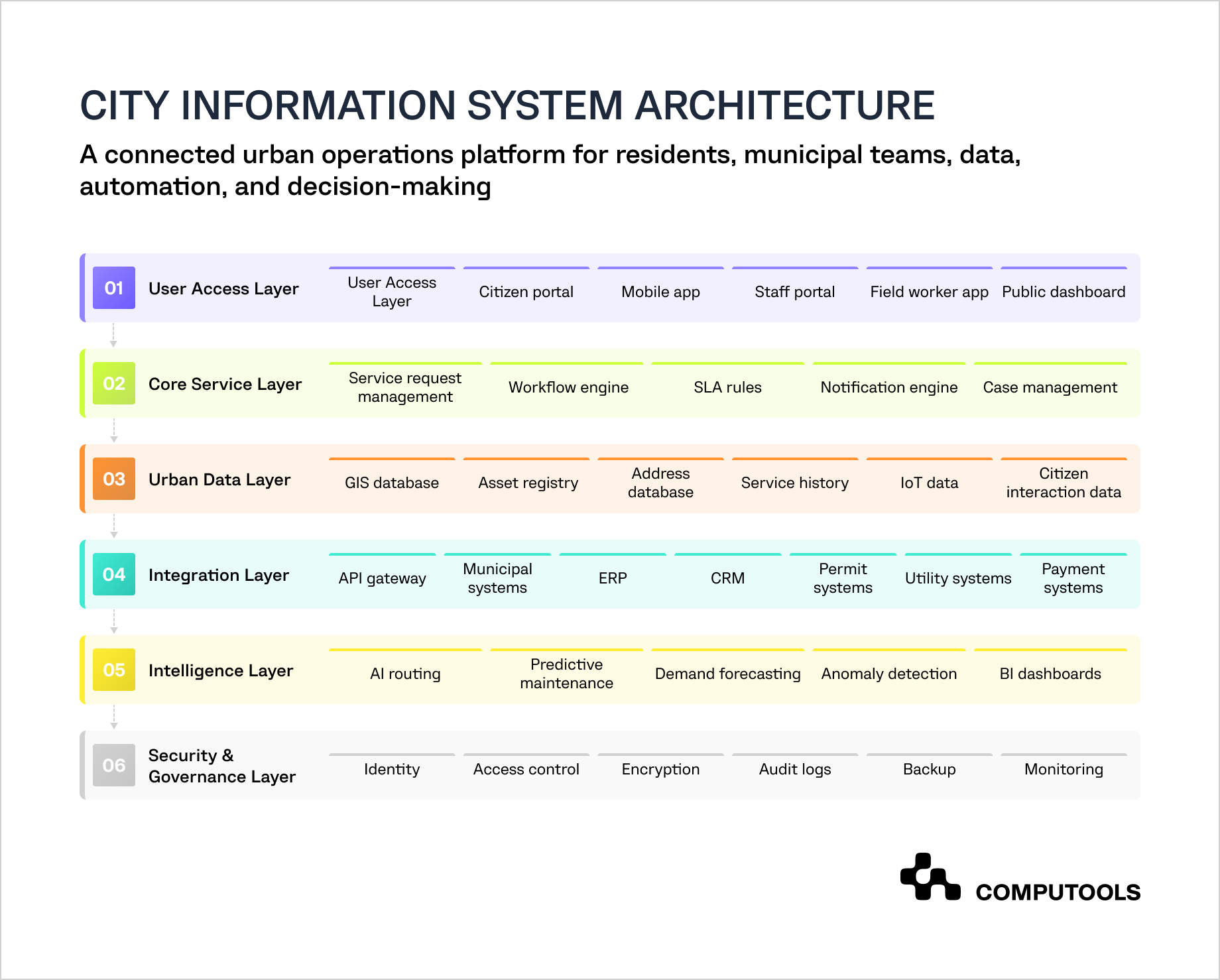
City information system development requires early integration of architectural decisions and implementation steps. Each phase of development should reflect the operational issue being addressed, as well as the technical groundwork to support that. Start with the service goals, validate the MVP, roll out GIS, other integrations, IoT, AI, analytics, and then expand coverage to the rest of the municipal services.
Step 1. Define Urban Service Goals and System Scope
First, identify which of the urban services the platform will improve. These may include the management of road maintenance, waste collection, street light repair, maintenance of public spaces and facilities, permit processing, environmental monitoring, and non-emergency citizen requests.
Objectives must be defined with a target. An example could be a city reducing the average street light repair from 10 days to 5 days, a 30% decrease in duplicate requests, or improving maintenance teams’ SLA compliance.
Technical recommendations:
From the perspective of system design, the initial scope can be outlined based on 3 to 5 defined service objectives. For each selected workflow, define the users, data, integration needs, SLAs, notifications, and reports. This will aid in the development of a system architecture, backlog, and refinement of the MVP.
Step 2. Map Stakeholders, Roles, and Access Levels
City administration software solutions cater to a broad spectrum of users. These include residents, businesses, municipal employees, field crews, contractors, utility operators, administrators, and public officials. Each user group demands a unique system interface and set of permissions.
To illustrate, residents need interface elements to submit and track requests. Field workers require the ability to view and receive work orders in a mobile format. Managers should have access to customized dashboards. Contractors may only need access to view and update their assigned tasks.
Technical recommendations:
Begin with the design of role-based access controls. Create distinct groups that can be assigned permissions, such as resident, dispatcher, field worker, department manager, contractor, admin, and auditor. For access control design and implementation, consider OAuth 2.0, OpenID Connect, or SAML, particularly if the system needs to integrate with governmental identity systems or internal municipal employee directories.
Step 3. Review Current Systems, Data, and Integration Limitations
Most cities use a combination of GIS tools, ERP systems, permit software, call center solutions, spreadsheets, asset databases, utility systems, document management platforms, and various department-specific tools. Any new platform must interface with these systems.
The purpose of the audit is to identify systems that have APIs and those requiring manual data exports. Also, establish software that contains data duplication and determine which is less critical and can be replaced in the future.
Technical recommendations:
Integrations should be mapped out before development. Systems can be categorized into four groups: API-ready, database-only, file-based, and manual. Use an API gateway for modern integrations, middleware for legacy systems, and planned ETL jobs for systems that only support CSV, XML or database exports. Avoid direct database writes to legacy systems unless it is the only safe option.
For modern, approved integrations, use an API gateway. For legacy systems, use middleware. For systems that only allow exports as CSV, XML, or database exports, use ETL jobs. Avoid writing directly to the database of a legacy system unless that is the only viable alternative.
Step 4. Build the Core Data Model and Governance Rules
An urban services information system requires an established data structure for service requests, users, assets, locations, departments, work orders, statuses, SLA rules, and audit log attachments. Without a logic that brings data and services together, you get inconsistent service categories, duplicated addresses, and unreliable asset data.
Technical recommendations:
Use a relational database such as PostgreSQL for core transactional data. Add PostGIS for geospatial records, including assets, service zones, coordinates, polygons, and map layers. Define master data rules for addresses, asset IDs, department codes, service categories, status names, and priority levels. Keep audit logs for every status change, assignment, data export, user action, and administrative update.
Step 5. Design the MVP Architecture Around Priority Services
The MVP should perform the following functions: collect requests and accurately route them, assist field teams, provide alerts to residents, and evaluate the performance of a service. It shouldn’t cover every city department.
A realistic MVP may involve the following components: request submission from citizens, GIS location capture, ticket routing, task management, SLA (Service Level Agreement) management and tracking, field updates, alerts and notifications, and dashboards.
From a technical perspective:
The MVP should have a modular design. User management, request management, workflow logic, notifications, GIS and related support data, reporting, and integrations should be maintained as separate services.
Step 6. Build Citizen-Facing Web and Mobile Channels
Residents ought to have the ability to make and track requests, specify their locations, provide photographs, receive notifications, and respond to surveys. The system should not necessitate knowledge of the specific city department that is responsible for addressing the requests.
For instance, a resident should have the ability to click on a flooded street, indicate the location, upload a picture, make a request, and receive a tracking number in a matter of seconds.
Technical recommendations:
Implement the web portal’s front end using React, Vue, or Angular. For mobile, use Flutter or React Native if the city needs faster cross-platform development, or Kotlin and Swift for native performance. Implement WCAG-based accessibility, multilingual capabilities, address autocomplete, pin placement on maps, image compression, file type and size validation, and CAPTCHA/rate-limiting to reduce spam.
The SMARTCITY project also shows the value of mobile-first UX for location-based urban platforms. Computools focused on an intuitive interface and strong responsiveness to support user retention. For city information systems, this is critical because residents and visitors often interact with the platform while moving through the city. Reporting an issue, finding a place, checking an event, or receiving a public alert should take only a few taps.
Step 7. Build Internal Workflow and Case Management Logic
The internal workflow layer is where the platform’s operational value is most pronounced. Requests should move through the following stages: intake, classification, routing, assignment, execution in the field, approval, closure, and resident notification.
The municipal information system software should provide for the assignment of tickets, SLA (Service Level Agreement) rules, priority levels, and escalations, as well as work orders, coordination with contractors, internal comments, photographic evidence, and resolution history.
Technical recommendations:
Use a configurable workflow engine instead of hardcoding every municipal process. Camunda, Temporal, Zeebe, or a custom BPMN-based workflow layer can support different approval paths, SLA rules, and department-specific logic. Allow processes to be customized by storing workflow states separate from the content of the request so that departments can change processes without completely building a new system.
Step 8. Connect GIS, Assets, and Service Requests
In the SMARTCITY project, geolocation was not just a background feature. It powered nearby place discovery, location-linked content, AR interaction, and 3D navigation. A municipal platform can apply the same principle to urban services by linking each request, asset, alert, event, or public facility to a specific location. This turns the system from a basic service portal into a spatial operations platform.
As most urban-based services require location information, GIS should be placed at the center of the system. Requests need to link to streets, buildings, street lights, waste bins, drainage, parks, transport stops, parking zones, utility assets, and risk areas.
This way, the city will be able to note patterns, such as flooding in the same district, repeated road damage in the same heavily used area, or clusters of missed waste collection.
Suggested practices to achieve this goal:
Use PostGIS for spatial queries and service asset location. Accept GeoJSON, WMS, WFS, KML, and SHP files for data transfers from planning, transport, utility and environmental services. For mapping services, Leaflet or OpenLayers provide an adaptable, flexible, and completely free solution. Consider using Mapbox for modern map experiences, or ArcGIS integration if the municipality already uses Esri tools.
Step 9. Add the Integration Layer
Urban digital infrastructure platforms should link with other municipal systems. Typical integrations are with ERP, CRM, GIS, permitting, payment, utility, and transport solutions, as well as call center software, open data portals and identity systems.
Technical advice:
Use an API gateway for authentication, rate limits, routing, monitoring, and version control. Use message queues such as RabbitMQ, Kafka, or AWS SQS for asynchronous tasks, including notifications, status updates, IoT events, and data synchronization. Use webhooks for systems that need real-time updates. Keep integration adapters decoupled from core business logic, allowing legacy systems to be changed or replaced with lower integration risk.
Step 10. Add Field Workforce Functionality
Field crews need a mobile-first design for all work orders. Include routing details, asset history, checklists, added photos, status updates, and note the ability to work offline. This is especially vital for the maintenance, inspection, waste, road, utility, and public space teams.
Technical recommendations:
Build an offline-first mobile design. Include local storage, background sync, conflict resolution, GPS timestamping, and media uploads with compression. Use push notifications for time-critical tasks. Add QR codes, NFC, or asset tag scanning where teams need to verify equipment, bins, poles, signs, or utility assets in the field.
Step 11. Add IoT and Real-Time Data Only Where It Improves Operations
IoT development should be implemented to address a particular service need. Some good examples are smart bins that can report their fill level, streetlights that report outages, flood sensors that can send alerts, air quality sensors that can assist in environmental monitoring, and sensors that can measure traffic congestion.
As an example of operational efficiency, in waste collection, bins that report fill levels can eliminate fixed routes and instead implement collection on an as-needed basis.
Technical recommendations:
For communication of small IoT devices, use the MQTT (Message Queuing and Telemetry Transport) protocol. For the storage of sensor readings, use a time-series database such as TimescaleDB, InfluxDB, AWS Timestream, etc. Incorporate device identity and track device firmware along with data validation, battery health monitoring, and anomaly detection. Do not send all raw IoT data to the main transactional database. Instead, process it in a specialized ingestion pipeline and then route the information as necessary.
Step 12. Add AI Services With Human Review Controls
AI can classify requests, detect duplicates, recommend departments, estimate urgency, forecast demand, predict asset failures, summarize cases, and support call center employees. It should support municipal teams first, especially where data quality and accountability matter.
For example, when a citizen reports something by sending a photo on the app, the AI system is able to classify the problem, recognize duplicate reports, and, based on the app usage, suggest that the report be assigned a higher priority.
Technical recommendations:
AI systems should be implemented as a stand-alone service. For each request, log user inputs and outputs, the AI system’s confidence in the service, and any overrides. Use MLOps tools such as MLflow or cloud-native model registries for versioning, testing, monitoring, and rollback. For text search and case similarity, use vector search through pgvector, OpenSearch, Pinecone, or a similar tool. Require human approval for sensitive or high-impact decisions.
Step 13. Build Analytics and Performance Dashboards
City leaders need to balance resident satisfaction with the demand on services and the productivity of staff in the field. They also need to understand the volume of repeat issues, the patterns of asset failures and service level agreement (SLA) compliance.
Dashboards should focus on daily operations and long-term trends.
Technical recommendations:
Keep operational data separate from analytical data. Use PostgreSQL for transactional data and a data warehouse or analytical database for reporting. Power BI, Tableau, Looker, Apache Superset or custom dashboards can visualize KPIs. Design dashboards that focus on service metrics, including average resolution time, SLA breaches, cost per resolved case, request density per district, and incidents that repeat by asset type.
Step 14. Build Security, Privacy, and Resilience Into Every Layer
City management software solutions can include citizen information, data on city assets and infrastructure, employees, alerts to the public, contractors, IoT data, and internal workflows of the city. Because of this, security has to be part of the overall design from the beginning.
Technical recommendations:
Use MFA, RBAC, and both encryption and secure management of APIs. Implement audit logs, backups, and secrets management. Use a disaster recovery and a vulnerability response plan. Place a boundary between services that are used by the public and those that are internal. Keep development, testing, staging, and production separated. Use OpenTelemetry, Prometheus, Grafana, ELK, or cloud-native monitoring services for centralized logging and monitoring.
Step 15. Test With Real Users, Data, and Service Scenarios
Standard QA is not enough for this step. Teams must analyze request submissions, GIS positioning, workflow routing, and SLA rules, as well as mobile usability and accessibility, offline field use, and notifications and integrations. Don’t forget to access dashboards, security controls, and the overall system performance.
QA testing should also use realistic scenarios.These include the cases when multiple residents report the same issue, when a field worker has lost the connection, when a department denies a ticket, when an SLA is breached, or when a storm suddenly causes an increase in queries.
Try this:
Automated unit, integration, API, and regression tests should be employed. Load testing should be added for periods of high system demand, especially public emergencies or weather-related events. For system security, more traditional testing should occur, as well as GIS data accuracy verification using real addresses, asset IDs, and field routes.
Cities often need several connected digital products to support residents, visitors, businesses, and public services. Event and cultural discovery platforms can increase resident engagement, improve the visitor experience, and give local businesses more visibility.
Computools explores this model in its guide on how to build an urban event discovery platform.
Location-based mobility tools can strengthen the same ecosystem. City navigation apps with real-time location data help people move through the city more easily, find nearby services, avoid disruptions, and access relevant urban information at the right moment.

Launch your city information system in just 1–3 months, not years. Give residents instant access to urban services, requests, payments, and real-time updates through one scalable digital platform.
Why clients choose Computools to build a city information system
Computools develops city information systems to streamline the delivery, management, and assessment of urban services. Our smart city data platforms unify residents, staff, field workers, spatial data, service workflows, analytics, and external systems in one environment.
Our clients appreciate time savings with expedited requests and fewer manual transfers, staff accountability, asset visibility, and planning data. Computools offers a full suite of urban services, including citizen-facing apps, GIS-based service request platforms, field worker tools, city data management platforms, public dashboards, tourism platforms, urban mobility features, data-driven municipal service systems, and government information systems for cities.
With travel and hospitality software development services, Computools builds systems that connect users to local events, transportation, venues, and more. With heritage tourism software development, cities can create cultural pathways, interactive maps, and AR-guided tours along with location-based frameworks for storytelling in public spaces, museums, landmarks, and historic districts.
Computools also supports daily municipal operations. Our mobile app development services cover resident reporting, field inspections, offline work orders, push notifications, photo uploads, and map-based interaction.
We also provide AI development services to add request classification, duplicate detection, workload forecasting, predictive maintenance, citizen support assistants, and analytics that help municipal teams respond faster and plan with better data.
The team reduces delivery risk by starting with a focused MVP, not an oversized platform. Computools defines priority services, designs scalable architecture, integrates legacy systems, connects GIS and operational data, tests workflows with real users, and expands the platform in phases. Cities get a practical path to launch, measure results, and scale into a broader smart city ecosystem.
You can also review Computools’ research on top travel and hospitality software development companies to understand the broader vendor landscape and evaluation criteria.
Final thoughts
While cities strive for faster, transparent, and efficient services, they continue to feel the pressures of growing infrastructure, budget constraints, and greater citizen expectations.
City management platforms provide the resources to manage urban operations with greater speed, visibility, and control. When citizen requests, GIS data, field teams, municipal workflows, and analytics are integrated, cities have the tools needed to respond to demands more quickly, streamline manual coordination, and make more informed decisions about the development and delivery of infrastructure and services.
To build a city information system, an iterative, service-driven approach is most appropriate. Start with a focused MVP, evaluate operational impact, and expand functionality. Given proper data governance, architecture, and integrations with AI and decision support tools, the solution will deliver the foundation for more advanced urban services.
Urban operations should not depend on spreadsheets, phone calls, and scattered software. Computools municipal IT systems development gives teams clearer control over daily work.
Computools
Software Solutions
Computools is an IT consulting and software development company that delivers innovative solutions to help businesses unlock tomorrow.