
THE AUTHOR:

For entertainment, sports, travel, and venue businesses, the need to develop a ticket reservation system is now tied directly to revenue protection and customer experience. Online ticketing is no longer just a digital sales channel where users choose an event, pay, and receive a confirmation. It has become a high-load transaction environment where thousands of users may search, select seats, apply promo codes, start payments, and expect instant confirmation at the same time.
The market keeps moving in that direction. The global online event ticketing market is estimated at $56.58 billion in 2026 and is projected to reach $71.54 billion by 2030, which reflects steady demand for digital-first ticket sales across concerts, sports, cinema, theatre, festivals, and other live experiences. Live entertainment demand also remains strong. Live Nation reported $3.8 billion in Q1 2026 revenue, while its ticketing segment processed 81 million fee-bearing tickets during the quarter, and more than 107 million tickets had already been sold for 2026 concerts by the end of April.
User preferences are developing even faster. Mobile tickets, digital wallets, faster venue entry, secure QR codes, and personalized event discovery are becoming standard parts of the booking experience. Ticketmaster’s 2025 Nexus report found that mobile ticketing adoption grew 53% year over year across global sports leagues, while biometric venue entry doubled, showing how digital access is becoming part of venue operations.
At the same time, ticket reservation software development faces more technical and security requirements. Peak-demand ticket drops can expose weak software architecture through slow seat maps, checkout errors, failed payments, overselling, and support overload. Fraud and bot activity add another layer of risk. Akamai reported that the commerce industry saw more than 25 billion AI bot requests during a two-month observation period in 2025, making bot protection, API security, and fraud monitoring essential for a high-performance ticket reservation platform.
This article explains how to develop a ticket reservation system that can manage live availability, temporary seat holds, secure payments, AI-enabled personalization, external integrations, and high-demand sales without double booking or operational chaos.
Real-time booking solutions are also becoming part of broader event commerce models, where discovery, ticket sales, customer data, and repeat engagement are connected in one platform.
Computools explains this approach in its guide on how to build an event discovery platform with ticket sales.

Real-time ticket booking in practice: Multitrading case study
A real-time ticket reservation system needs to simplify the booking experience while maintaining platform stability to meet customer demand. Finding this balance was crucial in Multitrading, a platform Computools developed for an entertainment startup that provides access to a variety of events. The client was looking to improve their digital platform, streamline the ticket purchase process, and optimize their use of customer data.
Due to the limitations of its existing ticket booking web application, the company was struggling to keep pace with its growing customer and transaction volumes. This caused users to experience long wait times and intensely frustrating browsing and reservation processes, which ultimately severely limited business growth.
Computools developed a multi-threaded event ticketing system designed to handle millions of simultaneous requests. The solution included data collection, storage functionality, API integrations, and web scraping. The team also focused on performance, reduced latency, and testing under heavy-load conditions to make the platform more reliable during high-demand usage.
This case reflects a key technical requirement for any real-time booking system: concurrency must be designed from the beginning. Many users can browse events, open seat maps, select tickets, start checkout, trigger payment, and request confirmation at the same time. The platform needs quick request processing, efficient database handling, stable API connections, and booking logic that safeguards inventory from conflicts.
The Multitrading application became more responsive and easier to use. Guests could view and reserve tickets faster, waiting times decreased, and customer satisfaction soared.
How to develop a ticket reservation system with real-time booking
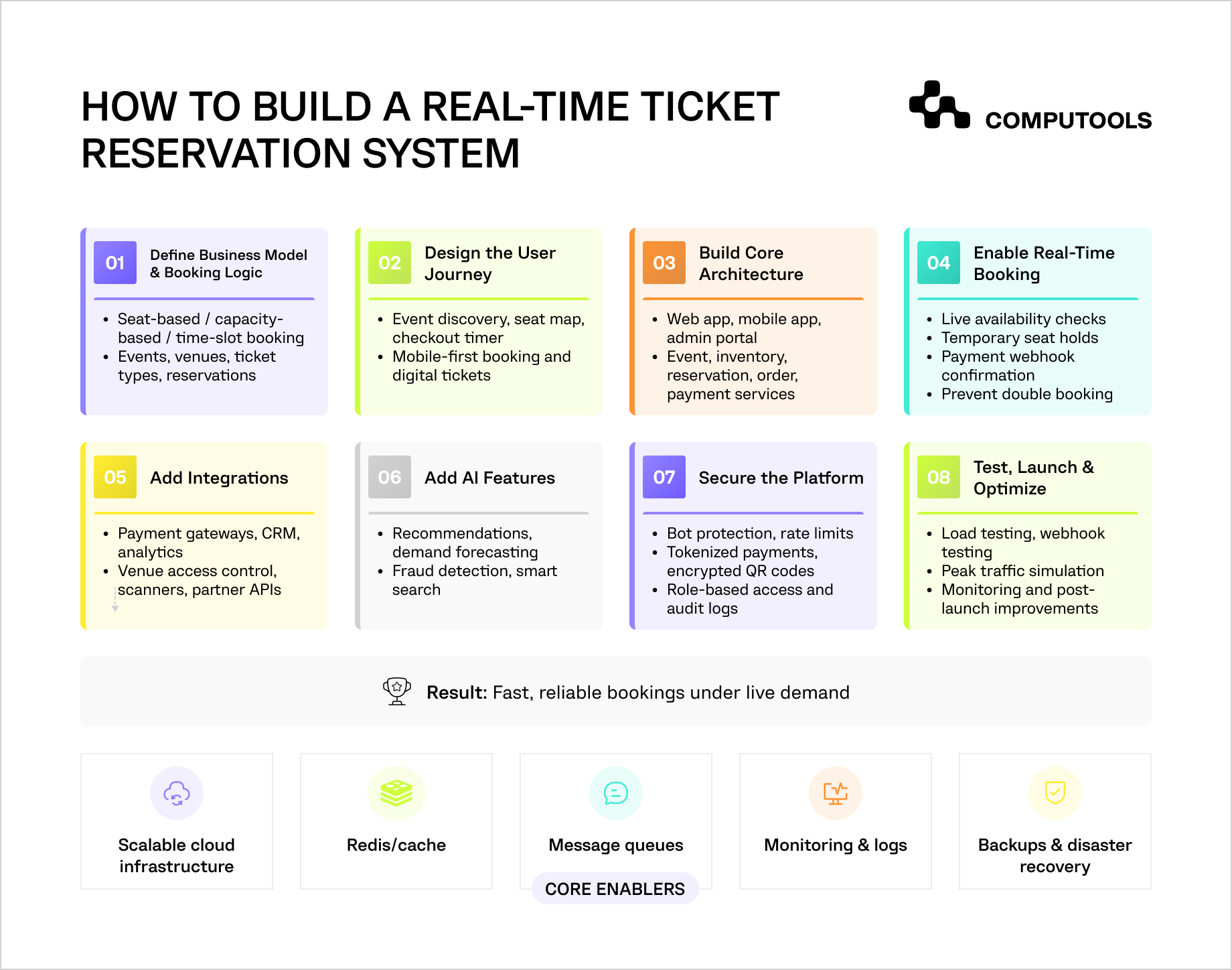
Ticket booking platform development begins with building it as a transactional system. Every part of the product, including the user journey, database model, payment flow, integrations, and security layer, should support one goal: accurate booking under live demand.
Step 1. Define the Business Model and Reservation Logic
The first step is to establish the type of solution we need to implement – a venue-owned system, a resale marketplace, a festival platform, a cinema booking application, or a travel-and-event-bundle portal, as well as how the tickets will be sold.
A theatre platform, for example, will have to implement seat-based reservations, whereby each seat’s location, category, price, and availability will be fixed and defined. On the other hand, reservation systems for music festivals may implement capacity-based reservations, which may let users purchase general admission, VIP, or even backstage tickets, rather than specific seat options.
If the business model is based on resale, the platform needs additional logic for seller onboarding, ticket verification, commission rules, payout workflows, and resale limits.
Computools covers these requirements in more detail in its article on how to build a ticket marketplace platform for event resellers.
The technical model as a whole will be affected by this choice. The system will have to separate events, venues, ticket types, seats, reservations, orders, payment, users, and ticket ownership. If you combine these entities prematurely, it will complicate the management of refunds, transfers, ticket limits, allocations, and reporting.
The reservation logic should also define how long a ticket can stay on hold, what happens when payment fails, how group bookings work, how promo codes affect inventory, and whether tickets can be transferred or resold. These rules should be documented before development starts because they directly affect backend architecture and database transactions.
Step 2. Design the Booking Journey Around Speed and Clarity
Users often buy tickets under time pressure. They may be competing for limited seats, using a mobile phone, switching between payment apps, or trying to complete checkout before a timer expires. A confusing flow can cause lost sales even if the backend works correctly.
The booking journey should take all the above into consideration. It should allow users to find events quickly, understand search queries, offer useful filters, live availability, intuitive seat maps, a countdown timer for checkout and clear fees. It should feature guest checkout and saved payment methods, and deliver instant confirmations and tickets directly to the user’s device. For mobile, the booking journey should be optimized for minimal input and support wallet passes, QR codes, or a rotating barcode.
Also, improving the booking experience through AI is a modern take on ticketing. AI will improve searches with natural language options like “jazz concerts this weekend” or “family events near me.” AI-powered features can also support recommendations based on browsing history or other criteria like location, performers, price, and previously bought tickets. Organizers will benefit from AI support through event descriptions, suggested campaigns, audience segmentation, and predicted attendance.
The technical detail behind this is important: the frontend should not reload heavy venue layouts or full seat maps every few seconds. Static venue data can be cached, while live availability should come from a dedicated inventory service. This keeps the interface fast without sacrificing real-time accuracy.
Sports and concert platforms also need specific UX and backend decisions, including venue maps, fan account flows, ticket transfer rules, access control, and surge-ready checkout.
These requirements are covered in Computools’ guide on how to develop an event ticketing system for sports and concerts.
Step 3. Build the Core Architecture
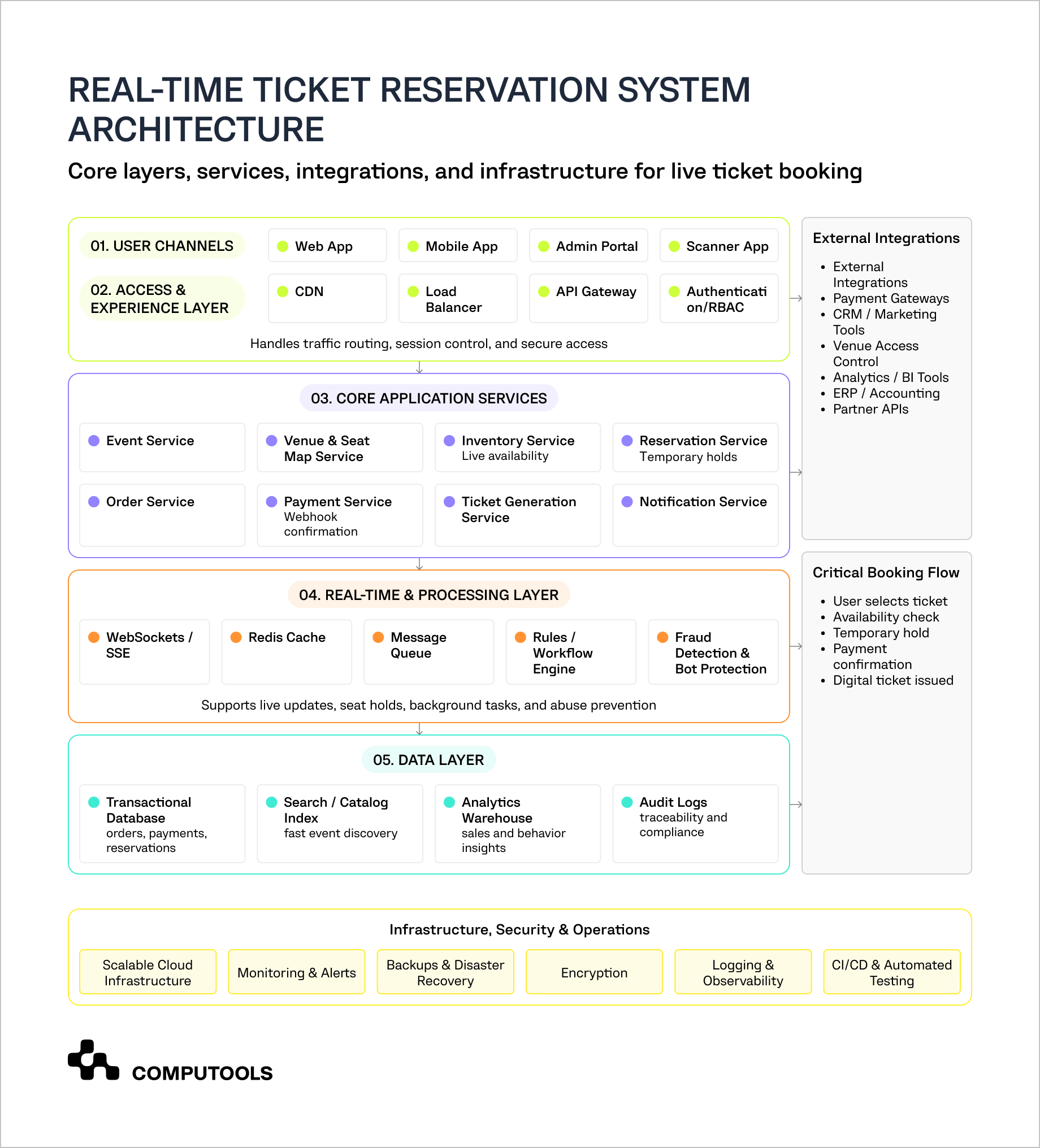
Online ticketing platform architecture typically consists of multiple interconnected components.
The user layer comprises the web application, mobile application, admin portal, customer account, ticket wallet, and a scanner application for entry into the venue. The backend layer includes event, venue, inventory, reservation, order, payment, ticket generation, notification, analytics, and user management services.
The real-time layer provides accurate availability. It may employ WebSockets or Server-Sent Events to update seating maps, and use Redis for temporary holds and caching, as well as message queues to help maintain a speedy checkout. For example, confirmation emails, CRM sync, analytics events, and invoices can run in the background after the main transaction is completed.
The data layer must ensure transactional precision. Orders, payments, bookings, and stock records typically suit relational databases due to their consistency requirements. Fast event discovery may require search databases. Reporting and forecasting may benefit from data warehouses or BI tools.
The infrastructure layer should contain CDN, load balancing, autoscaling, monitoring and logging, backup and disaster recovery. Ticket launches with high demand may require the platform to serve a large number of users simultaneously. However, most critical is not only serving the ticketing traffic but also protecting the reservation and payment flow from being overloaded.
Modular monoliths may suit small MVPs. Larger platforms may benefit from a separation of the reservation, payment, ticketing, notification, analytics, and admin functions to reduce operational risk. Reservation and payment services should not be slowed by marketing service synchronization, reporting, or other third-party services that are not critical.
A real-time ticket reservation system should be designed for concurrent activity. Computools solved a similar performance problem for the Multitrading project through a multi-threaded application architecture. The project used C#, Task Parallel Library, MongoDB, and Windows Services. TPL was used to add parallelism and concurrency, while Windows Services supported long-running background operations that did not require an active user interface.
Step 4. Ensure Real-Time Booking and Prevent Double Booking
The reservation flow should be designed around temporary holds. When a user selects a seat or ticket category, the system checks live availability and creates a temporary reservation. The ticket status changes from available to held, and a checkout timer starts. If the user completes payment, the system changes the ticket from held to sold. If the timer expires or payment fails, the ticket returns to available inventory.
This sounds simple, but most booking failures happen because reservation status and payment status are not handled separately. A ticket should not become sold just because the user started payment. Payment providers can delay confirmation, retry webhooks, send duplicate callbacks, or return failed responses after the user has already left the page.
A clean status model may include:
| Ticket Status | Meaning |
| Available | The ticket can be selected |
| Held | The ticket is temporarily reserved during checkout |
| Payment pending | Payment has started but is not confirmed |
| Sold | Payment is confirmed and the ticket belongs to the buyer |
| Expired | The hold ended before payment confirmation |
| Cancelled | The order was cancelled before completion |
| Refunded | Payment was returned after purchase |
| Blocked | The ticket is unavailable for operational reasons |
To eliminate double booking, several options are available. Teams may employ atomic inventory updates, database transactions, either optimistic or pessimistic locking, version checks on seat records paired with automatic seat hold expiration. Fast temporary holds may be accomplished using Redis, however, the final state of the order must be saved in a reliable, transactional database.
Payment webhook processing needs to be idempotent, allowing for the same payment confirmation to cause exactly one order, one ticket, and one confirmation email, even if it is received more than once. This is most important for payment providers that retry sending a callback due to a network timeout.
Step 5. Plan Integrations Before They Become Bottlenecks
Online ticket reservation software requires many integrations. These may include payment solutions, customer relationship management systems, email and SMS services, marketing automation, analytics, accounting, venue or access control, identity verification systems, and partner APIs.
For platforms that combine ticketing with travel, hospitality or other services, integrations may also cross booking engines for hotels and restaurants, loyalty programs, transport providers, and city event discovery applications.
The Multitrading solution also included API integrations, data collection, storage functionality, and web scraping, which helped the client improve platform functionality and better understand customer behavior.
To keep the core reservation system protected, the best practice is to implement an integration layer or API gateway rather than connecting every single third-party tool directly to it. This also keeps the booking flow safe in the event an external service becomes slow, updates its API, or goes down.
Webhook handling must be done with a lot of consideration. The ticket management system is responsible for processing a lot of different tasks, like payment confirmation, refunds, ticket transfers, event cancellations, venue scans, CRM updates, delivery status of notifications, and partner allocation. Each webhook must be validated, logged, retried if necessary, and linked to the corresponding internal record.
As an example, if a payment confirmation is received after the hold has expired, the algorithm has to decide which rule will be applied. An order could be completed if the ticket hasn’t been sold, or it could be an automatic refund. These unique situations are bound to come up and should be planned for in advance. Ignoring these cases may result in a flood of support requests.
Some reservation systems also combine event tickets with hospitality services, such as restaurant bookings, hotel stays, or destination packages.
Computools’ guide on how to build a restaurant table reservation system explains how availability, time slots, guest flow, and operational integrations work in restaurant reservation products.
Step 6. Add AI and Data-Driven Features
AI features should aim for various business goals, including better conversions and demand forecasting, fraud detection, and more personalized customer engagement.
AI allows users to receive better recommendations and smarter searches, tailored alerts, dynamic ticket pricing, and assists with abandoned checkout recoveries. For instance, a user who frequently purchases football tickets in a particular city is likely to receive early notifications for similar events, nearby matches, or bundled offers.
AI can assist operators with demand forecasting, pricing, and sales, as well as detecting fraud and segmenting audiences. It can also help identify which events are likely to sell out quickly, which ticket categories are underperforming, or which users are likely to return for similar events.
Support teams can use AI assistants to respond to repetitive questions regarding tickets, refunds, transfers, venue policies, and changes to the events. This helps ease the crisis that emerges during peak times, especially when users reach out for help regarding payment issues or event updates.
However, the AI features are dependent on the quality of data. The system needs organized event information, clear histories of the transactions, data on the users, changes in pricing, cancellations, campaigns, and movement of inventory. If not, the AI will not be able to provide solid suggestions and forecasting will be inaccurate. The Multitrading project included data collection and storage functionality, which is the kind of foundation needed for future AI use cases.
Dynamic pricing also needs to be strategically thought out. It can support revenue growth, but users need clear pricing logic and transparent fees. If customers feel that prices change unfairly during checkout, the platform may increase short-term revenue while damaging trust.
Step 7. Secure Payments, Tickets, and User Data
Security should cover the full booking lifecycle.
For payments, the system should use tokenized transactions, PCI DSS-aware architecture, 3D Secure where needed, fraud scoring, refund controls, chargeback records, and secure payment webhook validation. Sensitive card data should be handled by certified payment providers rather than stored inside the platform.
For ticket authenticity, use encrypted QR codes, rotating barcodes, ownership history, transfer limits, official resale rules, scan logs, and duplicate scan detection. A ticket should not be easy to copy, resell outside approved rules, or use twice at the venue.
For platform security, implement role-based access, admin activity tracking, authenticated and rate-limited APIs, data protection and masking with secure backup, bot protection, and purchase limits. Admin accounts are especially sensitive because they can access the setup of events and control inventory, refunds, customers, and financials.
Bot protection is critical for high-demand ticketing. The solution may need device fingerprinting, behavioral analysis, queue protection, CAPTCHA in selected flows, suspicious traffic detection, and limits by account, device, payment method, or IP pattern. These controls help protect inventory from automated purchasing and reduce unfair access during popular ticket drops.
Step 8. Test Under Real Booking Conditions
Standard QA is not enough for a real-time seat reservation system. The application should be tested under scenarios that reflect actual ticket sales. Cover thousands of users selecting tickets at the same time, expired holds, failed payments, delayed webhooks, duplicate webhooks, refund flows, promo code limits, seat map performance, bot-like traffic, scanner validation, offline scanner behavior, event cancellation, and sudden traffic spikes.
Computools also tested the Multitrading platform under heavy-load conditions, which is critical for ticketing products because most performance issues appear during peak booking periods, not during normal traffic.
For QA load testing, priority should be given to the reservation and checkout pathways. Stress testing should prove seat locking, payment, and ticket generation modules are stable. All non-critical functions, such as email notifications, CRM updates, analytics events, and marketing sync, should be asynchronous to prevent delays in booking.
The team should also test the operational workflows prior to launch. Admins should know how to block seats, change events, issue refunds, send messages to customers, send tickets, and create support requests. A reliable ticketing system is not only what users see during checkout. It is also the control panel that helps the business manage demand, revenue, and service quality in real time.

Launch your real-time ticket reservation platform in 1–3 months, not years. Eliminate overbookings, payment friction, and fragmented user experiences, and scale confidently to 50,000+ users from day one.
Why choose Computools for real-time ticket reservation system development
Many companies can create a basic booking interface. Computools delivers greater value by building a connected business system with real-time availability, secure payments, customer data, venue access, partner integrations, automation, and AI engagement.
The company combines web development services and mobile app development services, and creates a comprehensive booking solution, which includes event pages, seat maps, checkout flows, customer accounts, digital tickets, QR codes, and push notifications, as well as admin tools and scanner workflows.
Our experience in travel and hospitality software development services makes Computools a strong tech partner to build a custom ticket reservation system that combines events with hotels, tours, destination passes, or venue packages.
For cultural attractions, museums, exhibitions, and local tourism platforms, Computools offers relevant expertise in heritage tourism software development. Our teams can engineer timed-entry bookings, capacity controls, multi-lingual visitor flows, guided tour apps, visitor analytics, and more.
Computools applies AI development services to create useful features, such as event suggestions, demand forecasting, smart search, and audience segmentation, as well as fraud pattern detection and AI-based customer support.
Through business process automation services, we can help our clients eliminate manual work for refunds, CRM entries, notifications, partner assignments, reports, and support processes.
For companies that want to develop a ticket reservation system, Computools offers a lot more than just development resources. We help to connect the booking solution with the commercial and operational systems around it, so the platform can support demand, protect revenue, improve user experience, and scale after launch.
Final thoughts
A real-time ticket reservation platform must manage live availability, temporary reservations, payment confirmation, digital ticket delivery, user data, integrations, and peak demand as one connected transaction flow. The best solutions are built around clear reservation logic. Tickets should move through controlled statuses such as available, held, payment pending, sold, expired, cancelled, or refunded. This prevents double booking, protects inventory, and keeps the checkout process reliable even when thousands of users try to buy tickets at the same time.
The system architecture is just as important as the UI design. A scalable ticketing platform requires a reliable back-end, real-time updates for available inventory, secure payment processing, intelligent caching, API integration, performance monitoring, and load testing. For more advanced services, AI can enhance event browsing, demand forecasting, fraud detection, support, and customer engagement.
The commercial impact of this design becomes apparent with reduced failed purchases, lower support demands, increased trust from customers, more control over inventory, and increased opportunities to generate revenue across different events and partners with repeat bookings.
If your business requires a real-time ticket reservation system that can manage live demand with secure payment processing, integrations, AI-enabled features, and zero risk of double bookings or checkout failures, Computools is the right place to start. Work with us to secure inventory, prevent double bookings, and improve conversion rates. Talk to our team at info@computools.com.
Companies looking for the right development partner for travel, booking, or event platforms can refer to the overview of the top travel and hospitality software development companies.
Computools
Software Solutions
Computools is an IT consulting and software development company that delivers innovative solutions to help businesses unlock tomorrow.