
THE AUTHOR:

The restaurant sector in the U.S. is expanding and expected to hit $1.55 trillion in 2026. Digital adoption is already at saturation. 99% of full-service restaurants use at least one online ordering system, with most having three or more. Coupled with the fact that 81% of operators reported a spike in takeout and delivery sales in 2025, it is apparent that restaurants face a challenge of unifying dine-in and digital services into a single operational flow. In this context, restaurants are looking to build a digital restaurant menu app that can bring ordering, payments, and operations under one roof.
Customer expectations reinforce this shift. 59% of diners say they might not return to the venue due to a complicated ordering experience. At the same time, 83% consider online checkouts easy, and 79% are fine with making payments in the app. This sets a clear baseline – ordering must be fast, intuitive, and frictionless, whether it happens at the table or through a digital channel.
Evidently, poor UX doesn’t just frustrate users, but it directly impacts revenue and retention. If you want to improve this layer, check the restaurant web design steps to boost online presence.
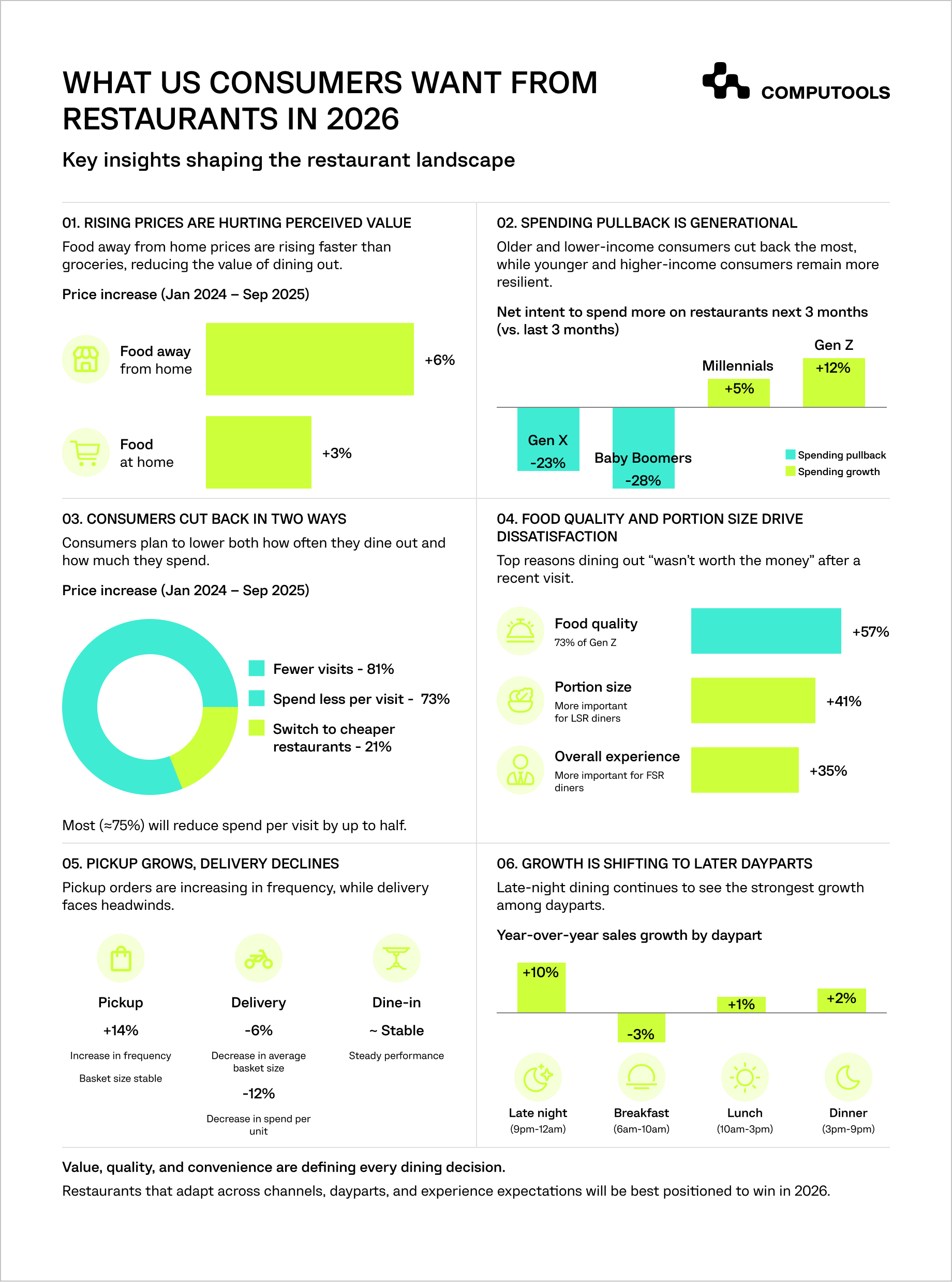
Key requirements to build a digital restaurant menu app that delivers results
First off, the system has to be built for speed and simplicity, because both diners and operators consider fast service critical.
Second, it must provide operational reliability. This requires fast, functional, and reliable integrations with POS, payment, and kitchen with minimal errors.
Third, the solution must be flexible when it comes to the dining experience. The QR app should be added as another ordering channel and should not be a forced replacement of in-person service.
Consequently, a modern restaurant menu app should be designed as a real-time operational system featuring:
- dynamic menu management
- table/session logic
- structured order workflows
- secure payments and integrations
- analytics and performance tracking.
Restaurants are willing to invest in digital solutions when the return is seen in faster service, reduced manual workload, and improvement in the overall customer experience without losing the touch of hospitality.
For a broader breakdown of business benefits, see ways a restaurant app can help owners and visitors.
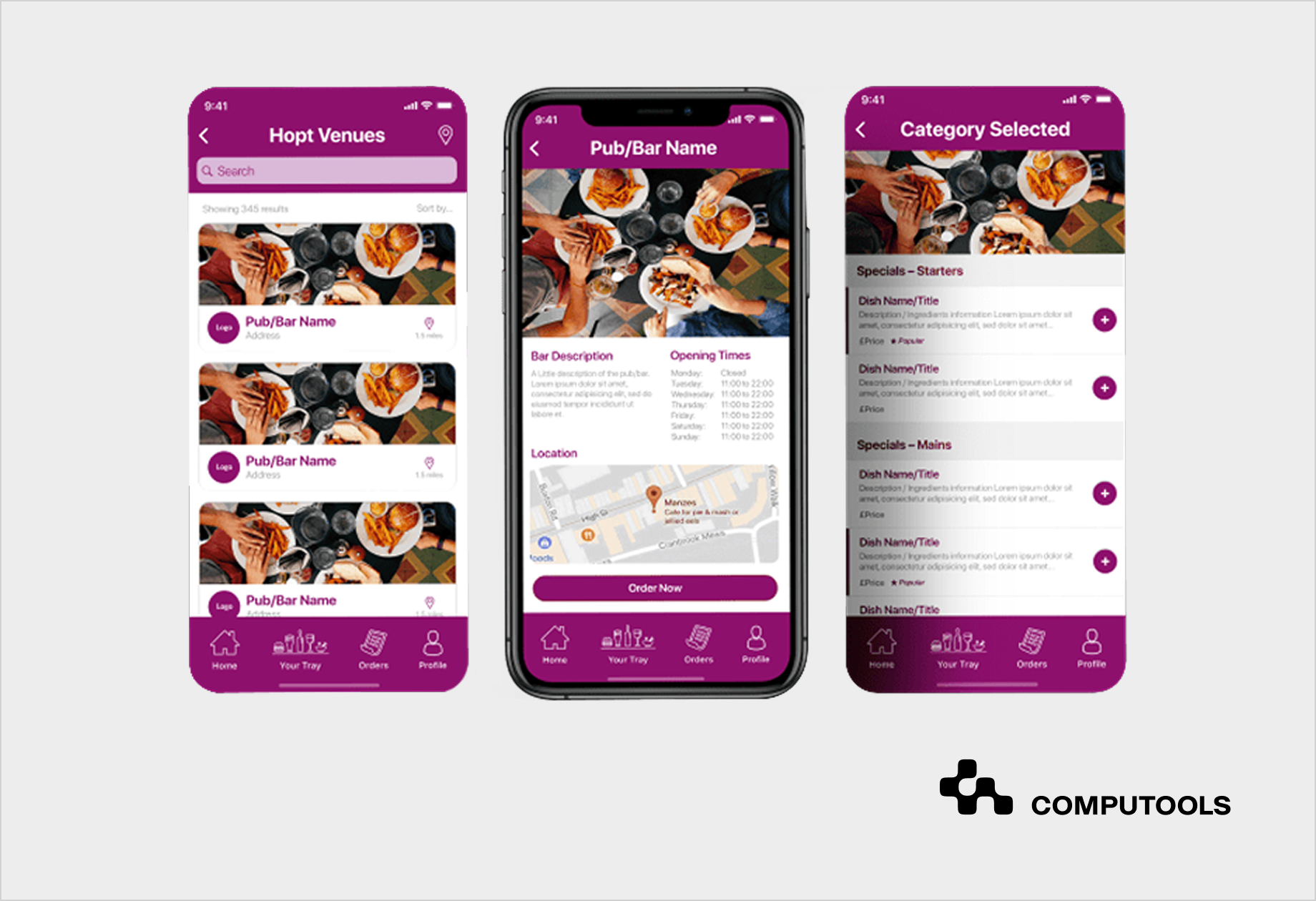
How Tap App addresses modern ordering needs
A practical example of this approach is Tap App – a cross-platform solution that Computools developed for one of its clients. It shows how a QR ordering system for restaurants works when it is designed as part of a broader operational platform, rather than purely a digital menu.
1. From Menu Access to Unified Ordering
Instead of browsing the QR portal as a stand-alone entry point, Tap App connects menus, item availability, table ordering, payment, and tracking in one ecosystem. Users can scan, browse, order, and pay in a seamless flow while restaurants receive a management hub for all their locations.
2. Designed Around Real Restaurant Workflows
The app supports a dine-in experience, as well as off-site ordering. It features table sessions, order notes, tips, and status tracking. It’s a flexible restaurant digital ordering system that can operate in a venue’s own logic, whether through its menu structure, tiered pricing, service styles, and more, all while retaining system consistency.
3. Driving Operational Efficiency
With real-time synchronization of order data, coupled with cashless payments and performance monitoring, Tap App substantially reduces unnecessary manual coordination, misplacement, and mishandling of orders by staff. It directly improves speed and trust when service demand is at its peak.
4. Delivering Measurable Results
The impact is not theoretical:
- 7% revenue growth through improved cross-selling campaigns,
- 85% improvement in processed orders that were previously unfulfilled or modified.
5. Built for Growth from Day One
The initial system design was a cross-platform application that opted for scalable backend infrastructure and iterative delivery. This enabled Computools to rapidly deploy a solution that excelled in performance in real restaurant conditions.
In practice, Tap App demonstrates that digital menu software for restaurants should not be evaluated based on the code itself, but rather the ecosystem it integrates into. That ecosystem becomes the value creation point, as it ties customer interaction, order routing logic, and restaurant operational processes into a cohesive, reliable flow.
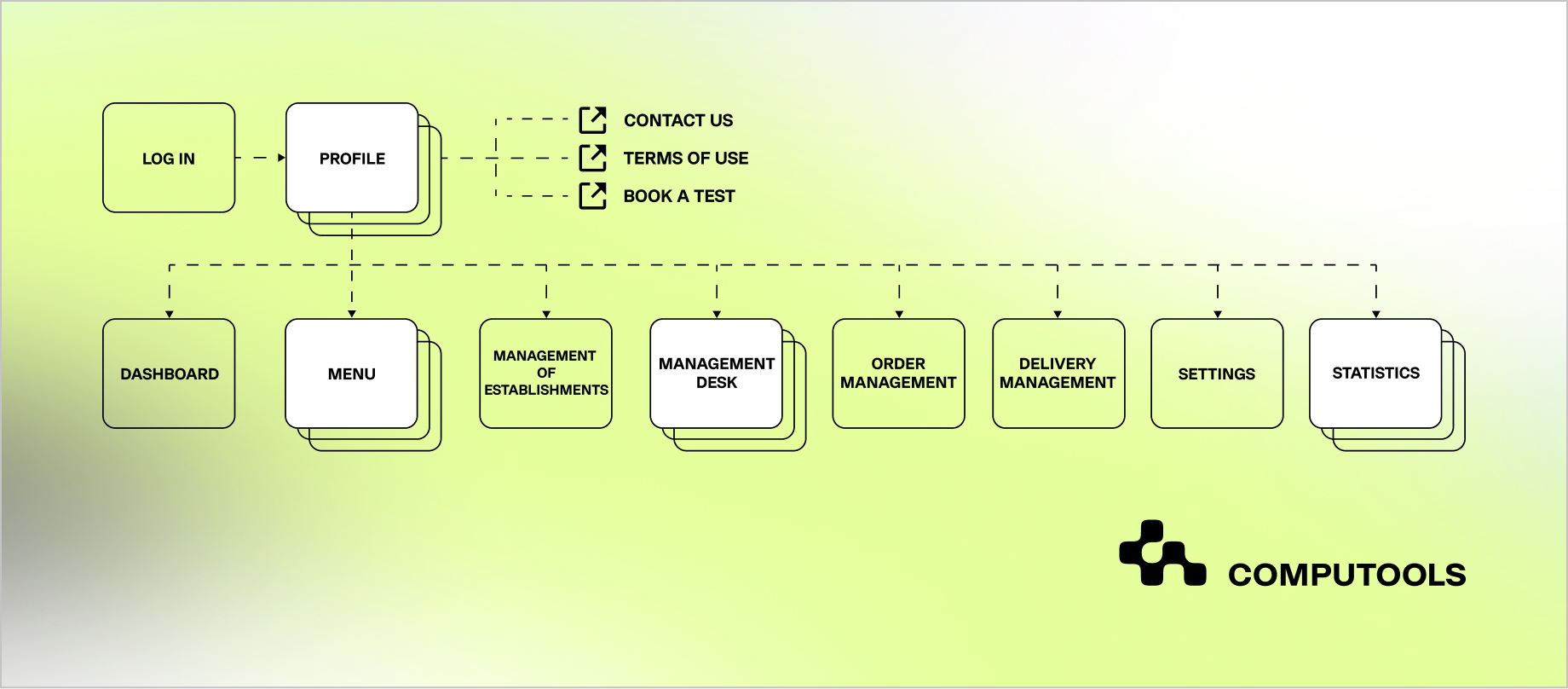
How to build a digital restaurant menu app with QR ordering: step-by-step
Making a QR code restaurant ordering system in 2026 means going beyond a mobile design. Success, in practical terms, depends on the system’s ability to handle operational complexity in real restaurant conditions.
Step 1. Define the QR Ordering Model and Use Cases
The starting point is to specify how QR ordering will operate within the business model, as it will impact structure, data design, permissions, and payment logic from the very beginning.
The team’s preliminary assessments should focus on order segmentation in the solution:
- table QR ordering only
- takeaway ordering only
- a hybrid model that includes dine-in, takeaway, and potential delivery.
Besides, it is extremely important to establish if the system will be designed for a single restaurant, a multi-location brand, or a multi-tenant platform with a range of venues. These scenarios require different approaches to menu inheritance, pricing overrides, location-specific availability, and access control.
How payments will be handled is also a major decisive factor. A QR menu app may allow:
- payment before order submission
- payment at the table, post service
- split billing among several guests.
From a technical perspective, these decisions shape the architecture of order checkout, session persistence time, tax calculation, refund management, and payment status control.
Step 2. Model Table Sessions and Order Lifecycle
QR code menus for restaurants shouldn’t simply launch a menu page. It should start a session for a specific table and venue.
This session will serve as a ‘container’ for the following actions:
- browsing a specific menu
- setting location-based pricing
- associating orders with a table
- directing orders to the correct kitchen
- managing payment and fulfilling tracking.
The order lifecycle should be modeled as a formal state machine, for example:
created → confirmed → preparing → served → completed
A restaurant mobile ordering app often requires intermediate or exception states, such as:
- pending_payment
- failed_payment
- cancelled
- refunded
- needs_review
Each state transition should include an initiating event, the actor responsible for the transition, validation requirements and downstream systems to be notified.
This model should also account for repeat orders in the same dining session, multi-user orders at one table, as well as session expiration due to inactivity, table reset, or payment. This is particularly applicable to dine-in scenarios where multiple guests can scan the same code, add items, and expect a split or unified checkout.
For example, such session-based logic is how Tap App enables multiple users to interact within the same table context, placing orders, adding notes, and completing payments (including tips) without breaking the flow.
Step 3. Design the System as Service-Based Modules
A digital menu ordering app for restaurants becomes difficult to maintain when menu logic, ordering, payments, and operational workflows are tightly coupled. A more effective way to design the system is to approach it as a collection of service-based modules with distinct boundaries.
Here’s what it would look like to separate these practically:
| Layer | Capabilities |
| Customer Side | Menu browsing, cart and checkout, payments, order tracking |
| Restaurant/Admin Side | Menu and availability management, order dashboard, table and session control |
| Operations Side | Kitchen routing, preparation timing, exception handling |
These capabilities (often) work best as domain services and can include:
- catalog service
- ordering service
- payment service
- session service
- notification service
- analytics service
- admin/configuration service
With this separation, it’s possible to reduce the interdependencies of features. For instance, the retrieval of a menu can’t break because payment processing is pending. In addition, it creates a cleaner path for scaling specific system components independently, such as high-read menu traffic versus lower-volume but critical payment operations.
In Tap App, separating ordering, payments, and session handling into distinct services helped maintain stability, especially under time constraints and limited testing windows during the initial launch phase.
Step 4. Choose Architecture for Real-Time Dining Scenarios
A QR ordering system usually entails:
- low waiting times for loading menus and cashing out
- high user traffic during peak lunch and dinner times
- consistency with orders, payments, and availability.
All these characteristics result in a backend architecture that centres around a few key areas:
1. Core scalable backend
The ordering core should allow for horizontal scaling to handle simultaneous spikes in menu views, cart updates, and order submissions.
2. Caching layer
Orders, modifiers, restaurant configurations, table mappings, and opening hours are read-heavy and should be cached to improve speed and lower the load on the database.
3. Message queues
There is no need to process every action synchronously. Asynchronous processing via queues is preferable for notifications, analytics events, webhooks, loyalty updates, and some kitchen sync communications.
4. Domain-driven design
Restaurant ordering involves multiple business domains that evolve separately: catalog, ordering, payments, table sessions, promotions, and kitchen operations. Domain-driven design helps keep these models explicit and prevents business rules from collapsing into one oversized service.
From a database perspective, relational systems are often a strong fit because they support transaction integrity, structured relationships, and complex queries across orders, items, modifiers, tables, and payments.
Step 5. Build POS and Payment Integrations as Core Components
In restaurant software, integrations are among the most failure-prone parts of the system. Therefore, they should be treated as first-class contracts, rather than secondary connectors.
Typical integrations include POS systems, payment gateways, kitchen display systems, loyalty and CRM platforms.
All integrations should have descriptions for:
- response and request formats
- authentication methods
- time-out thresholds
- retry policies
- fallback behaviors
- reconciliation logic.
For example, if a payment succeeds but the POS write fails, the system needs a recovery path. If a POS confirms an item that is no longer available in the kitchen workflow, there must be an exception state and a staff notification mechanism.
Step 6. Design UX for Instant QR Interaction
Concerning smart restaurant menu app solutions, the user experience is directly proportional to efficiency. Design aesthetically, but also consider the impact of poor system design. Users don’t want to wait for the menu system to load, or experience session time-outs, or lose cart items when they decide to check out. Instead, guests expect no app install, instant load after scan, minimal steps to order and reliable checkout.
Supporting these core UX principles requires making design decisions like:
- placing menus and restaurant metadata as close as possible to the user to minimize loading time
- preloading images that may be selected by the user for the next step
- storing cart state locally to survive connection interruptions
- allowing session recovery if the tab is refreshed to restore subsequent menu selections
- providing error messages that clearly identify the state of the order when the payment process fails.
In practice, QR ordering UX should be engineered for unstable real-world conditions: weak restaurant Wi-Fi, older devices, interrupted sessions, and simultaneous edits from multiple diners.
Step 7. Build Analytics Into the Core System
Analytics should be designed into the architecture of the custom restaurant menu app, so that operators can understand both customer behavior and operational performance.
The system should provide the ability to capture:
- table scans
- menu views
- items added to the cart
- checkout initiated
- orders placed successfully
- sessions abandoned
- order prep times
- failed payment transactions
- behavior associated with repeat orders.
From the business perspective, this provides the ability to assess the performance of individual tables, volume and average value of orders, abandoned sessions and frequently ordered items.
From a technical perspective, this provides support for funnel analysis, operational diagnostics, and experimentation, which allows businesses to pinpoint where revenue leakage occurs: slow discovery of the menu, confusing modifiers, payment abandonment, or ineffective upselling.
In practice, Tap App uses this type of data to monitor ordering behavior and optimize menu structure, helping operators identify where users drop off or what drives higher order value.

Want to launch a QR-based digital menu app that helps restaurants serve guests up to 2X faster while reducing staff workload? Contact our experts to estimate your project.
Step 8. Integrate Revenue Logic into the Ordering Flow
Revenue optimization should be designed into the platform as configurable business logic, supporting:
- upselling via add-ons and combos
- time-based promotions
- table-specific offers
- behavior-based recommendations.
The key technical principle is that promotional logic should be driven from the server to allow changes without a redeployment of the app.
Operators can use this to test rules like:
- suggest a drink when a main dish is added
- activate lunch bundles only during specific hours
- trigger repeat-order prompts based on prior behavior
- show table-specific offers in dine-in sessions.
Successful use cases of this functionality typically require a rules engine, or at a minimum, a configurable promotional engine that can evaluate basket, time, place, and customer context in real time.
Step 9. Prevent Errors Through System Design
In restaurant technology solutions, a lot of problems and costs are incurred due to missing validations and inconsistent states.
These may include:
- unavailable items on the menu
- invalid combinations of modifiers
- orders that are duplicates due to repeated taps
- outdated prices in the cart
- mismatch between frontend and backend order totals.
These issues need to be resolved with clear technical solutions, such as real-time validation of availability, back-end checking and recalculation of price, idempotent requests, validation of modifiers and combos on the server side, and menu updates based on the state of inventory.
For instance, by improving ingredient and order management logic, Tap App reduced unfulfilled or modified orders by 85%, showing how system-level validation directly impacts operational accuracy.
Step 10. Use Iterative Development to Reduce Risks
Operator-side workflows often reveal hidden complexity only after real usage begins. This is another reason why restaurant QR menu app development has been of the iterative type.
One feasible starting point is the MVP with:
- QR entry
- Digital menu
- Cart
- Order
- Payment
- Basic admin controls.
Try it out in a real restaurant setting, and see how staff and diners interact with it, then make adjustments to the solution step by step. For each iteration, check the order state, logic, integration, performance under concurrency and usability for staff.
This will minimize the chances of building the wrong flow and help the app fit into actual restaurant behavior.
Step 11. Test Under Real Dining Conditions
Testing needs to encompass the use case for live service as well as under control QA. The top validation scenarios to focus on are peak hours, bad connectivity, multiple users and payment interruptions.
You should also check:
- duplicate submission attempts
- two users editing the same table session
- item availability changing during checkout
- integration timeout between payment and POS
- delayed notification delivery
- browser refresh or session restoration mid-order.
Testing with load, failure-path, and end-to-end integration are the minimum requirements for a custom restaurant menu app.
Step 12. Plan Post-Launch Growth
The launch of the solution shouldn’t be viewed as the finish line in the development cycle, but more like the starter’s pistol in a long-distance race.
As the business evolves, so will the product. The app will need to support additional locations, extend integrations, or employ more sophisticated promotional strategies. The initial design should support further changes without the need for extensive design modifications.
Why clients choose Computools for QR menu app development
Building a contactless restaurant menu solution is about developing a system that would work at peak hours, with multiple users at one table, changing menus, and POS/payment systems. Here is where Computools has historically brought the greatest value with its travel and hospitality software development services.
1. Building for Real Operational Complexity
At Computools, we view digital restaurant menu app development as a system design challenge. Rather than concentrating only on the customer side, we develop solutions that integrate menu logic, table session management, payment processes and kitchen workflows into one coherent flow.
This allows the application to function reliably during service time, when multiple customers place orders, availability changes in real time and operational delays take place.
2. Strong Engineering Foundation for Performance and Scale
Given its extensive experience with 400+ delivered projects and 250+ engineering talents, Computools can build systems resilient enough to withstand high concurrency and heavy transactional loads. Stability, performance, and rapid cross-platform delivery are the hallmarks of our mobile app development services.
In the context of QR menu apps, our approach translates into:
- consistent performance during high traffic hours
- rapid menu loading and swift checkout
- reliable order processing without duplication or loss.
3. Deep Integration Expertise
The success of mobile applications is determined by how tightly they are integrated with existing systems. Computools designs integrations as core components, especially within their software development services for HoReCa:
- POS synchronization
- secured payment systems
- kitchen display and workflow routing
- CRM and loyalty system integration.
This eliminates manual processes, reduces the risk of data discrepancies, and ensures that the systems remain synchronized in real time.
4. Focus on Measurable Business Outcomes
The goal of our restaurant app development services is to provide a solution to operational challenges our clients face.
Computools develops systems that improve:
- order accuracy
- speed of service
- efficiency of the staff
- the average order value.
For instance, in the case of Tap App, this resulted in a 7% increase in revenue and 85% drop in order inaccuracies, illustrating that system design improves business operation.
5. Quality, Security, and Reliable Delivery
Computools, having achieved ISO 27001 and ISO 9001 certifications, is dedicated to providing high-quality services in a secure and timely manner.
This means operators can count on:
- stable system functionality
- safe payment and customer info processing
- predictable delivery timelines.
6. Flexibility in Development and Long-Term Support
To adapt to changes on the client side, Computools uses Agile (Scrum) methodology and delivers in iterations. Computools supports the app after the first launch, offering additional functionality, growing the integrations and enhancing the overall system performance.
Clients choose Computools because they get more than a working app.
They get a scalable, integrated system that:
- handles real restaurant workflows
- reduces operational friction
- scales across locations and channels
- delivers measurable improvements in efficiency and revenue
For QR menu apps, where performance and reliability define success, this level of engineering becomes a business advantage – not just a technical detail.
You can also explore our overview of the 20 Best Restaurant POS Software Development Firms for a broader look at the current restaurant technology landscape.
Final thoughts
Building a QR-based ordering app is no longer just digitizing menus. It’s about creating a system that fully integrates customer experience, order management, payments, and restaurant workflows. The difference between a functional tool and a revenue-driving solution lies in how well the various operational touchpoints work in the peak hours, with many users and constant data flow. That’s why choosing the right engineering partner makes all the difference.
Need to validate your QR ordering concept fast? Work with Computools to launch and iterate with confidence. Contact us at info@computools.com.
Computools
Software Solutions
Computools is an IT consulting and software development company that delivers innovative solutions to help businesses unlock tomorrow.